AI for Client Communication & Support

This guide forms part of our complete resource on Small Business AI & Automation.

Client communication is one of the most important parts of running a small business. It shapes how people experience working with you, how confident they feel in your services, and whether they decide to move forward.

At the same time, it can also be one of the most time-consuming and mentally draining areas of your work.

Writing emails, responding to enquiries, preparing proposals, and managing ongoing communication all require clarity, consistency, and attention to detail.

When you are busy, these tasks can become repetitive and harder to manage, especially when you are trying to respond quickly without compromising quality.

AI can support this process by reducing the effort required to draft, structure, and refine your communication. It helps you move from a rough idea to a clear response more efficiently, while still allowing you to stay in control of how you communicate.

The key is to use AI in a way that supports your voice rather than replacing it. Clients are not just reading your words. They are forming an impression of your business based on how you communicate. That means clarity, tone, and consistency still matter just as much as speed.

This page looks at how to use AI to improve client communication without losing that personal connection. You will see where it helps, where it needs to be used carefully, and how to build a communication workflow that feels natural, consistent, and easy to maintain.

Writing Clear, Professional Client Emails Faster

Start With the Outcome, Not the Wording

One of the main reasons client emails take longer than they should is because people focus on how to say something before they are clear on what needs to be said. You might rewrite the same sentence multiple times, trying to make it sound right, without first defining the purpose of the message. This slows everything down and often leads to emails that feel longer than necessary.

A more effective approach is to start with the outcome. What does the client need to understand, decide, or do after reading your email? Once that is clear, the wording becomes much easier to shape because you are working toward a specific result rather than trying to write something that “sounds good.”

AI works well at this stage because it can take your rough intent and turn it into a structured draft. For example, you might prompt: “Draft a client email explaining the next steps for a website project, keeping it clear, friendly, and easy to follow.” This gives you a starting point that is aligned with your goal, which you can then refine rather than build from scratch.

Use AI to Draft, Then Refine the Tone

AI is particularly useful for getting to a first draft quickly, but that draft should never be the final version. Client communication is where tone matters most, and small differences in wording can change how your message is perceived. A response that is technically correct can still feel too formal, too vague, or slightly disconnected from your usual style.

Once you have a draft, your role is to adjust the tone so it feels natural and consistent with how you normally communicate. This might involve softening certain phrases, simplifying the language, or making the message more direct. Over time, you can guide AI more effectively by refining your prompts, such as asking it to keep the tone straightforward, professional, and not overly polished.

If you want to improve how AI-assisted content sounds overall, the article Boost Your Brand Voice: Turning AI Text into Human-Friendly Content goes deeper into making outputs feel more natural and aligned with your voice.

Handle Repetitive Enquiries More Efficiently

Most businesses receive similar types of enquiries on a regular basis. Questions about pricing, timelines, services, or how a process works tend to repeat, even if they are phrased slightly differently each time. Writing a fresh response from scratch for each enquiry can take up a significant amount of time.

AI can help you create structured responses that you then adapt as needed. For example, you might build a base response for a common enquiry and prompt AI to tailor it based on the specifics of each message. This keeps your replies consistent while still allowing for personalisation where it matters.

Over time, this approach reduces both the time spent writing and the mental effort required to respond. Instead of starting from zero each time, you are working from a clear structure that can be adjusted quickly. This is similar to how structured workflows improve efficiency across other areas of your business, as outlined in 121 Practical Things AI Can Help With When You’re a Solo Business Owner.

Make Complex Information Easier to Understand

Client emails often involve explaining processes, timelines, or technical details that may not be familiar to the person reading them. This can make messages longer and harder to follow, especially when you are trying to include everything the client needs to know.

AI can help simplify these explanations by restructuring them into clearer, more digestible formats. You might ask it to break information into steps, shorten sentences, or remove unnecessary detail while keeping the meaning intact. This makes your communication easier to read without losing important context.

For example, instead of sending a long paragraph explaining how a website project will progress, you can prompt AI to turn that explanation into a short sequence of steps. This makes it easier for the client to understand what will happen next and reduces the likelihood of follow-up questions caused by confusion.

Keep Your Final Review Step in Place

No matter how useful AI becomes, the final version of any client email should always be reviewed by you before it is sent. This is where you check that the tone feels right, the information is accurate, and the message reflects how you want your business to be perceived.

Skipping this step introduces risk. Even small issues, such as slightly awkward phrasing or missing context, can affect how your communication is received. Taking a moment to review and adjust ensures that the email feels considered and consistent with your usual style.

Over time, this review process becomes faster because you develop a clearer sense of what needs to be adjusted. AI handles the drafting, but you remain responsible for the final direction. That balance keeps your communication efficient without losing the personal element that clients expect.

Build a Simple System for Ongoing Communication

Client communication is not a one-off task. It is an ongoing process that continues throughout the lifecycle of a project. Creating a simple system for how you handle different types of communication can make a noticeable difference in how manageable it feels.

This might include using AI to draft initial responses, structuring follow-up emails in a consistent way, and preparing updates that keep clients informed without requiring extensive writing each time. When these steps are part of a repeatable process, the effort required to maintain communication decreases significantly.

If you want to take this further and connect your communication workflows with your broader business processes, your guide Wait… You Can Do That? Save 8–12 Hours a Week with AI shows how to build systems that support both productivity and client experience.

Clear, structured communication does more than save time. It builds trust, reduces misunderstandings, and creates a smoother experience for both you and your clients.

Handling Enquiries Without Sounding Robotic

Understand What the Client Is Really Asking

Most enquiries are not just about the question being asked. A client might ask about pricing, timelines, or availability, but behind that question is usually something else. They are trying to understand whether you are the right fit, whether you are easy to work with, and whether they can trust you to deliver what they need. If your response only answers the surface-level question, it often feels incomplete.

This is where AI can help you think more clearly about what the enquiry actually represents. Instead of responding directly to the question, you can use AI to unpack the intent behind it. For example, you might prompt: “A potential client asked about pricing for a website. What concerns or questions might be behind this, and what should I address in my response?” This helps you shape a reply that feels more thoughtful and complete.

When you respond with this level of awareness, your communication feels more natural and less transactional. You are not just providing information. You are addressing the broader context of the enquiry, which is what makes your response stand out.

Use AI to Draft Responses, Not Replace Your Voice

AI is very effective at creating structured drafts quickly, especially when you provide clear input. It can take a rough idea and turn it into a well-organised response that covers key points in a logical way. This is particularly useful when you are busy and need to respond efficiently without losing clarity.

However, relying on the draft without adjusting it is where problems start. AI tends to default to language that is safe and neutral, which can feel slightly generic if left unchanged. This is why your input remains essential. You need to shape the tone so that it reflects how you naturally communicate with clients.

For example, you might prompt: “Draft a response to this enquiry in a friendly, straightforward tone, avoiding anything overly formal or salesy.” Once the draft is created, you refine it by adjusting phrasing, removing anything that feels off, and making sure it aligns with your usual style. This keeps the efficiency of AI while maintaining authenticity.

Personalise Without Starting From Scratch

One of the biggest challenges with handling enquiries is balancing efficiency with personalisation. Clients want to feel that their enquiry has been read and understood, but writing a completely new response each time can be time-consuming and inconsistent.

AI allows you to work from a structured base while still tailoring the response. You can create a core message for common enquiries and then prompt AI to adjust it based on the specific details of each request. This might include referencing the client’s situation, their goals, or anything unique in their message.

For example, instead of writing a new response for every enquiry about website design, you might have a base structure and prompt: “Adapt this response based on a client who runs a coaching business and wants to attract higher-value clients.” This gives you a personalised version without requiring you to build it from the ground up each time.

This approach keeps your communication consistent while still making each client feel acknowledged. It also reduces the time spent switching between writing styles or trying to remember what you said in previous responses.

Handling enquiries without sounding robotic

Keep Your Responses Clear and Easy to Follow

Clients are often reading your response quickly, sometimes on their phone, and usually while thinking about multiple things at once.

Long, dense paragraphs or overly detailed explanations can make it harder for them to understand what you are saying, even if the information itself is useful.

AI can help simplify and structure your responses so they are easier to follow. You can prompt it to break information into short sections, highlight key points, or remove unnecessary detail while keeping the meaning intact. This makes your communication more accessible without losing clarity.

For example, if you have written a detailed explanation of your process, you might ask AI to restructure it into a clear sequence of steps. This allows the client to quickly see what will happen next, which reduces confusion and follow-up questions.

Clear communication at this stage also supports better outcomes later, particularly when it comes to setting expectations.

Build a Consistent Enquiry Handling Process

Handling enquiries becomes significantly easier when you have a repeatable process rather than approaching each one as a completely new task. This does not mean your responses become generic. It means you have a clear structure that you follow, which you then adapt based on the situation.

A simple process might include reviewing the enquiry, identifying the underlying intent, drafting a response using AI, refining the tone, and then sending the final version. Each step has a purpose, and over time, the process becomes faster and more natural.

AI supports this by reducing the effort required at each stage, particularly when it comes to drafting and structuring responses. When combined with a clear process, it helps you respond more efficiently while maintaining a high standard of communication.

If you want to connect this with your broader workflow and reduce the overall time spent on repetitive tasks, your guide Wait… You Can Do That? Save 8–12 Hours a Week with AI shows how to build systems that support both productivity and client experience.

A consistent approach to handling enquiries not only saves time. It creates a smoother experience for your clients and helps you present your business in a clear, confident way from the very first interaction.

Using AI to Prepare Proposals and Responses

Start With a Clear Structure Before You Write

Many proposals take longer than they should because there is no clear structure guiding them. You might start writing, then jump between sections, add details out of order, and keep adjusting the flow as you go. This makes the process feel heavier than it needs to be and often results in a document that is harder for the client to follow.

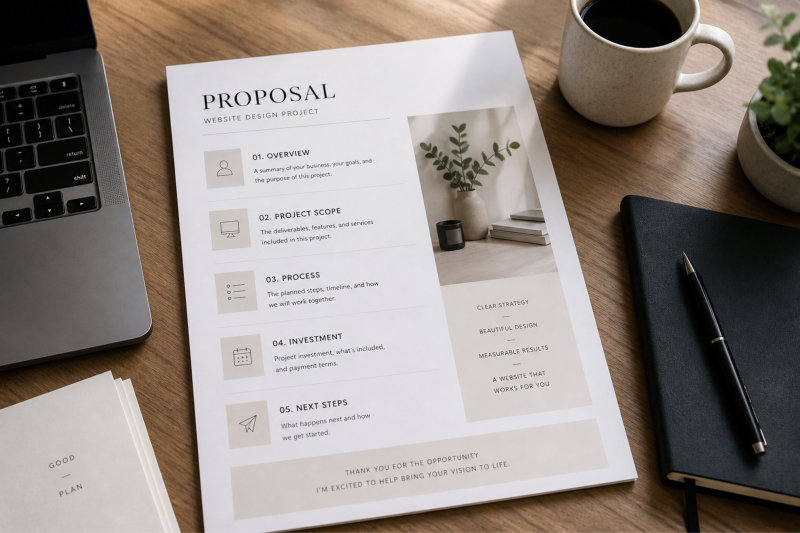
A more effective approach is to define the structure first. What does the client need to see in order to understand your offer and feel confident moving forward? This usually includes a summary of their situation, what you are proposing, how the process works, and what the next steps are. Once this structure is clear, the writing becomes much easier because you are filling in sections rather than creating everything from scratch.

AI can help at this stage by turning your rough idea into a clear framework. For example, you might prompt: “Create a simple proposal structure for a website design project, including key sections and what should be covered in each one.” This gives you a starting point that you can adapt to suit your style and services.

Turn Client Information Into a Clear Proposal

Every proposal should reflect the specific client you are working with, but translating their enquiry or discovery call into a structured document can take time. You may have notes, ideas, and a general sense of what they need, but turning that into something clear and professional requires effort.

AI can help bridge this gap by organising your notes into a coherent draft. For example, you might provide a summary of the client’s situation and prompt: “Turn this into a proposal draft that clearly explains the problem, the recommended solution, and the expected outcome.” This allows you to move quickly from information gathering to a structured document.

The key is to review and refine the output so it reflects your understanding of the client. The more context you provide, the more useful the draft will be. This approach also reduces the time spent re-reading notes and trying to piece everything together manually.

Keep the Proposal Clear, Not Overly Detailed

There is often a temptation to include as much detail as possible in a proposal, especially when you want to demonstrate value. The problem is that too much detail can make it harder for the client to understand what you are actually offering. Long explanations, technical language, and unnecessary information can dilute the core message.

AI can help simplify and refine your content so that it remains clear and focused. You might ask it to shorten sections, remove repetition, or make the language easier to follow. This does not reduce the value of your proposal. It makes that value easier to see.

For example, a detailed explanation of your process can be turned into a clear sequence of steps, making it easier for the client to understand what will happen and what to expect. This clarity is often more persuasive than adding more information.

Maintain a Consistent Tone Across All Proposals

When you are writing proposals at different times or under different levels of pressure, it is easy for the tone to shift. Some proposals may feel more formal, others more casual, and this inconsistency can affect how your business is perceived.

AI can help you maintain a consistent tone by acting as a reference point. You can guide it with prompts that reflect your preferred style, such as keeping the language clear, professional, and approachable without sounding overly sales-focused. Over time, this creates a consistent voice across all your proposals.

This consistency reinforces your positioning and makes your communication feel more intentional. It also supports how your overall messaging is presented across your website and content, particularly in areas like your website design services, where clarity and alignment are key.

Reduce Proposal Time Without Losing Quality

The biggest advantage of using AI in proposals is not just speed, but the ability to maintain quality while reducing the time required. Instead of starting from a blank page each time, you are working from a structured draft that you refine and personalise.

For example, a process that might normally take several hours can be shortened by using AI to create the initial structure and draft, leaving you to focus on the final adjustments. This includes aligning the proposal with the client’s goals, refining the wording, and ensuring everything feels accurate and complete.

Over time, this creates a more efficient process that does not rely on starting from scratch. Each proposal builds on what you have already done, which reduces both the time and the mental effort involved.

If you want to connect this with your broader workflow and reduce the overall time spent on tasks like proposals and communication, your guide Wait… You Can Do That? Save 8–12 Hours a Week with AI shows how to build systems that support consistent, high-quality output.

When used correctly, AI allows you to create proposals that are clear, structured, and tailored to the client, without the process becoming time-consuming or difficult to maintain.

Using AI to prepare proposals

Setting Boundaries Without Overexplaining

Be Clear About the Outcome You Want to Communicate

Setting boundaries in client communication often feels uncomfortable because it involves saying something that may not fully align with what the client wants. This can lead to overexplaining, softening the message too much, or adding unnecessary detail in an attempt to avoid friction. The result is usually a longer, less clear response that creates more confusion rather than resolving the issue.

A more effective approach is to focus on the outcome of the message before worrying about how it sounds. What do you need the client to understand or accept? Once that is clear, the wording becomes easier because you are working toward a specific point rather than trying to make the message feel comfortable.

AI can support this by helping you structure a response that is direct but still professional. For example, you might prompt: “Write a clear and polite response explaining that this request falls outside the agreed scope, without sounding defensive or overly detailed.” This gives you a starting point that balances clarity and tone.

Avoid Overexplaining as a Way to Soften the Message

Overexplaining is often used as a way to make a message feel more acceptable, but it usually has the opposite effect. Adding extra detail, justification, or background information can dilute the main point and make it harder for the client to understand what you are actually saying.

For example, if a client requests additional work outside the agreed scope, a long explanation about your workload, process, or previous decisions is not necessary. What matters is clearly stating what is included, what is not, and what the next step is.

AI can help you simplify these responses by removing unnecessary detail while keeping the message intact. You might ask it to shorten a response or make it more direct while maintaining a professional tone. This helps you communicate boundaries more clearly without adding complexity.

Keep the Tone Calm and Consistent

When setting boundaries, tone plays a significant role in how the message is received. A response that feels abrupt or overly firm can create tension, while a response that is too soft may not clearly communicate the boundary.

The goal is to keep the tone calm, neutral, and consistent with how you normally communicate. This reinforces professionalism and reduces the likelihood of the message being misinterpreted.

AI can help you adjust tone by refining wording without changing the meaning. For example, you might prompt: “Rewrite this so it sounds calm, clear, and professional, without sounding overly formal or overly apologetic.” This allows you to maintain control over the message while ensuring it feels balanced.

Consistency in tone also supports your overall client experience, where clear and steady communication builds trust over time.

Offer a Clear Next Step Where Possible

Boundaries are easier to accept when they are paired with a clear alternative or next step. Instead of simply saying no, you can guide the client toward what is possible within your process.

For example, if a request falls outside the agreed scope, you might explain how it can be included as an additional service or handled in a future phase. This keeps the conversation constructive and focused on solutions rather than limitations.

AI can help you frame these responses by structuring the message in a way that acknowledges the request, explains the boundary, and provides a clear path forward. This makes the communication feel more complete and reduces the likelihood of back-and-forth clarification.

Setting boundaries

Build a Consistent Approach to Boundary Setting

Handling boundaries becomes easier when you have a consistent approach rather than treating each situation as completely unique. While every client interaction is different, the way you communicate limits can follow a similar structure.

This might include acknowledging the request, clearly stating the boundary, and outlining the next step. Once this structure becomes familiar, it reduces the mental effort required to respond and helps you maintain consistency across different situations.

AI supports this by helping you draft responses based on that structure, which you then refine to suit the specific context. Over time, this creates a repeatable process that feels natural and controlled.

If you want to connect this with your broader communication workflow, your guide Wait… You Can Do That? Save 8–12 Hours a Week with AI shows how to build systems that support both efficiency and clarity in client interactions.

Clear boundaries do not damage relationships. When communicated well, they create a more predictable and professional experience for both you and your clients.

Improving Client Experience Without Adding More Work

Recognise the Difference Between Support and Automation

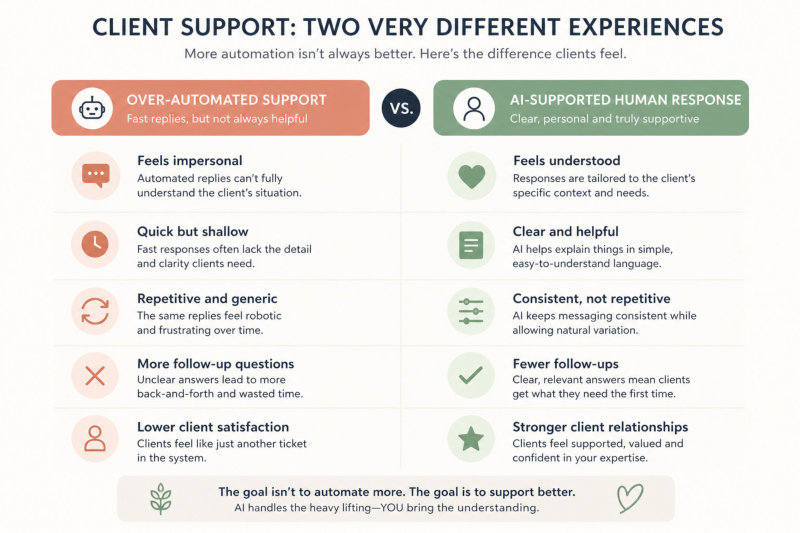
Client support is often where businesses over-automate without realising it. The intention is usually to respond faster and handle more enquiries efficiently, but when automation replaces thought instead of supporting it, the interaction starts to feel impersonal. Clients may receive a response quickly, but it lacks the sense that their situation has been understood.

AI works best when it supports your response rather than replaces it. This means using it to draft, structure, or clarify your communication, while you remain responsible for the final message. The goal is not to remove yourself from the interaction, but to reduce the effort required to respond well.

For example, instead of using a fully automated reply to a support question, you might use AI to generate a clear explanation based on the issue, then adjust it to reflect the client’s specific situation. This keeps the response efficient without losing the human element.

Use AI to Explain, Not Just Respond

Many support requests involve explaining something the client does not fully understand. This could be a process, a technical detail, or a decision that needs clarification. Writing these explanations repeatedly can take time, especially when you are trying to make them clear and easy to follow.

AI can help by turning complex information into simpler language. For example, you might prompt: “Explain this in a way a non-technical client would understand, using clear and simple language.” This allows you to provide helpful, structured explanations without spending excessive time reworking your wording.

Once the explanation is generated, you can adjust it to include context that is specific to the client. This ensures the response feels relevant rather than generic. Over time, this approach improves both efficiency and clarity, which reduces follow-up questions and makes support easier to manage.

Keep Context at the Centre of Every Response

One of the main risks when using AI for client support is losing context. AI can produce a well-written response, but if it does not reflect the client’s specific situation, it can feel disconnected or slightly off.

This is why your input is critical. Before using AI, you need to clearly understand what the client is asking, what has already been discussed, and what outcome they are expecting. This context should guide how you prompt and how you refine the output.

For example, if a client is asking about changes to a website, the response should reflect where they are in the process, what has already been agreed, and what is realistically possible. AI can help structure the explanation, but the relevance comes from you.

Keeping context at the centre ensures that your responses remain accurate, helpful, and aligned with the client’s expectations.

Reduce Repetition Without Losing Consistency

Support often involves answering similar questions repeatedly, which can become time-consuming and mentally draining. While it might seem efficient to create fixed responses, these can quickly feel generic if they are reused without adjustment.

AI allows you to maintain consistency without sounding repetitive. You can create a core explanation for common questions and then prompt AI to adapt it based on the situation. This gives you a consistent message while still allowing for variation in how it is delivered.

For example, if you frequently explain how a process works, you can use AI to rephrase that explanation in different ways depending on the client’s level of understanding. This keeps your communication clear without making it feel scripted.

This approach is similar to how structured workflows improve efficiency in other areas of your business, as outlined in 121 Practical Things AI Can Help With When You’re a Solo Business Owner.

Build a Support Process That Feels Natural

Client support should feel like a natural extension of how you work, not a separate system that you have to manage. If using AI makes the process feel more complicated or disconnected, it is likely being applied in the wrong way.

A simple process might involve reviewing the client’s message, using AI to draft or structure your response, refining the tone and context, and then sending the final version. Each step is clear, and over time, the process becomes faster and more intuitive.

When this approach is used consistently, it reduces the effort required to handle support while maintaining a high standard of communication. Clients receive responses that are clear, relevant, and easy to understand, which improves their overall experience.

If you want to connect this with your broader workflow and reduce the time spent across communication tasks, your guide Wait… You Can Do That? Save 8–12 Hours a Week with AI shows how to build systems that support both efficiency and client satisfaction.

Effective support is not about responding faster. It is about responding clearly and consistently in a way that makes clients feel understood and supported.

Improving client experience

Where AI Should Never Replace You (Reality Check Section)

Move From Reactive Replies to a Structured Approach

Many small business owners handle client communication in a reactive way. Messages come in, responses go out, and each interaction is treated as a separate task. While this works in the short term, it becomes harder to manage as the volume of communication increases. It also leads to inconsistency in how information is shared, how expectations are set, and how clients experience working with you.

A more effective approach is to treat communication as a workflow rather than a series of isolated responses. This means having a general structure for how you handle enquiries, updates, follow-ups, and support. Each stage has a purpose, and over time, the process becomes more predictable and easier to manage.

AI supports this shift by helping you apply that structure consistently. Instead of deciding how to respond each time, you are working within a framework that already exists, which reduces both time and mental effort.

Define the Key Communication Points in Your Process

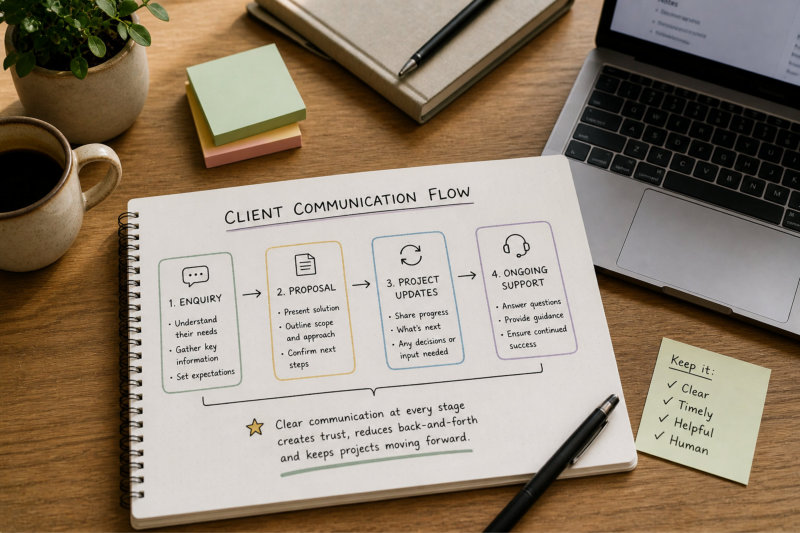
Most client relationships follow a similar pattern, even if the details vary. There is usually an initial enquiry, a response or proposal, project updates, and ongoing support. Defining these key points allows you to create a clearer communication flow.

Once these stages are identified, you can think about what the client needs at each point. What information do they need? What questions are they likely to have? What should they understand before moving to the next step?

AI can help you map this out by turning your process into a structured sequence. For example, you might prompt: “Outline the key communication stages in a website project and what should be included in each stage.” This gives you a clearer overview of how your communication fits together.

This structured approach also aligns with how your website design services guide clients through a clear process, where each stage builds on the previous one.

Where AI should never replace you

Create Repeatable Structures for Each Stage

Once you have defined the key communication points, the next step is to create repeatable structures for each one. This does not mean using fixed templates without variation. It means having a consistent way of organising your communication so that important information is not missed.

For example, an enquiry response might consistently include a brief acknowledgement, a clear explanation of your services, and a next step. A project update might include progress, what is coming next, and anything the client needs to review or provide.

AI can help you apply these structures quickly by drafting responses that follow the same format each time. You can then adjust the details to suit the specific client. This reduces the effort required to write while maintaining consistency across your communication.

Over time, this consistency improves the client experience because they know what to expect and can easily follow the information you provide.

Reduce Back-and-Forth Through Clear Communication

One of the biggest time drains in client communication is unnecessary back-and-forth. This often happens when messages are unclear, incomplete, or require additional clarification. Each follow-up adds time and interrupts your workflow.

AI can help reduce this by structuring your responses in a way that anticipates what the client might need next. Instead of answering only the immediate question, you can include relevant context, next steps, and any actions required from the client.

For example, when sending a project update, you might include what has been completed, what is coming next, and what feedback is needed. This reduces the likelihood of follow-up questions and keeps the process moving smoothly.

Clear communication upfront saves time later. It also creates a more professional and organised experience for the client.

Keep the Workflow Flexible and Human

While structure is important, client communication should not feel rigid or overly systemised. Every client interaction has its own context, and your responses need to reflect that. A workflow should guide your communication, not limit it.

AI should support this flexibility by helping you adapt your responses rather than forcing you into a fixed format. You can use it to adjust tone, simplify explanations, or restructure information while still keeping the message relevant to the situation.

The balance comes from combining structure with awareness. You follow a consistent process, but you remain responsive to the specific needs of each client. This keeps your communication efficient without losing the personal element that builds trust.

If you want to connect this with your broader systems and reduce the time spent managing communication overall, your guide Wait… You Can Do That? Save 8–12 Hours a Week with AI shows how to build workflows that support both productivity and client experience.

A consistent communication workflow does not just save time. It creates a smoother, more predictable experience that makes it easier for clients to work with you and move forward with confidence.

Frequently Asked Questions

The key is to use AI for drafting, not for the final response. Provide context about the client and what they are asking, then use AI to generate a structured draft. After that, refine the tone so it sounds like you. Adjust wording, remove anything that feels generic, and make sure the response reflects your usual communication style. This keeps the efficiency of AI while maintaining a natural, human tone.

Yes, as long as it is used responsibly. Clients care about clarity, responsiveness, and feeling understood. AI can help you deliver all three more efficiently, but it should not replace your judgement. You are still responsible for the message, the tone, and the accuracy of the information. When used properly, AI improves communication rather than weakening it.

AI works well for drafting emails, structuring responses, simplifying explanations, and preparing proposals. It is especially useful for repetitive tasks, such as responding to common enquiries or explaining standard processes. It is less effective when used for situations that require careful judgement, sensitive communication, or decisions that affect your relationship with the client.

Personalisation comes from context. Before using AI, make sure you understand the client’s situation and what they are asking. Include that context in your prompt and then refine the output to reflect it. Even small adjustments, such as referencing their business, their goals, or previous conversations, can make the response feel more relevant and considered.

Yes, particularly when it is used to make your responses clearer and more complete. Instead of replying with only the immediate answer, you can use AI to structure a response that includes context, next steps, and any information the client may need. This reduces the likelihood of follow-up questions and keeps communication more efficient.

Both can work well together. Templates provide structure and consistency, while AI helps adapt that structure to each situation. Instead of using fixed templates that feel repetitive, you can use AI to adjust the wording based on the specific enquiry. This gives you the benefit of consistency without making your communication feel scripted.

Relying on it too heavily. Copying and sending the first response without reviewing it can lead to messages that feel generic or slightly off. Another common mistake is using AI for situations that require judgement or sensitivity. The best results come when AI supports your communication, while you remain responsible for the final message.

Start by identifying the main stages of your client communication, such as enquiries, proposals, updates, and support. Create a simple structure for each stage, then use AI to draft and refine responses within that structure. Over time, this becomes a repeatable workflow that reduces effort and improves consistency across all interactions.

Putting It All Into Practice

Client communication is where your business becomes real to the people you work with. It is not just about answering questions or sending updates. It is about creating clarity, building trust, and guiding clients through a process that feels structured and easy to follow.

AI can support this by reducing the time and effort required to draft, structure, and refine your communication. When applied to the right tasks, it helps you respond more efficiently while maintaining a consistent standard. When used without clear intent, it can lead to responses that feel generic or disconnected from the client’s situation.

The difference comes from how you use it. Keeping your voice at the centre, reviewing every response, and using AI to support rather than replace your thinking allows you to maintain a high level of communication without the process becoming overwhelming.

A simple, repeatable workflow makes this easier to maintain. When you have a clear structure for enquiries, proposals, updates, and support, your communication becomes more predictable and easier to manage. AI fits into that structure by reducing friction at each step rather than adding complexity.

If you want to connect your communication processes with your broader business workflow and reduce the time spent across multiple areas, your guide Wait… You Can Do That? Save 8–12 Hours a Week with AI shows how to build systems that support both productivity and client experience.

Clear, consistent communication does more than save time. It creates a better experience for your clients and allows you to run your business with more control and confidence.

AI Sounds Great … But Where Do You Actually Start?

I’m Ivana, a website designer who works with small business owners, coaches and consultants to create websites they actually feel confident sharing. I focus on clarity, structure and making things feel simple – whether that’s your website or how you use tools like AI in your business.

If you’re reading this and thinking, “I know AI could help, but I don’t know where to start or what to use it for,” you’re not alone.

Most small business owners aren’t struggling with effort. They’re struggling with clarity — what to use AI for, how to use it properly, and how to make it fit into their day without creating more work.

That’s exactly where the difference is.

If you want a practical, no-fluff way to start using AI to save time, organise your thinking, and actually get things done, you can explore it here:

Wait… You Can Do That? – Save 8–12 Hours a Week with AI

Or if you’d rather see how this works in real situations, including what worked and what didn’t:

ChatGPT Confessions

The goal isn’t to use AI for everything.
It’s to use it in the right places so your business feels simpler, clearer, and easier to run.

Ivana Katz - Website designer