Tools, Platforms & Tech Stack
Choose the Right Tools So Your Business Runs Smoothly

This guide forms part of our complete resource on Small Business AI & Automation.

AI tools are everywhere right now. New platforms are released constantly, each promising to save time, improve productivity, or transform how your business operates.

While this creates opportunity, it also creates confusion. Many small business owners end up trying too many tools at once without a clear idea of how they fit together.

The problem is not the tools themselves. It is how they are chosen and used.

Without a clear workflow, adding more tools usually creates more complexity rather than less. Instead of saving time, it introduces more steps, more decisions, and more things to manage.

A more effective approach is to focus on how your business actually operates and then select tools that support that workflow. This keeps your setup practical and avoids unnecessary overlap. You do not need every tool. You need the right combination of tools that work together in a simple, structured way.

If you are unsure where to start, resources like Artificial Intelligence: Easy-to-Implement AI Tools for Small Business provide a useful overview of tools that are already being used effectively in real business scenarios.

This page focuses on helping you choose tools with intention, avoid unnecessary complexity, and build a tech stack that supports your business rather than slowing it down.

Choosing the Right AI Tools Without Getting Overwhelmed

Start With What You Are Trying to Improve, Not What Looks Impressive

Most overwhelm around AI tools comes from starting in the wrong place. Instead of asking “What tool should I use?”, it is far more effective to ask “What am I trying to improve?” Without that clarity, every new tool looks useful, and it becomes difficult to decide what is actually worth your time.

For example, if you are struggling with content creation, the solution is not to explore every AI tool available. It is to focus specifically on improving how you plan, write, and refine content. In that case, something like AI Content Creation: How Artificial Intelligence Can Help Small Businesses Create Irresistible Copy becomes far more relevant than a general tool list.

When you start with the outcome, your choices become clearer. You are no longer comparing tools based on features. You are evaluating them based on whether they solve a specific problem in your workflow.

Limit Yourself to One Tool Per Function First

One of the fastest ways to feel overwhelmed is to use multiple tools for the same task. This often happens when you are experimenting or following recommendations without a clear structure. While each tool may have strengths, using too many creates duplication and confusion.

For example, using multiple AI writing tools at the same time can slow you down rather than speed you up. Each tool has a different interface, different outputs, and a different way of working. Instead of improving your process, it introduces more decisions.

A more practical approach is to choose one tool for each function and use it consistently. For example, one tool for content drafting, one for communication support, and one for workflow organisation. Once you understand how each tool fits into your process, you can decide whether anything else is actually needed.

This is also where structured resources like ChatGPT Prompts for Small Business Owners can be more valuable than adding another tool, because they improve how you use what you already have.

Focus on How the Tool Fits Into Your Workflow

A tool on its own does not improve your business. It only becomes useful when it fits into a clear workflow. Without that connection, even the best tool becomes another disconnected step that you have to manage manually.

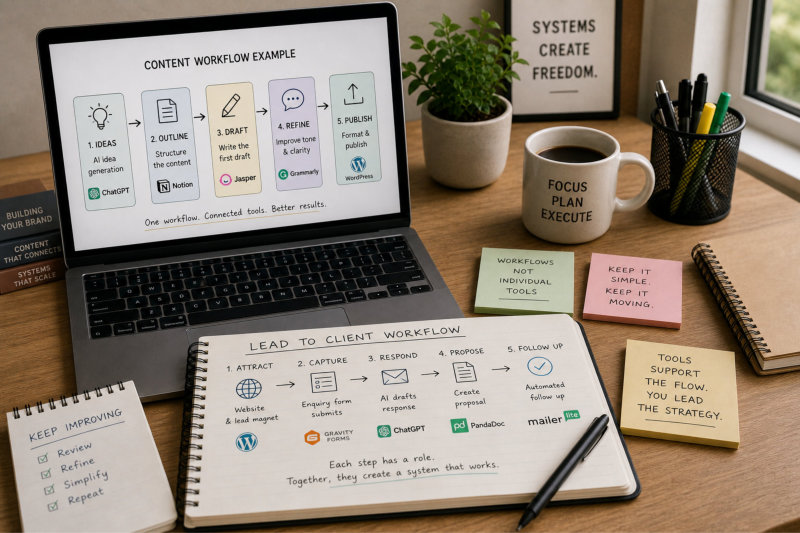
For example, if you are using AI for content, how does that content move from idea to published piece? Does the tool help with outlining, drafting, refining, and publishing, or does it only handle one part of the process? If it only solves a small piece of the puzzle, you need to consider how it connects to everything else.

This is where many businesses struggle. They collect tools without thinking about how they work together. A more effective setup focuses on flow. Each tool should support a specific step and connect naturally to the next one.

This idea is explored further in Best AI Automation Solutions for Small Businesses: A Guide to the ROI of Time, where the emphasis is on how tools contribute to real outcomes rather than just features.

Choosing the right AI tools

Avoid Tools That Require You to Change How You Work Completely

Some tools promise significant improvements but require you to completely change how you work. While this can be appealing, it often creates resistance and makes the tool harder to adopt in practice.

For example, a complex platform that requires a full system rebuild may not be practical if your current workflow is relatively simple. The time required to learn, set up, and maintain the tool can outweigh the benefits, particularly if you are running a small business.

A better approach is to choose tools that fit into your existing workflow with minimal disruption. They should enhance what you are already doing rather than forcing you to start again. This makes them easier to use consistently and more likely to deliver real value.

Understanding how AI fits into your business at a broader level can help with this decision, which is why articles like AI For Small Business: Unleashing the Power of Artificial Intelligence are useful for building that context before committing to specific tools.

Give Yourself Time to Learn One Tool Properly

Jumping between tools without fully learning any of them is one of the biggest reasons people feel overwhelmed. Each tool has its own way of working, and it takes time to understand how to use it effectively. Without that familiarity, it is difficult to see real benefits.

For example, using AI effectively is not just about entering a prompt. It involves understanding how to guide the output, refine responses, and apply the results in a practical way. This level of use develops over time, not instantly.

This is why it is more effective to commit to learning one tool properly before adding another. As your understanding improves, you can decide whether additional tools are needed or whether you can achieve the same result with what you already have.

For a more structured approach to building this skill without feeling overwhelmed, Wait… You Can Do That? Save 8–12 hours a week with AI – without overwhelm walks through how to apply AI in a way that is practical and sustainable.

Choosing the right tools is not about finding the most advanced option. It is about selecting tools that fit your workflow, solving real problems, and using them well enough to make a difference.

The Core Tools Most Small Businesses Actually Need

Start With Functions, Not Tool Names

When people think about building a tech stack, they often start by looking for specific tools. This usually leads to comparing features, pricing, and recommendations without a clear understanding of what they actually need. The result is a collection of tools that may be individually useful but do not work together in a meaningful way.

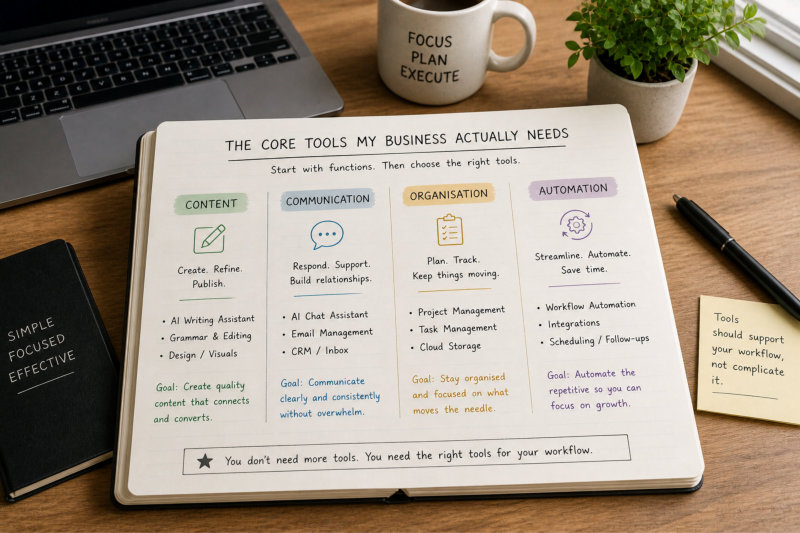
A more effective approach is to think in terms of functions. What does your business need to do on a regular basis? This might include creating content, managing communication, organising tasks, handling client information, and automating small workflows. Once these functions are clear, it becomes much easier to choose tools that support them.

For example, instead of asking “What is the best AI tool?”, it is more useful to ask “What do I need help with right now?” This shift simplifies decision-making and reduces the risk of choosing tools that you do not end up using.

Resources like Artificial Intelligence: Easy-to-Implement AI Tools for Small Business are useful at this stage because they frame tools within practical use cases rather than as isolated solutions.

Content Creation and Refinement Tools

Most small businesses need support with content, whether that is writing website copy, blog posts, emails, or social media. This is often where AI tools provide the most immediate value because they reduce the time required to plan, draft, and refine content.

For example, instead of starting from a blank page, you can use AI to generate structured drafts, outline ideas, and refine your messaging. This does not replace your voice, but it gives you a starting point that removes the initial friction.

Understanding how to apply AI in this area is more important than the tool itself. Articles like AI Content Creation: How Artificial Intelligence Can Help Small Businesses Create Irresistible Copy and Boost Your Brand Voice: Turning AI Text into Human-Friendly Content show how to use these tools effectively without losing your voice.

This is one of the few areas where most businesses benefit from having a dedicated tool, as long as it is used consistently.

Core tools small businesses need

Communication and Client Support Tools

Client communication is another core function where the right tools can make a noticeable difference. This includes responding to enquiries, managing conversations, and ensuring that communication remains clear and consistent.

AI can support this by helping draft responses, structure messages, and reduce the time spent thinking about how to reply. However, it should be used as support rather than replacement. You still review and refine what is being sent.

For example, using structured prompts from ChatGPT Prompts for Small Business Owners can help you respond more efficiently without relying on generic responses. This improves both speed and quality.

When communication is supported by the right tools, it becomes more consistent and less time-consuming, which has a direct impact on how your business is experienced by clients.

Organisation and Workflow Management Tools

As your business grows, keeping track of tasks, content, and client work becomes more important. This is where organisation tools play a key role. They provide a central place to manage what needs to be done and how different parts of your work connect.

For example, a simple workflow might involve capturing an enquiry, creating a task, preparing a response, and following up. Without a system, these steps rely on memory. With a tool supporting them, the process becomes more structured and reliable.

This is also where AI can support your workflow by helping structure tasks and reduce friction in how information is organised. Articles like From Data to Decisions: Using AI for Smarter Business Growth explore how better organisation leads to better decision-making.

The goal is not to create a complex system, but to ensure that your work is visible, manageable, and easy to move forward.

Automation and Integration Tools

Once your core functions are supported, automation becomes the layer that connects everything together. This is where small tasks are streamlined and processes begin to flow more naturally.

For example, an enquiry submitted through your website can automatically create a record, trigger a response, and schedule a follow-up. These connections reduce the need for manual intervention and help your workflow move forward without interruption.

However, automation should be introduced gradually. Trying to automate everything at once often leads to complexity. A more effective approach is to start with simple connections and build from there.

Understanding the return on automation is important, which is why Best AI Automation Solutions for Small Businesses: A Guide to the ROI of Time provides useful context on where automation actually makes a difference.

The right tech stack is not about having the most tools. It is about having the right combination of tools that support your workflow, reduce friction, and make your business easier to run.

How to Avoid Paying for Tools You Won’t Use

Most Tools Are Abandoned Within Weeks

It is surprisingly common for small business owners to sign up for tools with good intentions and then stop using them shortly after. The tool may seem useful at first, but without a clear role in your workflow, it quickly becomes something you “might use later.” Over time, these unused tools accumulate and quietly increase your monthly expenses.

This is not a reflection of the tool itself. It is usually a sign that the tool was chosen before the problem was clearly defined. Without a specific use case, it becomes difficult to integrate the tool into your daily work, which leads to it being ignored.

For example, signing up for an advanced AI platform without knowing exactly how it will improve your content, communication, or workflow often results in minimal use. In contrast, understanding practical applications first, through resources like 121 Practical Things AI Can Help With When You’re a Solo Business Owner, makes it easier to choose tools that actually get used.

Only Pay for Tools That Solve a Current Problem

A simple way to avoid wasted spend is to only pay for tools that solve a problem you are currently experiencing. If a tool is based on a future idea or something you “might need,” it is unlikely to become part of your workflow.

For example, if you are not currently producing regular content, investing in multiple content tools is unlikely to provide value. If you are not managing a high volume of enquiries, advanced automation tools may not be necessary yet.

Instead, focus on what is slowing you down right now. If content creation is a challenge, invest in tools that support that process. If communication is taking too much time, look at ways to streamline it. This keeps your tech stack aligned with your actual needs.

Building this clarity first is why broader articles like AI For Small Business: Unleashing the Power of Artificial Intelligence are useful before committing to specific tools.

Test Before You Commit Long Term

Many tools offer free trials or lower-tier plans, but these are often underused. Instead of committing to a paid plan immediately, it is more effective to test how the tool fits into your workflow.

This means using it in a real scenario, not just exploring features. For example, if you are testing an AI content tool, use it to create an actual piece of content from start to finish. If you are testing a workflow tool, apply it to a real process such as handling enquiries or managing tasks.

This approach gives you a clearer understanding of whether the tool is genuinely useful. It also highlights any friction points before you commit financially.

Testing tools in this way ensures that you are making decisions based on real use rather than assumptions.

How to avoid paying for tools

Avoid Overlapping Tools That Do the Same Job

Another common issue is paying for multiple tools that perform similar functions. This often happens when new tools are added without reviewing what is already in place. Over time, this creates duplication and unnecessary cost.

For example, using multiple AI writing tools, multiple scheduling tools, or multiple automation platforms can lead to confusion about which one to use. It also reduces the likelihood of mastering any single tool.

A more effective approach is to review your current tools regularly and identify overlap. If two tools perform similar functions, choose the one that fits your workflow best and remove the other.

This not only reduces cost but also simplifies your system, making it easier to manage and maintain.

Track the Real Value Each Tool Provides

It is easy to justify a tool based on what it could do, but the real measure is what it actually does for your business. This means looking at whether the tool is saving time, improving output, or making your workflow more efficient.

For example, if a tool saves you several hours each week, it may be worth the cost. If it is rarely used or does not significantly improve your workflow, it may not be justified.

This is where thinking in terms of return on time becomes useful. Articles like Best AI Automation Solutions for Small Businesses: A Guide to the ROI of Time focus on evaluating tools based on real impact rather than features.

When you track the value of your tools, it becomes easier to make decisions about what to keep, what to remove, and where to invest next.

A strong tech stack is not built by adding more tools. It is built by choosing the right tools, using them consistently, and ensuring they provide clear value to your business.

Combining Tools to Create a Practical Setup

Think in Workflows, Not Individual Tools

The biggest shift that makes a tech stack work is moving from thinking about tools individually to thinking about workflows. A tool on its own rarely creates value. It becomes useful when it plays a clear role within a sequence of steps that move your work forward.

For example, instead of focusing on a content tool, think about the full content workflow. This might include generating ideas, outlining topics, drafting content, refining the tone, and publishing. Each step may involve a tool, but the value comes from how those steps connect.

This is where many businesses struggle. They collect tools without defining the workflow first, which leads to a setup that feels fragmented. A more effective approach is to map the process first and then assign tools to each step.

Understanding how these workflows function in practice is explored in 121 Ways You Can Use AI to Grow Your Coaching or Consulting Business, where tools are applied within real business scenarios rather than in isolation.

Build Around Your Core Business Activities

Your tech stack should support the core activities that drive your business. These typically include attracting leads, communicating with clients, delivering your service, and managing ongoing tasks. If your tools do not support these areas, they are unlikely to add meaningful value.

For example, a simple setup might include your website capturing enquiries, a communication tool managing responses, and an organisational tool tracking tasks. AI can support each of these steps, but the structure remains the same.

This is why your website plays such an important role. It acts as the starting point for many workflows, particularly when it comes to capturing enquiries and directing users toward the next step.

Once your core activities are clear, it becomes much easier to identify where tools fit and where they are unnecessary.

Combining tools

Create Simple Connections Between Steps

A practical setup is not about complex integrations. It is about creating simple connections that allow your workflow to move from one step to the next without unnecessary friction. These connections do not need to be perfect. They need to be reliable.

For example, when a form is submitted on your website, the information should be captured and organised in a way that allows you to respond quickly. That response can then lead into a proposal, which follows a structured format. Each step connects to the next without requiring you to rebuild the process each time.

This is where automation can be introduced gradually. Instead of trying to connect everything at once, you focus on the points where small improvements make a noticeable difference.

Articles like Best AI Automation Solutions for Small Businesses: A Guide to the ROI of Time highlight how these small connections can create meaningful efficiency without overcomplicating your setup.

Use AI to Support Each Step, Not Replace the Flow

AI works best when it supports individual steps within your workflow rather than trying to replace the entire process. For example, it can help generate ideas, draft content, structure communication, or organise information, but it still needs to be guided by a clear process.

For instance, when creating content, AI can assist with outlining and drafting, but the overall direction still comes from your strategy. This is why understanding how to refine AI output is just as important as using it in the first place.

This is explored further in 27 Ways to Make Your AI Content Exceptional, where the focus is on improving quality rather than just generating content quickly.

By using AI in this way, you maintain control over your workflow while reducing the effort required at each stage.

Keep the Setup Flexible and Easy to Adjust

No setup is perfect from the beginning. As your business evolves, your workflows and tools will need to adapt. A rigid system that is difficult to change will eventually slow you down.

This is why flexibility is important. Your setup should be simple enough that you can adjust it without having to rebuild everything. For example, if a tool is no longer meeting your needs, you should be able to replace it without disrupting your entire workflow.

This also applies to how you use AI. As your understanding improves, you may refine your prompts, adjust your processes, or introduce new ways of working. Resources like ChatGPT Prompts for Small Business Owners can support this evolution by giving you structured ways to improve how you use AI within your existing setup.

A practical tech stack is not about perfection. It is about creating a system that works today and can evolve as your business grows.

Keeping Your Tech Stack Simple and Manageable

More Tools Usually Create More Work, Not Less

It is easy to assume that adding more tools will make your business more efficient. In reality, each additional tool introduces another layer of setup, maintenance, and decision-making. Instead of saving time, this often creates more work.

For example, every tool needs to be configured, updated, and understood. It may also need to connect with other tools, which adds another layer of complexity. When something changes or stops working, you are responsible for troubleshooting it, which can quickly become time-consuming.

This is why many businesses end up with a tech stack that feels heavier than the work it is meant to support. The issue is not the tools themselves, but the accumulation of tools without a clear structure.

Understanding this at a broader level is important, which is why AI For Small Business: Unleashing the Power of Artificial Intelligence provides useful context on how tools should support your business rather than define it.

Keep Only What You Use Consistently

A simple way to manage your tech stack is to keep only the tools that you use regularly. If a tool is not part of your weekly workflow, it is unlikely to provide ongoing value. Holding onto unused tools often comes from the idea that you might need them later, but this rarely happens in practice.

For example, if you have signed up for multiple AI tools but only use one consistently, the others are adding cost without providing benefit. Removing them simplifies your setup and makes it easier to focus on what actually works.

This is also where practical lists like 121 Practical Things AI Can Help With When You’re a Solo Business Owner can help you reassess which tools are truly supporting your workflow and which ones are unnecessary.

Keeping your tech stack lean makes it easier to manage and more effective overall.

Reduce Overlap Between Tools

Many tools offer similar features, which can lead to overlap in your tech stack. This often happens when new tools are added without reviewing what is already in place. Over time, this creates duplication and confusion about which tool should be used for a specific task.

For example, you might have multiple tools that assist with content creation, scheduling, or automation. While each tool may have strengths, using too many creates unnecessary complexity and reduces efficiency.

A more effective approach is to choose one tool per function and use it consistently. This allows you to build familiarity and use the tool more effectively. It also reduces the need to switch between platforms, which can disrupt your workflow.

This aligns with the idea of building a practical setup, where tools are chosen based on how they fit into your workflow rather than how many features they offer.

Keeping your tech stack simple

Make Your Setup Easy to Understand and Use

A tech stack should not require constant effort to understand. If you need to remember complex steps or refer to notes every time you use a tool, it is a sign that your setup may be too complicated.

For example, if your workflow involves multiple tools with different processes for similar tasks, it becomes harder to maintain consistency. This increases the likelihood of errors and slows down your work.

A simpler setup, where each tool has a clear role and the steps are easy to follow, makes your business easier to run. It also reduces the mental load associated with managing your work.

This is where structured approaches to using AI, such as those found in ChatGPT Prompts for Small Business Owners, can simplify how you interact with tools rather than adding complexity.

Review and Adjust Your Stack Regularly

Your business is not static, and your tech stack should not be either. Over time, your needs will change, and the tools you use should reflect that. Regularly reviewing your setup allows you to identify what is working, what is no longer needed, and where improvements can be made.

For example, a tool that was useful when you were starting out may no longer be necessary as your workflow becomes more structured. Alternatively, a new need may arise that requires a different type of support.

Taking the time to review your stack ensures that it continues to support your business rather than becoming a burden. It also allows you to make informed decisions about where to invest your time and resources.

A manageable tech stack is not about having fewer tools for the sake of it. It is about having the right tools, used in the right way, to support how your business operates.

What Matters More Than the Tools Themselves

Clarity of Process Matters More Than Features

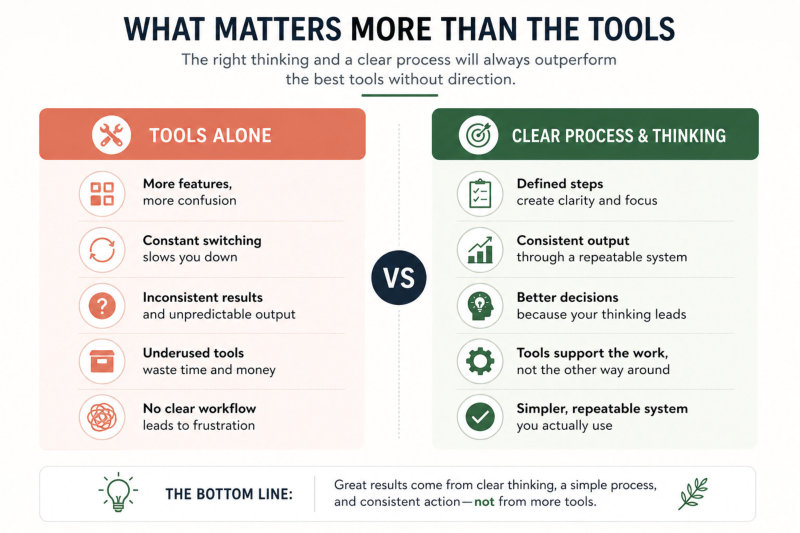
It is easy to assume that better tools will automatically lead to better results. In practice, the opposite is often true. Without a clear process, even the most advanced tool becomes difficult to use effectively. You may have access to powerful features, but without a defined workflow, those features remain underused.

For example, a business might invest in an AI content tool but still struggle with consistency because there is no clear process for planning, writing, and publishing content. The tool is not the problem. The missing structure is.

This is why focusing on process first makes such a difference. Once your workflow is clear, the tool simply supports it. Without that clarity, you are relying on the tool to do more than it is designed for.

This idea is reinforced in From Data to Decisions: Using AI for Smarter Business Growth, where the focus is on how structured thinking leads to better outcomes than tools alone.

Consistency Beats Constant Experimentation

Trying new tools can feel productive, but constant experimentation often prevents real progress. Each time you switch tools, you reset your learning curve and disrupt your workflow. This makes it difficult to build consistency, which is where real results come from.

For example, switching between different AI writing tools may seem like a way to find the “best” option, but it often slows you down. Each tool produces different outputs, requires different prompts, and introduces variation into your process.

A more effective approach is to choose a tool that works well enough and use it consistently. Over time, you develop familiarity, refine your approach, and improve your results. This is where real efficiency comes from.

This is also why structured guidance, such as ChatGPT Prompts for Small Business Owners, can be more valuable than trying multiple tools, because it improves how you use what you already have.

Your Thinking Shapes the Output More Than the Tool

AI tools reflect the input they are given. The quality of the output depends heavily on how clearly you define the task, structure your request, and guide the result. This means your thinking plays a bigger role than the tool itself.

For example, a vague prompt will produce a vague result, regardless of how advanced the tool is. A clear, structured prompt will produce a more useful output, even with a basic tool. This shifts the focus from finding the “best” tool to improving how you use it.

This is where understanding how to refine AI output becomes important. Articles like 27 Ways to Make Your AI Content Exceptional show how improving your input leads to significantly better results without changing tools.

When you improve your thinking, every tool you use becomes more effective.

What matters more than tools

Simple Systems Outperform Complex Setups

A simple system that you use consistently will always outperform a complex setup that you rarely follow. Complexity may look impressive, but it often creates friction that prevents you from using the system effectively.

For example, a basic workflow for content creation that you follow every week is far more valuable than a detailed system that you abandon because it is too difficult to maintain. The same applies to communication, automation, and overall workflow management.

This is why simplicity is a recurring theme across your entire setup. When your systems are clear and manageable, your tools become easier to use and your workflow becomes more efficient.

This connects directly with how your Content & Visibility strategy works, where consistent, structured effort leads to better results than sporadic activity.

The Right Setup Is the One You Actually Use

The most effective tech stack is not the one with the most tools or the most features. It is the one that fits your workflow and is used consistently. If a setup feels natural and supports how you work, it is far more likely to deliver results.

For example, a simple combination of tools that supports your content, communication, and workflow can be enough to run an efficient business. Adding more tools only makes sense if they provide a clear improvement.

This is why focusing on practical use cases is so important. Resources like 121 Practical Things AI Can Help With When You’re a Solo Business Owner help you see how tools are applied in real scenarios, rather than just what they can do in theory.

When your setup supports your workflow and your thinking is clear, the tools become far less important. They simply do their job, without getting in the way of how your business operates.

Frequently Asked Questions

There is no single “must-have” tool. What matters is choosing tools that support your workflow. Most small businesses benefit from tools that help with content creation, communication, organisation, and simple automation. The right combination depends on what tasks you need to improve.

Fewer than you think. A small number of well-chosen tools that you use consistently is far more effective than a large collection of tools that you rarely use. The focus should be on simplicity and how the tools work together.

Not necessarily. Many tools offer free versions that are enough to get started. The key is understanding how to use the tool effectively. Upgrading only makes sense when the tool is already part of your workflow and providing value.

A tool is worth paying for if it saves you time, improves the quality of your work, or makes your workflow easier to manage. If it is not being used regularly or does not provide a clear benefit, it may not be worth keeping.

Choosing tools before defining their workflow. This often leads to tools that do not fit how the business operates. It is more effective to understand your processes first and then select tools that support those processes.

AI tools are designed to support your systems rather than replace them completely. They can improve how you create content, communicate, and organise your work, but they still need to be part of a structured workflow.

It is a good idea to review your tools every few months. This helps you identify what is being used, what is not, and whether your current setup still supports your business needs.

It depends on your workflow. Some all-in-one tools work well, but they can also be limiting. In many cases, a small number of focused tools that connect well provides more flexibility and control.

Building a Tech Stack That Actually Supports Your Business

Choosing tools is often seen as a technical decision, but it is really a strategic one. The tools you use should support how your business operates, not define it. When your workflow is clear and your systems are structured, the role of each tool becomes much easier to understand.

The goal is not to build the most advanced setup. It is to create something that works consistently and is easy to manage. A simple, well-connected tech stack will always outperform a complex setup that is difficult to maintain.

This is why clarity matters more than features. When you know what you are trying to achieve, it becomes easier to choose tools that support that outcome. When you use those tools consistently, they begin to save time, reduce effort, and improve the way your business runs.

Your website, your content, your communication, and your workflows are all connected. When your tools support these areas in a practical way, your business becomes more efficient and more predictable.

If you want a structured way to apply AI across your business without overcomplicating your setup, Wait… You Can Do That? Save 8–12 hours a week with AI – without overwhelm shows how to build a practical system that supports your day-to-day work.

The right tech stack is not about having more tools. It is about having the right tools, used in the right way, to support how you work and where your business is going.

AI Sounds Great … But Where Do You Actually Start?

I’m Ivana, a website designer who works with small business owners, coaches and consultants to create websites they actually feel confident sharing. I focus on clarity, structure and making things feel simple – whether that’s your website or how you use tools like AI in your business.

If you’re reading this and thinking, “I know AI could help, but I don’t know where to start or what to use it for,” you’re not alone.

Most small business owners aren’t struggling with effort. They’re struggling with clarity — what to use AI for, how to use it properly, and how to make it fit into their day without creating more work.

That’s exactly where the difference is.

If you want a practical, no-fluff way to start using AI to save time, organise your thinking, and actually get things done, you can explore it here:

Wait… You Can Do That? – Save 8–12 Hours a Week with AI

Or if you’d rather see how this works in real situations, including what worked and what didn’t:

ChatGPT Confessions

The goal isn’t to use AI for everything.
It’s to use it in the right places so your business feels simpler, clearer, and easier to run.

Ivana Katz - Website designer