ChatGPT Confession #001
I Fell for a Scam Email (and it was convincing)
This is part of my ChatGPT Confessions series, where I share real things I’ve asked ChatGPT – and what actually happened.
I don’t fall for Nigerian prince emails promising me a $10 million inheritance.
At least, that’s what I used to think.
This one got me.
The Setup Was Almost Perfect
The email arrived exactly seven days after I had been to PRP Imaging for a scan. Almost to the hour.
That detail matters.
Because when something lands in your inbox at the exact moment your brain is expecting it… you don’t question it the same way.
It came from PRP Imaging. Not a weird address. Not something obviously fake. I checked that.
The message was simple:
“Sharing this with you.”
There was a link.
No urgency. No threats. No red flags.
Just enough to feel normal.
So I clicked.
The Moment It Went Wrong
The page that opened looked completely legitimate.
I later discovered it was hosted on ActiveCampaign, but at the time it looked like a standard secure login screen asking for my Microsoft password.
And because everything these days uses Microsoft, Google, or Facebook logins… it didn’t feel strange.
I assumed they needed me to verify my identity to access the results.
So I entered my password.
That was it.
No alarms. No warning.
Just… done.
The Call That Changed Everything
About 90 minutes later, I got a call from someone in New Zealand.
“I think your email has been hacked.”
My first thought? He’s mistaken.
Maybe he got a weird email that looked like it came from me.
I asked him to send a screenshot.
He did.
And that’s when my stomach dropped.
The emails weren’t spoofed.
They were being sent directly from my account.
I opened my Sent folder.
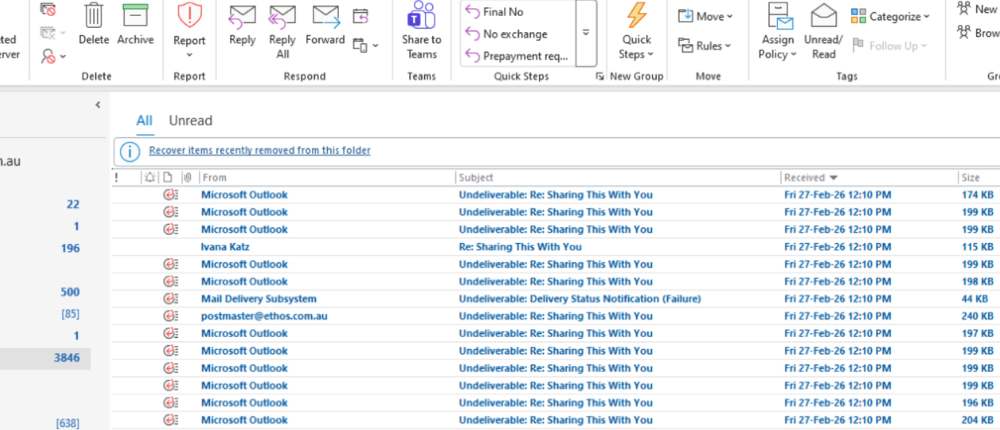
Dozens of emails had already gone out.
That’s the moment everything clicked.
The PRP email. The login. The password.
I had let them in.
What I Did First
I contacted my hosting provider immediately.
We:
- Reset the password
- Forced logout of all active sessions
That stopped the sending.
But I still felt exposed.
Because email isn’t just email.
If someone had access to that… what else had they touched?
That’s when I opened ChatGPT.
Result of the Experiment
I asked a simple question and got a structured checklist:
- Reset password
- Force logout of all devices
- Check sign-in activity
- Look for suspicious account changes
- Scan for malware
- Check Outlook rules
That last one?
I wouldn’t have thought of it in a million years.
The Part That Really Got Me
When I checked my Outlook rules, I found it.
The scammers had created a rule that automatically moved incoming emails into my Deleted Items folder.
So while they were sending emails from my account…
I couldn’t see any replies.
No confused responses.
No warnings.
No red flags.
They had hidden everything.
It was clever. And honestly… a bit terrifying.
The Extra Layer I Didn’t Expect
ChatGPT also told me to check login activity.
There were attempts from different locations, including California.
A week later, more attempts appeared.
Which likely means my password had been shared or sold.
Lovely.
It also suggested running a full computer scan.
That hadn’t even crossed my mind.
My focus was the email.
ChatGPT forced me to think bigger.
What ChatGPT Helped Me Realise
This wasn’t about being careless.
This was about context.
The timing matched my real life.
The sender looked legitimate.
The message was simple.
Everything lined up just enough to feel normal.
And that’s exactly why it worked.
The Prompt I Used
“What should I do if my Outlook email account has been hacked, and what else should I check beyond changing my password?”
Why I Asked This
Because I knew changing the password wasn’t enough.
And I didn’t want to miss something obvious.
Turns out… there were things I wouldn’t have even considered.
What ChatGPT Did Well
It gave me:
- Clear steps
- Logical order
- Non-obvious checks
But more importantly… it kept me calm.
No panic. No overwhelm. Just “do this next.”
What This Means for Small Business Owners
Let’s be honest.
If this happened to you right now… would you actually know what to do?
Not guess.
Not Google five tabs.
Actually fix it properly.
Because your email is tied to everything.
And one mistake like this can spiral fast.
This is where AI becomes more than a tool.
It becomes a thinking partner.
AI Takeaway
AI isn’t just for writing content.
It’s for thinking clearly when your brain can’t.
And in moments like this, that’s the difference between a quick fix… and a very expensive problem.
Want to See What Else AI Can Actually Do?
If this made you realise how much time you spend figuring things out the hard way, you’ll want to read this:
Wait … You Can Do That? Save 8–12 hours a week with AI without overwhelm
Start From the Beginning
If this is your first time here, you can explore the full series here:
Explore More AI Insights
AI For Small Business: Unleashing the Power of Artificial Intelligence
Frequently Asked Questions
How did the scam email look so real?
This email worked because it matched real-life timing and context. I had just been to PRP Imaging, so when an email arrived from them a week later, my brain accepted it without much resistance. The sender name looked legitimate, the message was simple, and there was no urgency or pressure. That combination is what makes modern scams so effective – they don’t feel like scams. They feel like something you were already expecting.
Is checking the sender email address enough to stay safe?
No, and this is where a lot of people get caught. Even if the sender name or email address looks correct, it can still be spoofed or come from a compromised account. In my case, I checked the sender and still clicked the link. A safer approach is to avoid clicking links in emails altogether when it involves sensitive information. Instead, go directly to the official website and log in from there.
What should you do immediately if your email account is hacked?
The first step is to reset your password immediately and force logout of all active sessions. This cuts off access quickly. After that, you need to check for any changes the attacker may have made, including email forwarding rules, deleted emails, or unauthorised login activity. It’s also important to scan your computer for malware, because if your device is compromised, simply changing your password won’t fully fix the issue.
Why are Outlook rules important to check after a hack?
Because they’re one of the easiest ways for attackers to stay hidden. In my case, the scammers created a rule that moved incoming emails straight into the Deleted Items folder. That meant I couldn’t see replies, warnings, or any signs something was wrong. It bought them time. This is a common tactic, and most people don’t even think to check it, which is exactly why it works.
Can scammers still access your account after you change your password?
Sometimes, yes. If they’ve set up forwarding rules, added backup email addresses, or created app passwords, they may still have indirect access. That’s why it’s critical to review your account settings carefully after a breach. Checking login activity, security settings, and connected apps helps ensure there are no backdoors left open.
How did ChatGPT actually help in this situation?
ChatGPT didn’t “fix” the hack, but it gave me a clear, logical process to follow when I was overwhelmed. Instead of guessing or missing steps, I had a structured checklist that guided me through what to do next. It also highlighted things I wouldn’t have thought of, like checking email rules and scanning for malware. That clarity saved time and reduced the chance of making the situation worse.
Is ChatGPT a replacement for IT or security support?
No, but it’s a very useful first line of support. It helps you respond quickly, ask better questions, and understand what’s happening. In situations like this, speed matters. ChatGPT helps you act immediately, and then you can bring in a professional if needed. Think of it as a thinking partner, not a replacement.
What can small business owners do to reduce the risk of this happening?
Start with the basics: enable two-factor authentication, use strong and unique passwords, and avoid clicking links in emails that involve sensitive data. Beyond that, make sure your website, hosting, and email systems are set up properly and securely. Many small business owners don’t realise how interconnected everything is until something goes wrong. Having the right setup in place reduces both risk and stress.
 Ivana Katz from Websites 4 Small Business is an award winning web designer who builds websites that build your business. She provides unbeatable web design services to fit your budget.
The end result? Professional, custom-made sites that give your business the extra oomph it needs to stand out from the competition and make an impact.
Whether you’re a brand-new business or an established one ready to improve your digital presence, Ivana makes it easy to get your business online very quickly. Her websites are professional, tailored to fit your budget, and give your business a serious boost.
Download your FREE copy of “Ultimate Website Design Secrets Blackbook – 10 Bulletproof Strategies for Designing an Outrageously Successful Website”