AI for Productivity & Time Saving

This guide forms part of our complete resource on Small Business AI & Automation.

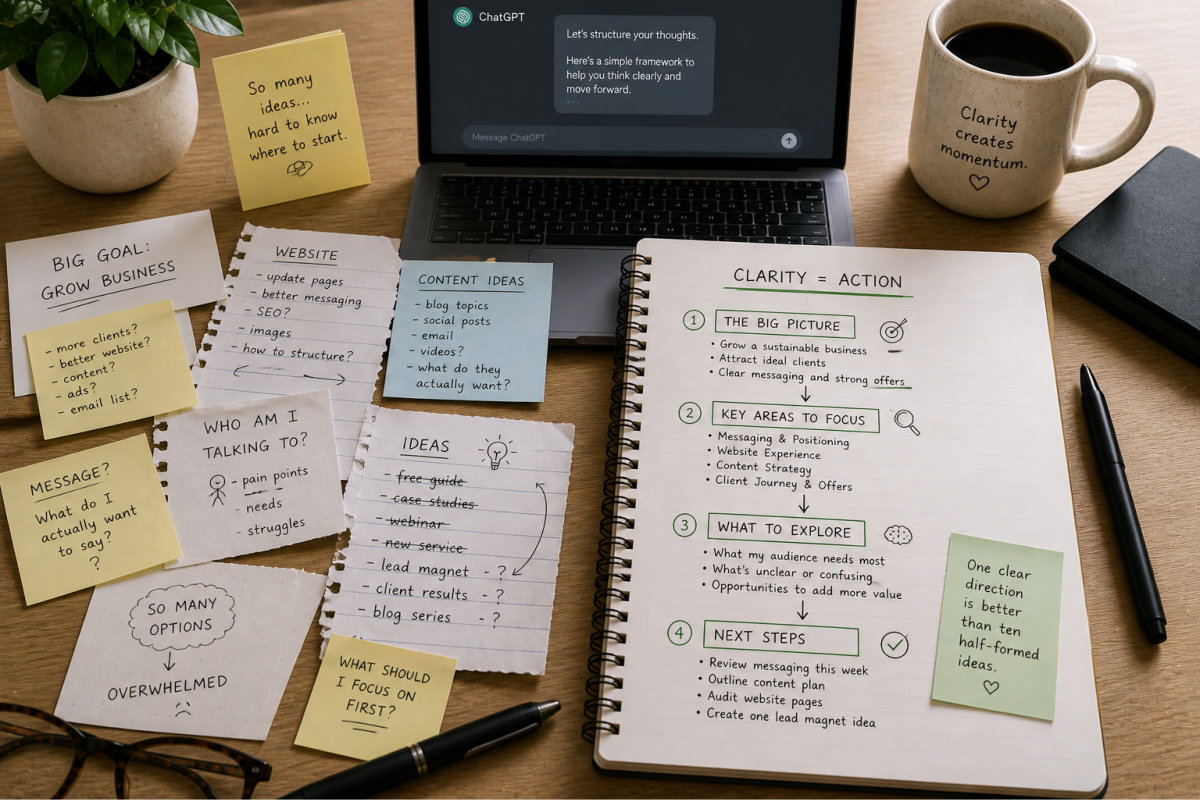
Most small business owners don’t have a time problem. They have a decision problem.

What to work on. What to ignore. What actually matters right now. And how to get through everything without constantly feeling like you’re behind.

That’s where the real pressure comes from. Not the number of tasks, but the mental load of trying to manage them all.

AI is often sold as a way to “save hours,” but that only happens when it’s used in the right places. When it’s applied properly, it can reduce repetitive work, remove the friction of starting, and help you move through tasks with more clarity and less hesitation.

Used poorly, it does the opposite. It creates more options, more noise, and more decisions to make. Instead of simplifying your workflow, it adds another layer to manage.

The goal isn’t to automate everything or hand over control. It’s to use AI selectively, in ways that support how you already work, without turning your day into a system you have to maintain.

This page focuses on practical, realistic ways to use AI to improve productivity without overcomplicating your business.

You’ll see where it actually saves time, where it doesn’t, and how to build a routine that fits into your day instead of taking it over.

Used well, AI doesn’t just make you faster. It helps you think more clearly, reduce mental load, and stay focused on what actually moves your business forward.
Finding the Right Tasks to Use AI For (Most People Get This Wrong)

Not Every Task Should Be Automated

There’s a strong push online to “automate everything.” It sounds efficient, but it ignores how most small businesses actually run. Not every task benefits from speed. Some benefit from thought, judgement, and experience.

When AI is used in the wrong place, it doesn’t save time. It creates a loop of reviewing, fixing, second-guessing, and rewriting. That loop often takes longer than doing the task properly in the first place.

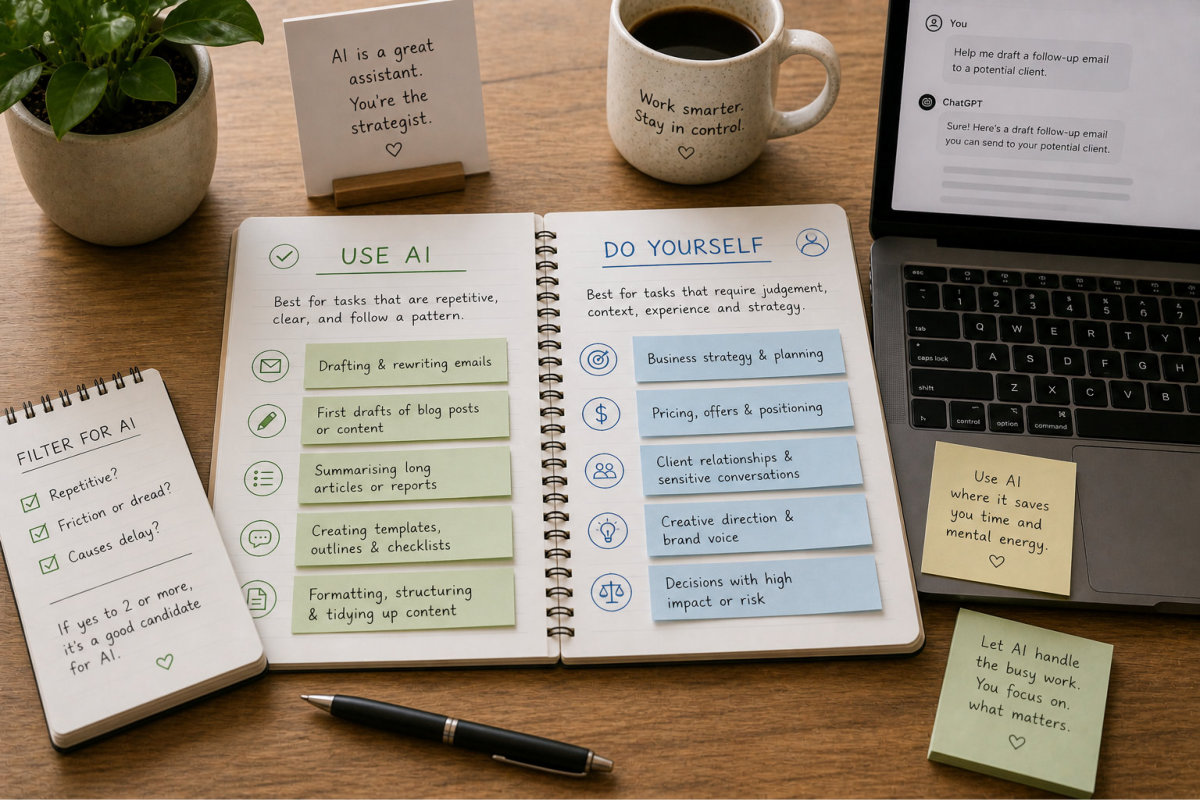
Tasks that involve positioning, decision-making, pricing, or anything that directly affects how your business is perceived should not be handed over to AI. These require context that only you have.

AI works best in clearly defined tasks where the outcome is predictable. If you can describe what “good” looks like in a simple way, AI can usually support it. If you can’t define the outcome clearly, AI will struggle as well.

The shift is subtle but important. You’re not asking, “Can AI do this?” You’re asking, “Should AI be involved in this at all?”

Look for Repetition, Friction, and Delay

Most people look at importance when deciding where to use AI. A better filter is repetition, friction, and delay.

Repetition shows you where time is being spent repeatedly on similar actions. Friction shows you where you hesitate or avoid starting. Delay shows you where tasks sit unfinished longer than they should.

When all three show up together, you’ve found a strong candidate for AI.

Examples include rewriting similar emails, structuring content from rough notes, summarising long information into something usable, or preparing first drafts that you refine later.

These tasks don’t require deep strategic thinking each time. They follow a pattern. That’s what makes them suitable for AI support.

If you want a broader breakdown of these types of tasks, the article 121 Practical Things AI Can Help With When You’re a Solo Business Owner shows how these patterns appear across different parts of a business.

Separate Thinking Tasks from Execution Tasks

This is where most people get stuck. They use AI for thinking when they should be using it for execution, and then wonder why the results feel off.

Thinking tasks involve decisions, direction, and judgement. Execution tasks involve formatting, structuring, drafting, or refining something that already exists.

AI is far more reliable when used for execution.

For example, deciding what your service positioning should be is a thinking task. Turning that positioning into structured website copy is an execution task.

If you skip the thinking and go straight to AI, you end up with content that sounds complete but lacks clarity. It reads well but doesn’t say anything meaningful.

A more effective approach is to separate the two. Do the thinking first, even if it’s rough. Then use AI to shape, organise, and refine it into something usable.

Use AI to Reduce Starting Friction

For many business owners, the hardest part of any task is starting. Not because the task is difficult, but because it’s unclear how to begin.

This is where AI can create immediate value. It gives you a starting point so you’re not beginning from nothing.

Instead of opening a blank page, you can prompt:

“Create a rough outline for this idea so I can refine it.”

That small shift changes how the task feels. You move from hesitation to movement. From deciding to refining.

This applies across multiple areas – writing, planning, responding, even organising your thoughts. AI reduces the energy required to begin, which is often the biggest barrier to getting things done.

Once you’re moving, it’s much easier to continue. That’s where the real time-saving happens.

Be Realistic About Where AI Slows You Down

There are situations where using AI will slow you down, even if it seems like the logical choice.

If a task is quick, familiar, and requires very little effort, using AI can add unnecessary steps. You have to explain the task, review the output, and adjust it. That can take longer than doing it yourself.

There’s also a learning curve. If you’re still figuring out how to prompt effectively, the time spent experimenting can outweigh the immediate benefit.

This doesn’t mean AI isn’t useful. It means you need to be selective. Not every task needs to be optimised.

A simple test is to ask: would I normally complete this in under five minutes without thinking? If the answer is yes, AI probably isn’t needed.

This kind of filtering keeps your workflow efficient instead of over-engineered.

Build Confidence Through Small Wins

Trying to apply AI across your entire business at once usually leads to overwhelm. There are too many moving parts, too many variables, and too many unknowns.

A better approach is to start with one task where you regularly lose time or energy. Apply AI there, refine the process, and get comfortable with how it works.

Once you’ve seen it work in one area, it becomes easier to expand into others. You’re not guessing anymore. You’re building on something that already works.

This is how AI becomes part of your workflow instead of something you experiment with occasionally.

If you want a structured way to build this out without overcomplicating things, your guide Wait… You Can Do That? Save 8–12 Hours a Week with AI shows how to move from isolated tasks to a consistent system.

Getting this right early changes how everything else fits together. It gives you a clear way to decide where AI belongs in your business, and where it doesn’t.

Find the right tasks to use AI for

Replacing Repetitive Work Without Breaking Your Workflow

Map the Task Before You Try to Improve It

Before you bring AI into any task, you need to understand how you currently complete it. Not the ideal version, but the real version you follow when you’re busy, distracted, or trying to move quickly.

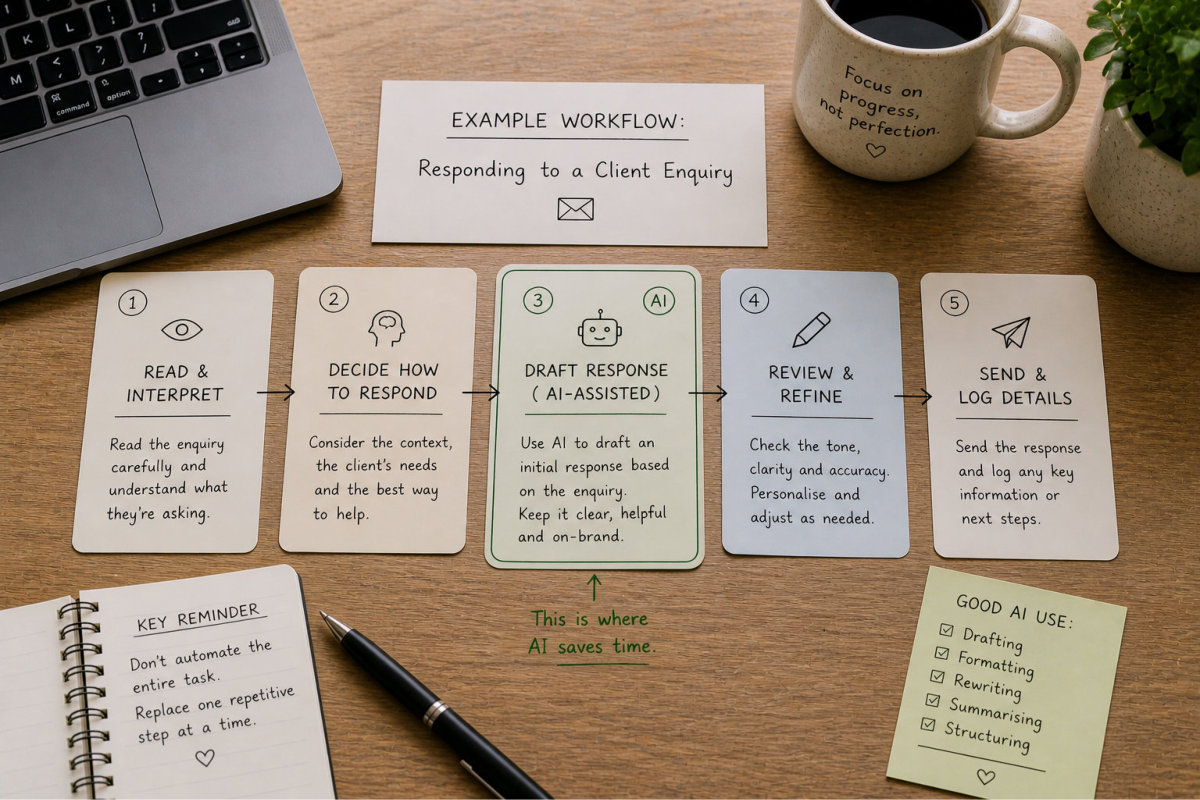
Take something simple like responding to a client enquiry. Most people don’t realise how many small steps are involved:

  • Reading and interpreting the message
  • Deciding how to respond
  • Structuring the reply
  • Writing it out
  • Reviewing tone and clarity

If you don’t map this out, you’ll end up trying to automate the entire task at once. That’s where things start to break down.

Once you can see the steps clearly, it becomes much easier to decide where AI actually fits. Usually, it’s not the whole task. It’s one or two parts within it.

Replace the Most Repetitive Step, Not the Entire Task

The safest and most effective way to introduce AI is to replace one repetitive step rather than the entire workflow.

Using the same example, instead of asking AI to handle your full client response, you might use it to draft the initial version:

“Draft a response to this enquiry. Keep it clear, friendly, and not overly salesy.”

You then review, adjust, and send it.

This approach gives you the benefit of speed without losing control. You’re still making the decisions. AI is simply reducing the time it takes to get to a solid draft.

The same applies to content creation. Instead of asking AI to “write a full blog post,” use it to structure your ideas or create an outline, then build on that yourself.

This aligns with how you already approach content in AI Content Creation for Small Business, where structure and clarity come before writing.

Use AI for Drafting, Formatting, and Rewriting

There are certain types of work that AI consistently handles well. These are usually tasks that follow a pattern and don’t require constant decision-making.

Examples include:

  • Drafting emails based on a rough idea
  • Rewriting content to improve clarity
  • Summarising long notes or documents
  • Structuring unorganised thoughts into sections
  • Turning bullet points into readable content

For example, you might take a rough set of notes and prompt:

“Turn these notes into a clear, structured email response with short paragraphs.”

Or:

“Rewrite this so it’s easier to read and sounds more natural.”

These are tasks that normally take longer than they should because they interrupt your flow. AI reduces that friction without changing the overall outcome.

If you want more examples of where this works in practice, the article 121 Practical Things AI Can Help With When You’re a Solo Business Owner breaks this down across different areas of a business.

Keep Your Review Step Non-Negotiable

Even when AI is doing a good job, the final step should always sit with you. This is where you check tone, accuracy, and whether the output reflects how you want your business to be perceived.

This step is often underestimated. Small details matter – wording, phrasing, and how something comes across to the reader.

For example, an AI-generated email might be technically correct but feel slightly too formal or slightly too generic. That’s something only you will notice and adjust.

This is especially important for client-facing communication. Your responses shape how people experience your business.

The review doesn’t need to take long, but skipping it introduces risk. Keeping it in place keeps your workflow controlled and consistent.

Watch for When AI Adds Extra Work

There are situations where AI doesn’t simplify a task – it adds extra steps.

This usually happens when:

  • The task is already quick and straightforward
  • The prompt requires too much explanation
  • The output needs significant rewriting

For example, rewriting a short email that would take you two minutes manually may not be worth running through AI, reviewing, and adjusting.

AI works best when the task is large enough or repetitive enough to justify the extra step of prompting and reviewing.

If you find yourself spending more time correcting AI output than doing the task yourself, it’s a sign that it’s being used in the wrong place.

This is where a bit of restraint goes a long way. Not every task needs to be optimised.

Build Small Systems That Fit Into Your Day

The goal isn’t to create a complex automation setup. It’s to build small, repeatable systems that fit naturally into your workflow.

For example, you might create a simple system for handling enquiries:

  • Use AI to draft the initial response
  • Review and personalise it
  • Send and log key details

Or for content creation:

  • Use AI to outline a topic
  • Write and refine the content
  • Repurpose it into smaller pieces

These systems don’t need to be complicated to be effective. The key is consistency.  Over time, these small improvements add up. Tasks become easier to start, faster to complete, and less mentally draining.

If you want to connect these individual improvements into a more complete workflow, your guide Wait… You Can Do That? Save 8–12 Hours a Week with AI shows how to build this into a system that works week after week.  When done properly, AI doesn’t replace how you work. It supports it in a way that feels natural, controlled, and sustainable.

Replacing repetitive work with AI

Using AI to Think Faster, Not Just Work Faster

Speed Without Clarity Creates More Work

AI can generate ideas, answers, and content quickly, but speed on its own doesn’t solve the underlying problem most business owners face. When there is no clear direction guiding that output, speed tends to create more noise rather than progress. You end up with multiple options, slightly different versions of the same idea, and an increasing number of decisions to make. Instead of moving forward, you’re reviewing, comparing, and second-guessing.

This is where many people feel like AI is “helping but not helping.” There is more output being produced, but no real reduction in mental load. The issue is not the tool itself. It is the way it is being used. When AI is treated as a generator of endless possibilities, it expands the problem. When it is used to narrow thinking and guide decisions, it becomes far more useful.

A more effective approach is to deliberately reduce the scope of what you ask for. Instead of requesting a long list of ideas, you guide the response toward a smaller number of realistic, relevant options. For example, asking for two or three practical directions based on your current business and audience gives you something you can actually evaluate and act on. That shift from expansion to focus is where AI starts to save time in a meaningful way.

Use AI to Structure Your Thinking

When something feels overwhelming, it is often because your thoughts are unstructured rather than because the task itself is too complex. You may have multiple ideas, concerns, or directions in mind, but without a clear framework to organise them, everything feels heavier than it needs to be. This is one of the most common sources of delay in decision-making.

AI can help by taking those scattered thoughts and turning them into a structured format. If you provide rough notes, partial ideas, or even a stream of thoughts, it can organise them into sections, steps, or logical groupings. This does not remove your thinking. It gives it shape, which makes it easier to refine and evaluate.

This becomes particularly useful when working on larger tasks such as planning a new service, refining your messaging, or outlining content. Instead of trying to hold everything in your head, you are working with something visible and editable. That shift reduces mental strain and allows you to focus on improving the structure rather than creating it from scratch. It also aligns with how your website design process relies on clarity and organisation to produce stronger outcomes.

Use AI to Pressure-Test Your Ideas

When you spend time developing an idea, it is natural to become close to it. That familiarity makes it harder to see where it may be unclear, incomplete, or open to misinterpretation. Without external input, these gaps often go unnoticed until they show up in client conversations or poor results.

AI can act as an initial layer of feedback by helping you explore potential weaknesses before you move forward. Instead of asking whether an idea is good, you can ask where it may fall short. This could include identifying unclear areas, possible objections, or assumptions that have not been fully considered. This type of questioning introduces a level of distance that is difficult to achieve on your own.

Using AI in this way does not replace real feedback from clients or peers, but it gives you a practical way to refine your thinking earlier in the process. It helps you move from a rough idea to something more considered and complete before it is tested in the real world. Over time, this reduces the amount of rework required and improves the quality of your decisions.

Turn Questions Into Clear Next Steps

Many business challenges start as broad, open-ended questions. You might be wondering why something is not working, what to improve next, or where opportunities are being missed. These questions are useful, but they are often too general to act on directly. Without breaking them down, they tend to lead to overthinking rather than progress.

AI can help convert these broad questions into a series of smaller, more actionable steps. Instead of trying to solve everything at once, you can ask it to outline the key areas that need to be explored and what to look for in each one. This creates a structured path forward rather than leaving you in a loop of uncertainty.

For example, understanding why a website is not generating enquiries becomes more manageable when it is broken into components such as messaging clarity, page structure, user experience, and visibility. Each of these can then be reviewed individually, which makes the overall problem easier to approach. This structured thinking reduces guesswork and allows you to move forward with more confidence.

Reduce Overthinking and Move to Action

One of the hidden downsides of AI is that it makes it easy to keep exploring. There is always another variation, another option, or another way to approach something. While this can be useful in certain situations, it often slows progress because there is no clear point where thinking stops and action begins.

A more effective way to use AI is to limit both the number of options you generate and the number of iterations you allow yourself. Asking for a small set of focused options reduces the mental effort required to evaluate them and makes it easier to choose a direction.

Setting a boundary also helps. Decide in advance how many refinements you will go through before taking action. This prevents you from getting stuck in a loop of constant improvement and keeps the process moving forward.

The goal is not to find the perfect answer. It is to find a clear, workable direction and act on it. Progress comes from movement, not from endless refinement.

Use AI as a Thinking Partner, Not a Decision Maker

AI is a useful tool for organising ideas, exploring possibilities, and identifying gaps, but it does not understand your business context in the same way you do. It does not have your experience, your client insights, or your long-term vision, which is why the final decision should always remain with you.

When used as a thinking partner, AI supports your process without taking control of it. You bring the judgement and direction, and it helps you work through the details more efficiently. This balance keeps your work grounded and relevant while still benefiting from the speed and structure that AI provides.

This approach also prevents your decisions from being shaped by generic outputs that do not fully reflect your situation. If you want to see how this works in real scenarios, the ChatGPT Confessions series shows how ideas evolve through prompting, refining, and real use.

Using AI to think faster

Creating Simple Daily Workflows That Save Hours Each Week

Start With a Workflow You Can Actually Maintain

Most productivity advice sounds good until you try to apply it in a real workday. Complex systems, detailed schedules, and multi-step processes often fall apart when you’re dealing with client work, interruptions, and shifting priorities. A workflow only works if you can realistically follow it.

This is where many people go wrong with AI. They try to build elaborate systems that look efficient but don’t fit into how they actually work. Instead of saving time, those systems create more decisions, more switching between tools, and more friction.

A better approach is to start with something simple and repeatable. One task, one structure, one way of doing it that you can follow even on a busy day. AI should support that process, not complicate it.

Anchor Your Day Around One Core Task

Trying to optimise everything at once usually leads to inconsistency. It is far more effective to focus on one core task that moves your business forward and build your workflow around it.

For many small business owners, this might be creating content, responding to enquiries, or working on client deliverables. Once that core task is defined, AI can be used to reduce the effort required to complete it.

For example, if your focus is content creation, your workflow might involve using AI to outline a topic, drafting the content, refining it, and then repurposing it into smaller pieces. This keeps everything connected rather than scattered across different priorities.

This approach also aligns with how your broader content strategy works, where consistency over time builds visibility and authority rather than one-off bursts of activity.

Use AI to Remove Friction at Each Step

Every workflow has small points where you slow down. Starting a task, structuring your thoughts, or deciding how to approach something can take more time than expected. These are the points where AI can have the most impact.

Instead of trying to automate entire processes, use AI to remove friction at specific steps. For example, you might use it to create a rough outline before writing, draft an initial response to a client, or summarise information before making a decision.

These small improvements reduce the effort required to move from one step to the next. Over time, that makes your workflow feel smoother and more manageable.

If you want more practical examples of how AI fits into everyday tasks, the article 121 Practical Things AI Can Help With When You’re a Solo Business Owner shows how these small efficiencies add up across different areas of a business.

Create a Repeatable Structure for Common Tasks

Many tasks in your business follow a similar pattern, even if they feel different on the surface. Responding to enquiries, writing content, or preparing information for clients often involves the same underlying steps.

Once you recognise those patterns, you can create a simple structure that you reuse each time. This might include a consistent way of outlining content, a standard format for responses, or a checklist you follow before completing a task.

AI makes this easier by helping you apply that structure quickly. Instead of building from scratch each time, you are refining something that already exists. This reduces decision fatigue and speeds up execution without sacrificing quality.

Over time, this creates consistency in both your output and your workflow, which makes everything easier to manage.

Keep Your Workflow Flexible, Not Rigid

A workflow should guide your work, not control it. If it becomes too rigid, it starts to feel restrictive and harder to follow, especially when your day doesn’t go as planned.

AI should fit into your workflow in a way that allows for flexibility. You might use it more on some days and less on others, depending on what you’re working on and how much support you need.

This flexibility is important because your workload will change. Some days require more thinking, others require more execution. Your workflow should adapt to that rather than forcing you into a fixed structure.

Keeping things flexible ensures that your system continues to work even as your business evolves.

Build a Routine That Reduces Mental Load

The real benefit of a good workflow is not just saving time. It is reducing the mental effort required to get through your work. When you know what to do next and how to approach it, everything feels more manageable.

AI contributes to this by removing the need to constantly decide how to start or structure a task. It provides a starting point that you can refine, which makes it easier to move forward without hesitation.

Over time, this creates a rhythm. You are no longer figuring things out from scratch each day. You are following a process that supports your work and reduces unnecessary thinking.

If you want to turn this into a more structured system that works week after week, your guide Wait… You Can Do That? Save 8–12 Hours a Week with AI shows how to connect these workflows into something you can consistently rely on.

A simple workflow, supported by AI in the right places, doesn’t just save hours. It makes your work feel more controlled, more focused, and far less overwhelming.

Where AI Actually Saves Time (And Where It Doesn’t)

AI Saves Time When the Task Has a Clear Pattern

AI delivers the strongest time savings when the task follows a recognisable pattern and the expected outcome is relatively consistent. This includes activities like drafting emails, summarising information, restructuring notes, or creating first drafts of content based on an existing idea. These tasks don’t require constant decision-making at every step, which makes them easier to support with AI.

For example, if you regularly respond to similar client enquiries, AI can generate a structured draft based on the key points you provide. You are still responsible for reviewing and adjusting the response, but the time spent getting from a blank screen to a usable draft is significantly reduced. The same applies to content creation, where AI can turn rough notes into a structured outline that you then refine into a finished piece.

The key factor here is predictability. When the task has a repeatable structure, AI reduces the effort required to complete it. If the structure is unclear, the output becomes inconsistent, which removes the time-saving benefit.

AI Helps When It Removes Starting Friction

Many tasks take longer than expected because of the time it takes to begin. Starting a piece of content, drafting a response, or organising ideas often involves hesitation, uncertainty, or overthinking. This starting friction can delay progress even when the task itself is not particularly complex.

AI is particularly effective at reducing this friction by providing an initial version that you can work from. Instead of deciding how to begin, you are refining something that already exists. This shift from starting to editing changes how the task feels and often speeds up the entire process.

For example, instead of spending time thinking about how to structure a blog post, you can ask AI to create a rough outline based on your topic. You then adjust the structure, expand the sections, and shape the content to match your voice. The thinking still happens, but it happens within a clearer framework.

This is one of the reasons AI works well in content-related workflows, as explored in AI Content Creation for Small Business, where the starting point often determines how efficiently the rest of the process unfolds.

AI Does Not Save Time When the Task Requires Judgement

Tasks that rely heavily on judgement, context, or experience rarely benefit from AI in the same way. These include decisions about positioning, pricing, messaging, or anything that directly affects how your business is perceived. In these situations, AI can provide input, but it cannot replace the thinking required to make the final decision.

When AI is used too heavily in these areas, the result often feels generic or slightly misaligned. You then spend additional time adjusting the output, rethinking the direction, or questioning whether it reflects your business accurately. This process can take longer than approaching the task manually from the beginning.

A more effective approach is to use AI as a support tool rather than a replacement. You might use it to explore options, organise your thoughts, or identify gaps, but the final direction should always come from you. This keeps the process efficient without compromising the quality of the outcome.

Where AI saves you time

AI Slows You Down When the Task Is Already Simple

There is a tendency to apply AI to tasks that are already quick and straightforward, simply because the tool is available. In these cases, the additional steps involved in prompting, reviewing, and refining can outweigh any potential time savings.

For example, rewriting a short email that would normally take a couple of minutes can become a longer process when run through AI. You need to explain the task, review the output, and adjust the tone, which introduces unnecessary steps into something that was already efficient.

This does not mean AI should be avoided entirely. It means that selectivity matters. The most effective use of AI comes from applying it to tasks where the effort saved is greater than the effort introduced. If a task is already simple, it is often better to complete it directly.

This level of awareness is what separates effective use from overuse. Not every task needs to be optimised, and trying to do so can create more complexity than it removes.

AI Saves Time When It Fits Into a Defined Workflow

The biggest time savings from AI come when it is part of a clear, repeatable workflow rather than used randomly. When you know where AI fits within a process, how to prompt it, and how to refine the output, the entire workflow becomes more efficient.

For example, in a content workflow, AI might consistently be used to outline topics, draft initial sections, and restructure content for clarity. Each step has a defined role, and the process becomes familiar over time. This reduces both the time required and the mental effort involved.

In contrast, using AI without a defined role often leads to inconsistency. You might use it differently each time, experiment with prompts, and spend additional time figuring out what works. This trial-and-error approach can slow you down instead of speeding you up.

If you want to see how this fits into a structured system, your guide Wait… You Can Do That? Save 8–12 Hours a Week with AI shows how to connect individual tasks into a workflow that consistently saves time.

AI is most effective when it supports a process that already makes sense. When used this way, it reduces effort, improves consistency, and creates a more efficient way of working without adding unnecessary complexity.

Building a Sustainable AI Routine You’ll Actually Stick To

Start With What You’re Already Doing

The easiest way to build a routine that lasts is to start with tasks that are already part of your day. Trying to introduce AI as a completely separate activity often leads to inconsistency because it feels like extra work rather than support.

Look at what you already do regularly. This might include responding to enquiries, creating content, planning your week, or organising information. These are natural entry points where AI can fit in without disrupting your workflow.

For example, if you already write emails daily, introducing AI to draft or refine those responses becomes a small adjustment rather than a major change. If you regularly create content, using AI to outline topics or structure ideas fits into a process that already exists.

Starting this way keeps the transition simple and reduces resistance. You are not building a new habit from scratch. You are improving one that already exists.

Keep the Routine Small and Repeatable

Consistency comes from simplicity. The more complex a routine becomes, the harder it is to maintain, especially when your workload increases or your schedule changes.

A sustainable AI routine should involve a small number of repeatable actions. This might include using AI to outline content, draft responses, or organise ideas before you refine them. The exact tasks will vary, but the structure should remain simple enough to follow without overthinking.

For example, a content routine might involve choosing a topic, using AI to create an outline, writing the content, and then repurposing it into smaller pieces. Each step has a clear purpose, and the process can be repeated without needing to be redesigned each time.

This approach reduces decision fatigue and helps you maintain momentum. Instead of figuring out what to do next, you are following a process that already works.

Building a sustainable AI routine

Use AI Consistently in the Same Places

One of the reasons routines fail is inconsistency in how tools are used. If you approach AI differently each time, you spend more time experimenting than actually getting results.

A more effective approach is to use AI in the same parts of your workflow each time. This could be outlining, drafting, or refining, depending on what suits your work best. By keeping its role consistent, you build familiarity with the process.

Over time, this reduces the effort required to use AI. You know what to ask, how to refine the output, and where it fits within your workflow. The process becomes faster and more reliable.

This is also where having a set of prompts or a reference point helps. Your ChatGPT Prompts for Small Business Owners page can act as a practical resource to support this consistency.

Avoid Overbuilding Your Routine

It is easy to get carried away and try to optimise every part of your workflow. While this can feel productive at the start, it often leads to routines that are too complex to maintain.

Adding more steps, more tools, or more layers of automation can create friction rather than reduce it. You may find yourself spending more time managing the system than doing the work itself.

A better approach is to keep your routine focused on the areas where AI provides the most value. This usually means reducing repetition, improving structure, and supporting decision-making without trying to automate everything.

If something feels complicated or difficult to maintain, it is a sign that the routine needs to be simplified. Sustainable routines are built on clarity, not complexity.

Build Momentum Through Consistent Use

The real benefit of an AI routine comes from repeated use over time. The more consistently you apply it, the more efficient it becomes. You refine your prompts, improve your workflow, and develop a clearer understanding of where AI fits best.

This creates momentum. Tasks become easier to start, faster to complete, and less mentally demanding. Instead of approaching each task as something new, you are building on a process that already works.

For example, a content routine that initially feels structured can become second nature after a few weeks of consistent use. The same applies to client communication, planning, and other repeatable tasks.

If you want to connect these routines into a broader system that supports your entire workflow, your guide Wait… You Can Do That? Save 8–12 Hours a Week with AI shows how to build something that remains practical over the long term.

A sustainable routine is not about doing more. It is about creating a way of working that you can maintain, even when your business becomes busier and more complex.

Frequently Asked Questions

AI saves time when it is applied to tasks that are repetitive, structured, or slow to start. This includes drafting emails, outlining content, summarising information, and organising ideas. The key is to use it to reduce friction within your existing workflow rather than trying to automate everything. When used in the right places, it helps you move through tasks faster without losing control of the outcome.

This usually happens when AI is applied to the wrong type of task or when the process itself is unclear. If you are using AI for tasks that require judgement or decision-making, you will spend more time reviewing and adjusting the output. It can also slow you down if you overuse it for simple tasks that would be quicker to complete manually. Being selective about where you use AI makes a significant difference.

Tasks that follow a clear pattern and do not require constant decision-making are the best fit. This includes writing first drafts, restructuring content, summarising notes, preparing responses, and organising information. These tasks benefit from having a starting point, which AI can provide quickly and consistently.

AI can support decision-making by helping you structure your thoughts, explore options, and identify potential gaps or risks. It can present different perspectives and organise information in a way that is easier to evaluate. The final decision should still come from you, as AI does not have the context or experience needed to make business-critical choices.

A practical way to start is to look at where you lose the most time or energy during your day. This might be writing, planning, responding to enquiries, or organising information. Choose one task that feels repetitive or slow, and introduce AI there first. Once that feels comfortable, you can expand into other areas.

No. In most cases, simpler systems work better. A small number of repeatable steps that fit into your existing workflow are easier to maintain and more effective over time. Complex systems often create more friction and are harder to stick to, especially when your workload increases.

There is no fixed rule, but consistency matters more than frequency. Using AI in the same parts of your workflow regularly helps build familiarity and reduces effort over time. This could be daily for tasks like emails or planning, or weekly for tasks like content creation. The goal is to make it part of how you work rather than something you use occasionally.

Trying to use it everywhere. This often leads to overcomplicated workflows, inconsistent results, and more time spent managing the tool than completing the task. The most effective use of AI comes from applying it selectively to the areas where it has the most impact and keeping the overall process simple.

Putting It All Into Practice

AI can improve productivity, but only when it is used with intention. Applying it to the right tasks, in the right way, makes a noticeable difference. Applying it without a clear purpose tends to create more work rather than reduce it. The distinction is not about the tool itself. It comes down to how it fits into your workflow.

Tasks that are repetitive, structured, or slow to start are where AI delivers the most value. These are the areas where it reduces friction, speeds up execution, and allows you to move through your work more efficiently. Tasks that require judgement, context, or decision-making still rely on your input, and using AI too heavily in these areas often leads to additional time spent reviewing and adjusting the output.

A simple, repeatable workflow is what turns AI from an occasional tool into something that consistently saves time. When you know where it fits, how to use it, and what to expect from it, your work becomes more structured and easier to manage. Instead of constantly figuring things out from scratch, you are building on a process that already works.

The goal is not to do more. It is to work with more clarity, less friction, and a better sense of control over how your time is used. AI supports that when it is applied selectively and used to strengthen your existing way of working.

If you want a structured way to apply this across your business without overcomplicating your workflow, your guide Wait… You Can Do That? Save 8–12 Hours a Week with AI shows how to turn these ideas into a practical system you can rely on week after week.

AI Sounds Great … But Where Do You Actually Start?

I’m Ivana, a website designer who works with small business owners, coaches and consultants to create websites they actually feel confident sharing. I focus on clarity, structure and making things feel simple – whether that’s your website or how you use tools like AI in your business.

If you’re reading this and thinking, “I know AI could help, but I don’t know where to start or what to use it for,” you’re not alone.

Most small business owners aren’t struggling with effort. They’re struggling with clarity — what to use AI for, how to use it properly, and how to make it fit into their day without creating more work.

That’s exactly where the difference is.

If you want a practical, no-fluff way to start using AI to save time, organise your thinking, and actually get things done, you can explore it here:

Wait… You Can Do That? – Save 8–12 Hours a Week with AI

Or if you’d rather see how this works in real situations, including what worked and what didn’t:

ChatGPT Confessions

The goal isn’t to use AI for everything.
It’s to use it in the right places so your business feels simpler, clearer, and easier to run.

Ivana Katz - Website designer