Workflow Automation & Systems
Build Simple Systems That Save You Hours Every Week

This guide forms part of our complete resource on Small Business AI & Automation.

Most small business owners don’t have a workflow problem. They have a repetition problem. The same tasks come up every day or every week, and they are handled manually each time. Responding to enquiries, preparing proposals, onboarding clients, updating content, and managing follow-ups all follow a pattern, even if it doesn’t feel that way in the moment.

Over time, this repetition creates friction. It slows you down, increases the chance of errors, and makes your workload feel heavier than it needs to be. This is where automation and systems can make a real difference, not by replacing your work, but by reducing the effort required to move through it.

The challenge is that many automation solutions are either too complex or too disconnected from how small businesses actually operate. They promise efficiency but introduce more setup, more tools, and more maintenance than they remove.

A more effective approach is to build simple systems around the work you are already doing. Identify the tasks that repeat, define a clear process, and then use AI or automation to support specific steps within that process. This keeps everything manageable and aligned with how your business actually runs.

This page focuses on how to create workflows that reduce repetition, improve consistency, and make your day-to-day work easier to manage. It connects with how your website, your content, and your client communication all work together as part of a broader system.

When done properly, automation is not about doing more. It is about removing unnecessary effort so you can focus on the work that actually matters.

Identifying Bottlenecks in Your Current Workflow

Look for Tasks That Keep Repeating

Most workflow problems are not obvious because they are hidden inside daily tasks that feel normal. You respond to emails, send proposals, follow up with clients, update content, and manage small admin tasks without thinking too much about it. Individually, these tasks do not seem like a problem. Over time, they create a pattern of repetition that slows everything down.

The first step is to recognise what keeps coming up again and again. These are the tasks that follow a similar process each time, even if the details change. For example, responding to initial enquiries, preparing project outlines, or sending onboarding instructions are all tasks that repeat in slightly different forms.

Once you start identifying these patterns, it becomes clear where your time is going. This is where automation and systems begin, not with tools, but with awareness of what is actually happening in your day.

Pay Attention to Where You Hesitate or Delay

Bottlenecks are not always about volume. They often show up as hesitation. Tasks that take longer to start, require more thought than expected, or get pushed to later in the day are usually areas where your workflow is not fully defined.

For example, writing a proposal may take longer than necessary because there is no clear structure. Responding to certain client emails may feel harder because the message needs to be carefully worded. These delays are signals that the process is not as clear or repeatable as it could be.

AI can help in these situations, but only once the bottleneck is identified. If you do not know where the friction is, you will end up applying AI in places where it does not make a meaningful difference.

Notice Where You Are Switching Between Tasks Too Often

Another common bottleneck comes from constant task switching. Moving between emails, content, client work, and admin tasks throughout the day creates a stop-start pattern that reduces efficiency. Even if each task is small, the mental shift between them adds up.

For example, checking emails every few minutes while trying to write content interrupts your focus. Switching between client work and admin tasks without a clear structure creates unnecessary friction.

This is where workflows become important. Grouping similar tasks together and handling them in a structured way reduces the need for constant switching. AI can then be applied within those grouped tasks to improve efficiency, rather than being used randomly throughout the day.

Identify Where You Are Recreating the Same Work

Many bottlenecks come from rebuilding the same thing repeatedly. This often happens in areas like proposals, emails, and content, where you start from scratch each time instead of working from a structured base.

For example, if you write a new proposal from scratch for every client, you are repeating the same process of structuring, wording, and organising information. The same applies to writing emails that follow a similar pattern but are treated as entirely new each time.

Recognising these patterns allows you to introduce systems. Instead of starting from zero, you create a base structure that can be adapted. AI can then support this by drafting and refining within that structure, which reduces both time and effort.

Understand the Difference Between Busy Work and Valuable Work

Not all tasks should be automated or optimised. Some work requires your attention, judgement, and experience. The goal is not to remove yourself from your business, but to reduce the time spent on tasks that do not require your full input.

For example, thinking through a client strategy or refining your messaging is valuable work that benefits from your involvement. Rewriting similar emails, organising information, or preparing standard documents are tasks that can be supported or streamlined.

This distinction is important because it prevents over-automation. When you focus on removing friction from repetitive tasks, you create more space for the work that actually moves your business forward.

If you want to see how this fits into a broader system, your guide Wait… You Can Do That? Save 8–12 Hours a Week with AI shows how identifying and addressing these bottlenecks leads to more efficient workflows.

Understanding where your time is really going is the foundation of any effective system. Without that, automation becomes guesswork rather than a solution.

Identifying bottlenecks

Connecting Tools So Your Business Runs Smoother

Start With the Workflow, Not the Tools

One of the biggest mistakes small business owners make is choosing tools first and trying to build a workflow around them. This often leads to disconnected systems that technically “work” but do not actually make anything easier. Each tool does its job, but the overall process still feels fragmented, and you are left manually bridging the gaps.

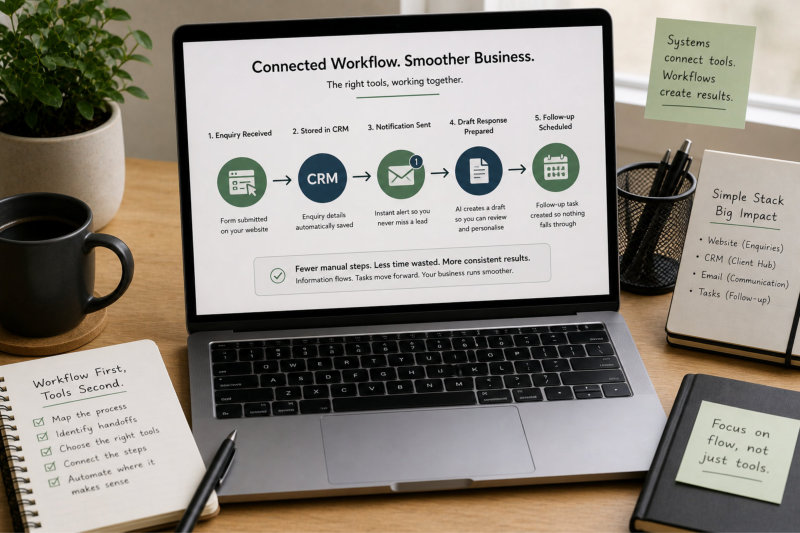
A more effective approach is to start with the workflow itself. Map out what actually happens from start to finish. For example, what happens when a new enquiry comes in? Where does that information go? How is it followed up? What happens next? Once that sequence is clear, it becomes much easier to see where tools should connect.

For instance, if an enquiry comes through your website, the ideal flow might be: form submission → stored in your CRM → notification sent → draft response prepared → follow-up scheduled. When you understand that flow, you can choose tools that support each step rather than trying to force tools to work together after the fact.

This is the difference between having tools and having a system. Tools perform tasks. Systems connect those tasks into something that actually runs smoothly.

Reduce Manual Handoffs Between Steps

Most inefficiency in a workflow comes from manual handoffs. These are the moments where you have to take information from one place and move it somewhere else, often repeating small actions that add up over time. Individually, these steps seem minor, but they create constant interruptions and increase the likelihood of errors.

For example, a typical process might involve receiving an enquiry via email, copying the details into a spreadsheet or CRM, drafting a response, and then setting a reminder to follow up. Each of these steps requires manual input, which breaks the flow and takes time.

When tools are connected properly, these handoffs are reduced. The enquiry can be captured automatically, stored in the right place, and trigger the next step without you needing to intervene. You might still review and refine the response, but you are no longer managing the movement of information between systems.

This does not remove your involvement. It removes the repetitive actions that do not require your input, which is where most of the time is lost.

Connecting tools

Create a Single Source of Truth for Your Information

Another common issue in disconnected systems is having information spread across multiple places. Client details may exist in your email, your CRM, your invoicing system, and your notes, with no clear version that you can rely on. This leads to confusion, duplication, and time spent searching for the right information.

A smoother system relies on having a clear “home” for your data. This might be your CRM, your project management tool, or another central system where key information is stored and updated. Other tools should connect to this source rather than creating separate copies.

For example, when a client submits a form on your website, their details should automatically flow into your CRM. When you send a proposal or invoice, that activity should be linked to the same record. This creates a consistent view of the client and reduces the need to cross-check information across multiple tools.

This approach also makes your workflow more reliable. When everything connects back to a central point, it becomes easier to track progress, follow up, and manage your work without second-guessing where things are.

Use Automation to Trigger the Next Step, Not Replace It

Automation is most effective when it moves your workflow forward rather than trying to complete everything on your behalf. A common mistake is attempting to fully automate processes that still require judgement, which often leads to errors or impersonal results.

A better approach is to use automation to trigger the next step in the process. For example, when a new enquiry is received, an automated action might create a task, prepare a draft response, or send a confirmation message. You then step in to review and complete the interaction.

This keeps the process moving without removing your control. You are still involved in the parts of the workflow that require decision-making, but you are not responsible for initiating every step manually.

For example, instead of writing every response from scratch, you might use AI to generate a structured draft based on the enquiry. This draft is not sent automatically. It gives you a starting point, which you refine before sending. This balance between automation and control is what makes the system effective.

Keep Your Tool Stack Simple and Purpose-Driven

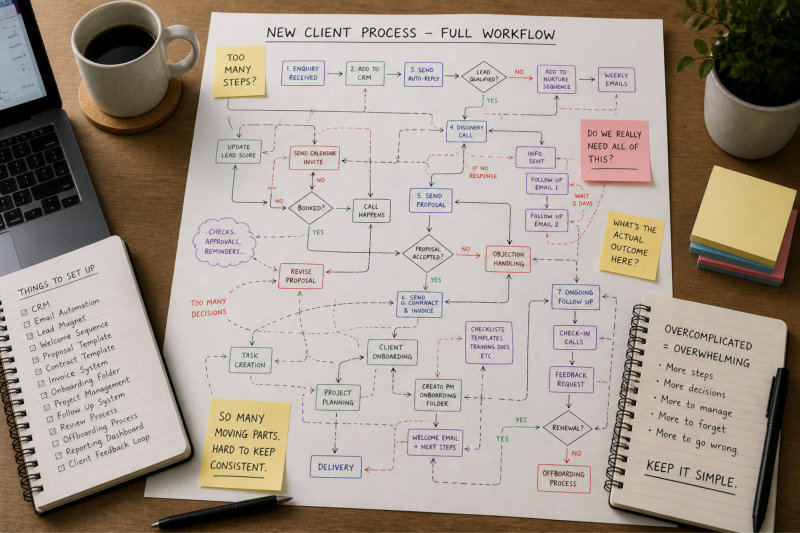
It is easy to assume that more tools will lead to better systems, but the opposite is often true. Each additional tool introduces another layer of complexity, another connection to manage, and another potential point of failure. Over time, this can make your workflow harder to maintain rather than easier.

A more effective approach is to use a small number of tools that each have a clear purpose and integrate well with each other. For example, you might have one tool for managing client information, one for communication, and one for handling specific tasks like invoicing or content management. The key is that these tools connect in a way that supports your workflow.

For instance, your website acts as the entry point for enquiries, your CRM manages client relationships, and your email or communication tool handles interaction. When these are connected, the system feels seamless. When they are not, you end up managing the gaps manually.

If you want to see how this fits into a broader, practical system without overcomplicating your setup, your guide Wait… You Can Do That? Save 8–12 Hours a Week with AI shows how to build workflows that remain simple, connected, and easy to maintain.

Connecting your tools is not about having the latest technology. It is about creating a system where information flows smoothly, tasks move forward without friction, and your time is spent on the work that actually matters.
Automating Small Tasks That Add Up Over Time

Start With What You Already Do, Not What You Think You Need

One of the fastest ways to overcomplicate your business is to design systems based on what you think a “proper” business should look like, rather than how your business actually operates. This often leads to creating processes that look organised on paper but feel difficult to follow in practice.

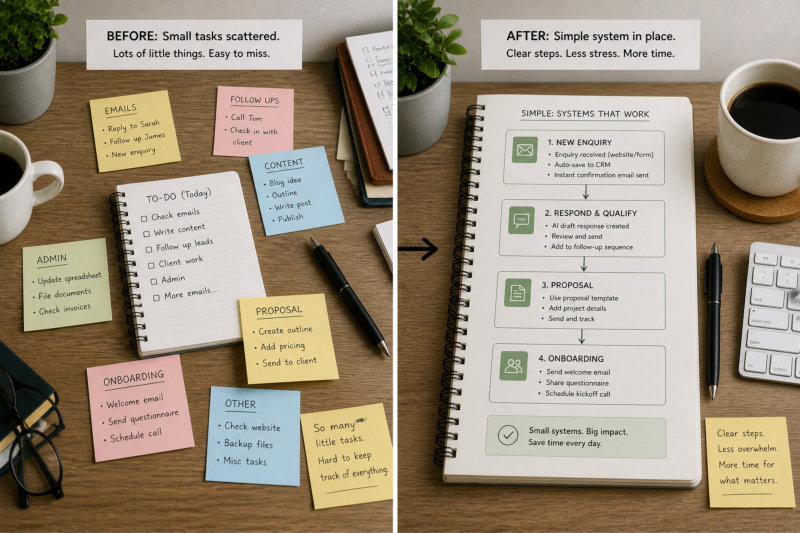
A better approach is to start with what you are already doing. Look at your current workflow, even if it feels messy, and identify the steps that naturally occur. These are the foundations of your system. Instead of replacing them, you refine and structure them.

For example, if your current process for handling a new client involves receiving an enquiry, sending a response, preparing a proposal, and onboarding, that is already a system. It just may not be clearly defined. By organising these steps into a simple sequence, you create clarity without adding unnecessary complexity.

This approach ensures that your system reflects reality, which makes it far easier to maintain.

Keep Each System Focused on One Outcome

Systems become difficult to manage when they try to do too much. Combining multiple goals into a single process often creates confusion about what the system is actually meant to achieve.

A more effective approach is to keep each system focused on a single outcome. For example, one system might handle new enquiries, another might manage content creation, and another might support client onboarding. Each system has a clear purpose and a defined result.

This makes it easier to understand, easier to follow, and easier to improve over time. When something is not working, you can identify the issue more quickly because the system has a clear role.

For example, if your enquiry system is not converting leads effectively, you know exactly where to look. You are not trying to untangle a process that covers multiple areas at once.

Build Systems That You Can Actually Follow on a Busy Day

A system only works if you can follow it when you are busy, distracted, or under pressure. If it requires too many steps, too much setup, or too much thinking, it will eventually be ignored.

This is why simplicity matters. A system should guide your actions without requiring constant decision-making. You should be able to move through it without stopping to figure out what comes next.

For example, a content system might involve choosing a topic, creating an outline, writing the content, and publishing it. If each step is clear and repeatable, the process becomes easier over time. If the system includes too many variations or optional steps, it becomes harder to follow consistently.

AI can support this by reducing friction within each step, but it cannot fix a system that is too complex to begin with. The structure needs to be simple first.

Automating small tasks

Avoid Building Systems You Don’t Need Yet

It is tempting to build systems for every part of your business, especially when you start thinking about automation and efficiency. The problem is that many of these systems are not needed yet. They are built for a future version of the business rather than the current one.

This often leads to wasted time and unnecessary complexity. You may spend hours setting up a system that you rarely use, while the tasks that actually slow you down remain unchanged.

A more effective approach is to build systems in response to real needs. If a task is repeated frequently, takes too long, or creates frustration, it is a good candidate for a system. If it happens occasionally, it may not need one yet.

This keeps your systems relevant and ensures that the effort you invest in building them has a clear return.

Refine and Improve Systems Over Time

Systems are not something you create once and leave unchanged. They evolve as your business grows and your needs change. What works at one stage may need to be adjusted later.

This is why it is important to keep your systems flexible. Instead of trying to build a perfect system from the start, focus on creating something that works well enough and then refining it over time.

For example, you might start with a simple process for handling enquiries. As your volume increases, you refine the steps, introduce automation, and improve the structure. This gradual approach keeps the system manageable while allowing it to grow with your business.

Simple systems are not basic. They are intentional. They reduce friction, support consistency, and make your business easier to run without adding unnecessary layers.

Creating Simple Systems Without Overcomplicating Everything

Start With What You Already Do, Not What You Think You Need

One of the fastest ways to overcomplicate your business is to design systems based on what you think a “proper” business should look like, rather than how your business actually operates. This often leads to creating processes that look organised on paper but feel difficult to follow in practice.

A better approach is to start with what you are already doing. Look at your current workflow, even if it feels messy, and identify the steps that naturally occur. These are the foundations of your system. Instead of replacing them, you refine and structure them.

For example, if your current process for handling a new client involves receiving an enquiry, sending a response, preparing a proposal, and onboarding, that is already a system. It just may not be clearly defined. By organising these steps into a simple sequence, you create clarity without adding unnecessary complexity. This is the same principle behind how a well-structured website is built in stages rather than all at once.

This approach ensures that your system reflects reality, which makes it far easier to maintain.

Keep Each System Focused on One Outcome

Systems become difficult to manage when they try to do too much. Combining multiple goals into a single process often creates confusion about what the system is actually meant to achieve.

A more effective approach is to keep each system focused on a single outcome. For example, one system might handle new enquiries, another might manage content creation, and another might support client onboarding. Each system has a clear purpose and a defined result.

This makes it easier to understand, easier to follow, and easier to improve over time. When something is not working, you can identify the issue more quickly because the system has a clear role.

This also aligns with how your broader Content & Visibility strategy is structured, where each piece of content has a defined purpose rather than trying to cover everything at once.

Creating simple systems

Build Systems That You Can Actually Follow on a Busy Day

A system only works if you can follow it when you are busy, distracted, or under pressure. If it requires too many steps, too much setup, or too much thinking, it will eventually be ignored.

This is why simplicity matters. A system should guide your actions without requiring constant decision-making. You should be able to move through it without stopping to figure out what comes next.

For example, a content system might involve choosing a topic, creating an outline, writing the content, and publishing it. If each step is clear and repeatable, the process becomes easier over time. If the system includes too many variations or optional steps, it becomes harder to follow consistently.

This is also where AI can support the process, particularly in structured areas like your AI for Content Creation workflows, where it helps reduce friction without adding complexity.

Avoid Building Systems You Don’t Need Yet

It is tempting to build systems for every part of your business, especially when you start thinking about automation and efficiency. The problem is that many of these systems are not needed yet. They are built for a future version of the business rather than the current one.

This often leads to wasted time and unnecessary complexity. You may spend hours setting up a system that you rarely use, while the tasks that actually slow you down remain unchanged.

A more effective approach is to build systems in response to real needs. If a task is repeated frequently, takes too long, or creates friction, it is a good candidate for a system. If it happens occasionally, it may not need one yet.

This keeps your systems relevant and ensures that the effort you invest in building them has a clear return.

Refine and Improve Systems Over Time

Systems are not something you create once and leave unchanged. They evolve as your business grows and your needs change. What works at one stage may need to be adjusted later.

This is why it is important to keep your systems flexible. Instead of trying to build a perfect system from the start, focus on creating something that works well enough and then refining it over time.

For example, you might start with a simple process for handling enquiries. As your volume increases, you refine the steps, introduce automation, and improve the structure. This gradual approach keeps the system manageable while allowing it to grow with your business.

You can see this same evolution in action through your ChatGPT Confessions, where workflows improve through real use rather than being over-engineered from the start.

Simple systems are not basic. They are intentional. They reduce friction, support consistency, and make your business easier to run without adding unnecessary layers.

When Automation Saves You (And When It Creates More Problems)

Automation Works Best When the Process Is Already Clear

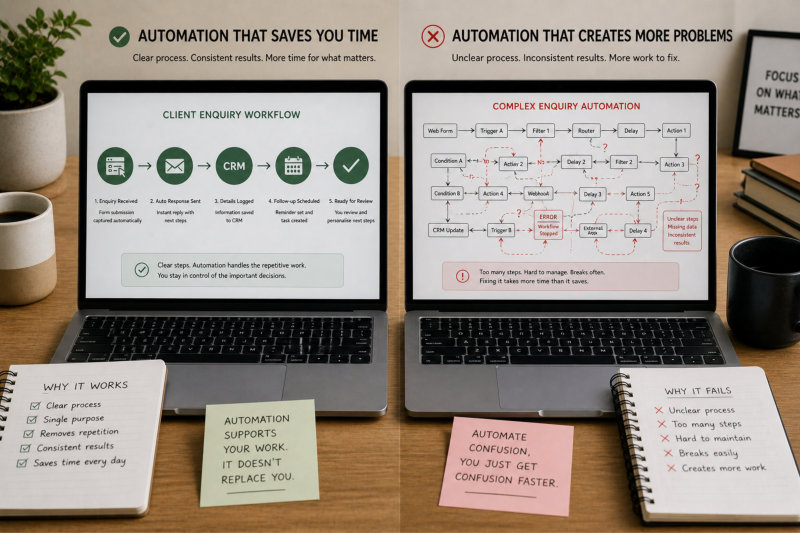
Automation is most effective when it is applied to a process that is already defined and working. If the steps are clear, consistent, and repeatable, automation can reduce the effort required to move through that process. It removes manual steps, reduces delays, and improves consistency.

Problems start when automation is applied to something that is not yet clear. If a process is inconsistent, unclear, or still evolving, automating it often makes things worse. Instead of fixing the issue, it scales the confusion. You end up with a system that runs automatically but produces inconsistent or incorrect outcomes.

For example, automating client onboarding without a clear onboarding process can lead to missing steps, unclear instructions, or a poor client experience. Defining the process first ensures that automation supports something stable rather than amplifying existing gaps. This is where having a well-structured foundation, similar to how your website design process is built in stages, makes a significant difference.

Automation Saves Time When It Removes Repetition

The strongest use of automation is in reducing repetitive actions that do not require your input. These are tasks that follow the same pattern every time and add little value when done manually.

For example, automatically capturing enquiry details from your website, setting follow-up reminders, or organising incoming information into the right system are all areas where automation can save time. These tasks do not require judgement, but they do require consistency.

By removing these repetitive steps, you reduce interruptions and create a smoother workflow. This allows you to focus on tasks that actually require your attention, such as client communication, decision-making, and strategy. It also connects directly with how your broader Content & Visibility approach supports consistent, structured work rather than one-off effort.

This is where automation creates real value. It supports your work without replacing it.

Automation Creates Problems When It Replaces Judgement

Not every task should be automated. Processes that involve decision-making, context, or sensitivity rely on your judgement and experience. When automation is used in these areas, it often leads to outcomes that feel generic, inaccurate, or disconnected from the situation.

For example, automatically sending detailed responses to client enquiries without reviewing them can result in messages that do not fully address the client’s needs. The response may be technically correct, but it lacks the context that makes it relevant. This is something you can clearly see in real-world examples through your ChatGPT Confessions, where prompts and outputs evolve through refinement rather than being used as-is.

Similarly, automating proposals or important communication without oversight can create inconsistencies or errors that affect how your business is perceived. These are areas where automation should support your work, not replace it.

Understanding this distinction is critical. Automation should remove effort where possible, but not at the cost of quality or clarity.

When automation saves you

More Automation Does Not Always Mean Better Systems

There is a common assumption that adding more automation will automatically improve efficiency. In practice, this often leads to overly complex systems that are harder to manage and maintain.

Each layer of automation introduces dependencies between tools, processes, and triggers. When something changes or breaks, it can affect multiple parts of your workflow. This creates a system that requires ongoing attention, which reduces the time-saving benefit.

For example, a simple process for handling enquiries can become complicated if it includes multiple automated steps across different tools. If one connection fails, the entire process may stop working as expected, requiring manual intervention to fix.

A simpler system that focuses on key areas of automation is often more effective than a complex system that tries to automate everything. The goal is to reduce friction, not create a system that needs constant management.

The Best Systems Balance Automation and Control

The most effective workflows combine automation with clear points of control. Automation handles the repetitive, predictable parts of the process, while you remain responsible for the areas that require judgement and decision-making.

For example, an enquiry might trigger an automated draft response, but you review and refine it before sending. A proposal process might be structured and partially automated, but the final version is still shaped by your understanding of the client. This balance reflects the same thinking behind how your broader AI workflows are structured, where tools support clarity rather than replace it.

When applied consistently, this approach creates systems that are efficient without feeling rigid. It also ensures that your business continues to reflect your experience and judgement, rather than becoming overly dependent on automation.

Automation works best when it fits into a clear, structured workflow. When that balance is in place, your business becomes easier to manage, more consistent, and far less reliant on manual effort at every step.

Building a Business That Doesn’t Rely on You for Everything

Most Businesses Depend on the Owner More Than They Realise

In many small businesses, the owner becomes the centre of every task without intending to. Every enquiry is reviewed, every decision is made manually, and every process depends on their involvement. While this can feel manageable at the beginning, it quickly becomes a limitation as the business grows.

The problem is not the workload itself. It is the lack of structure around it. When everything depends on you, progress slows down, consistency becomes harder to maintain, and the business cannot operate efficiently without your constant input.

This is often where frustration builds. You are working harder, but the business is not becoming easier to run. The goal of systems and automation is not to remove you completely, but to reduce unnecessary reliance on you for tasks that do not require your expertise.

Separate Decision-Making From Repetitive Work

One of the most effective ways to reduce dependency is to separate tasks that require decision-making from those that follow a clear pattern. Not every part of your business needs your input, but without a system, everything tends to default back to you.

For example, reviewing a client strategy or refining messaging requires your experience and judgement. Responding to standard enquiries, sending onboarding steps, or organising information are tasks that can be structured and supported.

When you clearly define which tasks require your involvement and which do not, it becomes easier to introduce systems. AI and automation can then support the repetitive parts, allowing you to focus on the areas where you add the most value.

This is where resources like 121 Practical Things AI Can Help With When You’re a Solo Business Owner become useful, because they help you identify exactly which tasks can be systemised without overthinking it.

Create Processes That Run Without Constant Input

A business becomes easier to manage when processes can run without needing your attention at every step. This does not mean removing yourself entirely. It means creating clear sequences that guide what happens next.

For example, a new enquiry can trigger a structured response process, a proposal can follow a defined format, and onboarding can move through a set sequence of steps. Once these processes are clear, they require less oversight and fewer decisions.

Using structured prompts from resources like ChatGPT Prompts for Small Business Owners can also reduce the effort required to start tasks, particularly when drafting responses or organising information.

Use AI and Automation to Support, Not Replace

AI and automation play an important role in reducing reliance on manual work, but they should not replace the parts of your business that require your judgement. Their role is to support processes, not take over decisions.

For example, AI can draft responses, structure content, and organise information, but you still review and refine the output. Automation can move tasks forward, but you still control the key decisions.

This balance is critical. Without it, automation can create more problems than it solves, particularly when applied too aggressively. A more grounded understanding of this is explored in Best AI Automation Solutions for Small Businesses: A Guide to the ROI of Time, where the focus is on return, not just implementation.

Building business that doesn't rely on you

Build a Business That Supports Your Time, Not Consumes It

The long-term goal of systems and automation is not just efficiency. It is creating a business that gives you more control over your time. When processes are clear and repetitive tasks are reduced, the business becomes easier to manage without constant effort.

This does not happen instantly. It is the result of gradually refining your workflows, identifying where you are most needed, and building systems around everything else.

A business that does not rely on you for everything is not less personal. It is more sustainable. It allows you to stay involved where it matters while creating systems that support everything else.

Frequently Asked Questions

Start with tasks that repeat frequently and follow the same pattern. This often includes responding to enquiries, sending onboarding information, or organising incoming data. These tasks do not require constant decision-making, which makes them easier to automate without affecting quality.

A task is a good candidate for automation if it is repetitive, predictable, and does not rely heavily on your judgement. If a task requires context, decision-making, or sensitivity, it should remain manual or only partially supported by automation.

Not if it is used correctly. Automation should support your processes, not replace your communication. When repetitive tasks are handled more efficiently, you have more time to focus on meaningful interactions with clients, which often improves the overall experience.

No. In most cases, fewer tools lead to better systems. The focus should be on how your workflow operates, not how many tools you use. A small number of well-connected tools is more effective than a complex setup that is difficult to manage.

No. In most cases, fewer tools lead to better systems. The focus should be on how your workflow operates, not how many tools you use. A small number of well-connected tools is more effective than a complex setup that is difficult to manage.

This is a gradual process. You do not need to build everything at once. Start by improving one area, such as handling enquiries or managing content, and then build from there. Over time, these small improvements create a more efficient overall system.

AI can support many parts of your workflow, particularly drafting, structuring, and organising tasks. However, it should not replace areas that require your expertise or judgement. The most effective systems combine AI support with human oversight.

Trying to automate too much too soon. This often leads to overly complex systems that are difficult to manage and maintain. A better approach is to focus on simple improvements that reduce repetition and build from there.

Systems create consistency and reduce the amount of manual effort required to run your business. This allows you to handle more work without increasing your workload at the same rate. It also creates a more predictable experience for your clients.

Creating Systems That Support the Way You Work

Automation and systems are often presented as something complex or technical, but in reality, they are built from the work you are already doing. Every repeated task, every familiar process, and every pattern in your day-to-day work is an opportunity to create something more structured and easier to manage.

The goal is not to remove yourself from your business. It is to reduce the effort required to run it. When repetitive tasks are streamlined and workflows are clearly defined, your business becomes more consistent and far less dependent on constant manual input.

This shift does not happen all at once. It comes from gradually identifying bottlenecks, simplifying processes, and introducing automation where it genuinely makes a difference. Over time, these small improvements build into systems that support how your business operates rather than adding complexity to it.

When your workflows are clear and your systems are aligned with how you actually work, your business becomes easier to manage, easier to scale, and far more sustainable in the long term.

This is where everything connects. Your content, your client communication, and your internal processes all work together as part of a larger system. When that system is working well, it creates more control, more clarity, and more time to focus on what matters most.

AI Sounds Great … But Where Do You Actually Start?

I’m Ivana, a website designer who works with small business owners, coaches and consultants to create websites they actually feel confident sharing. I focus on clarity, structure and making things feel simple – whether that’s your website or how you use tools like AI in your business.

If you’re reading this and thinking, “I know AI could help, but I don’t know where to start or what to use it for,” you’re not alone.

Most small business owners aren’t struggling with effort. They’re struggling with clarity — what to use AI for, how to use it properly, and how to make it fit into their day without creating more work.

That’s exactly where the difference is.

If you want a practical, no-fluff way to start using AI to save time, organise your thinking, and actually get things done, you can explore it here:

Wait… You Can Do That? – Save 8–12 Hours a Week with AI

Or if you’d rather see how this works in real situations, including what worked and what didn’t:

ChatGPT Confessions

The goal isn’t to use AI for everything.
It’s to use it in the right places so your business feels simpler, clearer, and easier to run.

Ivana Katz - Website designer