Website Redesign & Updates
This guide forms part of our complete Small Business Website Design resource, where we cover structure, branding, redesign planning and long-term website strategy.


Most small businesses don’t outgrow their website overnight – they outgrow it slowly. You refine your offer, learn what clients actually want, adjust your pricing, tighten your niche, and get clearer about the kind of work you want more of.
The problem is your website often stays stuck in the “early business” version of you – broad, cautious, and trying to speak to everyone. That creates a mismatch. You’re running a more mature business, but your website still feels like it’s asking permission.
Typical business changes that trigger a redesign:
What this looks like on the website:
A redesign becomes necessary when your website no longer reflects your current offer, confidence, and direction. A refresh might tidy things – but a redesign realigns your site with how your business actually operates today.
Websites rarely become visually inconsistent because someone “did it wrong.” They become inconsistent because the site has been updated in pieces over time – new pages here, new sections there, a fresh logo dropped in, a new colour used for a button… and suddenly the site looks like it was built by five different people (even if it was just you).
Fragmentation creates trust problems because it signals instability. Visitors may not consciously notice why something feels off, but the brain is very good at spotting inconsistency. If the website looks patched together, users subconsciously question whether the business is equally patchy behind the scenes.
Common fragmentation patterns:
Why a redesign fixes this better than continual patching:
If your website looks like it has evolved without a plan, a redesign is the reset that pulls everything back into one coherent brand experience.
As your business grows, your website usually grows in a messy way. New pages are added to solve immediate needs – a new service, a new landing page, a new blog category, a quick update – but the overall structure doesn’t get rethought.
That’s how a website becomes “technically complete” but practically confusing. Visitors should not have to work to understand what you do, who it’s for, or where to click. If they have to think too hard, they leave.
Common UX symptoms that point to redesign territory:
Quick reality check: if you feel the need to explain your business every time you send your website link, the site isn’t doing its job. Your website should make people feel oriented, not unsure.
If you want to evaluate whether the issue is structural (not visual), revisit the Website Structure & UX guide and look for gaps in hierarchy, navigation flow, and page relationships.
A redesign isn’t about making things prettier – it’s about restoring clarity so the website becomes easier to use and easier to trust.


Sometimes redesign is necessary because you’re fighting the platform. You can keep tweaking design, but if the underlying system is rigid, outdated, or overloaded, improvements become frustrating and inconsistent.
Examples of platform limitations that trigger redesign decisions:
What this looks like in real life:
Strategic redesign can include a platform shift when needed. The goal isn’t “new for the sake of new” – it’s a setup that supports consistency, stability, and future growth without constant patching.
This is the one business owners feel but don’t always say out loud: your website might be holding you back emotionally.
You may be doing great work, but when it’s time to share your link, you hesitate. Or you feel like you need to “explain it first.” That’s a confidence gap created by presentation.
Signs your website has fallen behind your ambition:
Why this matters: perception affects decision-making. If your website feels tentative, inconsistent, or dated, people make assumptions. Not because they’re mean – because that’s how humans assess risk. A confident website reduces perceived risk.
A strategic redesign aligns your online presence with your current level – and makes your website a tool you’re happy to share, not something you apologise for.
Businesses evolve in stages. Early on, you accept almost any project. Your messaging is broad because you are still learning what works. Over time, you refine your niche, increase your pricing, improve your delivery and become clearer about the kind of clients you want.
The issue is not growth. The issue is when the website does not grow with you.
What this misalignment looks like:
When your website reflects an earlier version of your business, it quietly caps perception. A redesign allows your digital presence to catch up to your real capability.
Most redesign conversations start with a sentence like this: “We’ve just added things over time.”
New services get added as new menu items. Landing pages are created for campaigns. A new colour is introduced for a new offer. A plugin is installed to solve a short-term problem.
Individually, each decision makes sense. Collectively, they create structural drift.
Structural drift creates:
A redesign is often less about “improving” and more about consolidating. It brings scattered growth back into one intentional system.
Clarity is the primary function of a website. If users hesitate, scroll excessively, or leave quickly, confusion may be the reason.
This doesn’t always show up as complaints. It often appears subtly:
Confusion increases perceived risk. When users feel unsure, they delay decisions. A redesign reorganises messaging, hierarchy and visual flow so understanding happens faster.
Visual perception influences judgement within seconds. Even if your service quality is high, presentation shapes first impressions.
Websites that feel dated, cluttered, or visually inconsistent can unintentionally signal:
This is not about chasing trends. It is about signalling stability, professionalism and alignment with modern expectations. When your visual system no longer matches your business maturity, redesign becomes a strategic brand decision.
Even if traffic is stable, engagement may decline. Redesign is not only about appearance; it can also address friction in the decision journey.
Warning patterns:
A strategic redesign revisits visual emphasis, layout flow and content hierarchy to improve clarity and decision-making alignment.
This is often the most honest indicator. If you feel the need to explain your website before someone views it, there is a trust gap.
Business owners frequently say things like:
When confidence in your website declines, it affects how you market your business. A redesign restores alignment between ambition and presentation.
For a deeper breakdown of these warning signs, see 7 Signs It’s Time to Redesign Your Business Website, where these indicators are explored further.
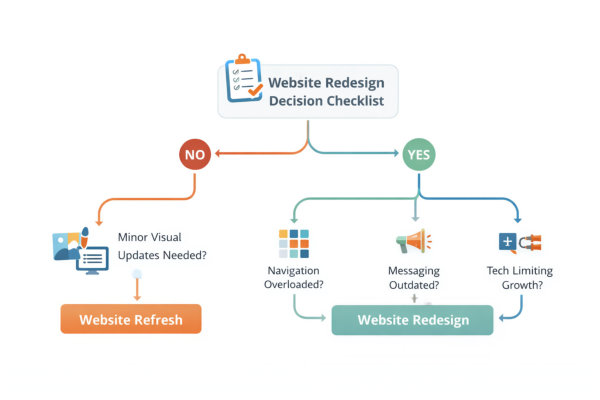
A refresh improves what already exists. It works within the current structure, layout system and platform, making adjustments without rebuilding the foundation.
A refresh may include:
It is cosmetic and surface-level by design. The navigation structure remains the same. Page hierarchy remains the same. Templates remain the same.
A refresh is appropriate when your foundation is strong but your presentation feels slightly dated.
Not every website needs a rebuild. If your site still reflects your services accurately, your navigation is clear, and your layout structure supports growth, a refresh may be a smart decision.
Refresh is usually enough when:
In these cases, refinement is more efficient than reconstruction. A targeted refresh can modernise perception without unnecessary disruption.
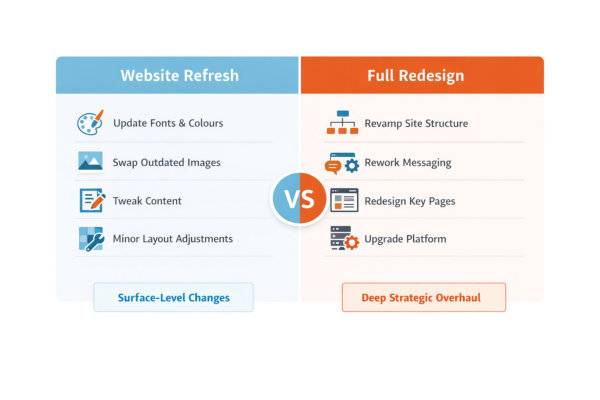
A full redesign rethinks the foundation. It does not just update styling – it re-evaluates structure, layout logic, content flow and strategic direction.
A redesign may involve:
It is a structural reset. It aligns the website with your current business stage rather than preserving past decisions.
One of the most common mistakes is trying to “refresh” structural problems. Visual adjustments cannot fix hierarchy confusion. New colours cannot fix unclear messaging. Updated images cannot correct overloaded navigation.
Choosing refresh when redesign is needed often results in:
It can feel less risky to avoid a full redesign. But delaying structural change can extend inefficiency.
The decision should be based on alignment, not emotion.
Ask:
If you would not rebuild the site in its current format, that is often your answer.
For a broader planning framework before making redesign decisions, review Designing a New Website? What You Need to Know First to understand foundational considerations.
Your website sets expectations. If those expectations are unclear, outdated or misaligned, you will attract enquiries that do not match your ideal client profile.
Warning signs include:
When your messaging and presentation are misaligned, your website filters poorly. Instead of pre-qualifying visitors, it increases your workload.
Even if your service quality is strong, perception influences comparison. Visitors often review multiple providers before making a decision.
If competitor websites feel clearer, more structured or more cohesive, you may appear smaller or less established — regardless of actual capability.
This can show up as:
A redesign can rebalance perception so your presentation matches your expertise.
This is one of the clearest signals. If you hesitate to run ads, share your website on social media, or send traffic to a specific page because it “needs fixing,” your website is limiting growth.
Common internal thoughts:
When marketing activity slows because of presentation hesitation, redesign becomes a growth investment rather than a cosmetic decision.

As services evolve, the original layout may no longer support how you sell. What worked when you had one main offer may not support tiered services, programs, retainers or packaged solutions.
Structural strain often appears as:
If your layout cannot clearly present how you now operate, redesign allows structure to support growth rather than resist it.
Sometimes the limitation is subtle. You may sense that your website reflects a previous stage of business ambition.
When a website feels smaller than the business behind it, it quietly caps confidence and perceived value.
Indicators include:
A strategic redesign removes this ceiling. It aligns presentation with ambition so your website supports expansion rather than limiting it.
A redesign should never begin with “We need something more modern.” That is a surface-level goal. A strategic redesign begins with clarity about direction.
Before design decisions are made, define:
Without strategic clarity, redesign becomes aesthetic experimentation. With clarity, it becomes structural alignment.
Not everything needs to disappear during a redesign. Strategic planning involves evaluation rather than demolition.
Divide existing content into three categories:
This prevents unnecessary content loss while ensuring clutter does not carry forward.
For a structured overview of required pages and hierarchy considerations, refer to Website Design Checklist – All You Need To Know For a Successful Website.

One of the most common redesign mistakes is starting with colours and layouts before rethinking structure. A visually polished website with weak hierarchy is still inefficient.
Strategic planning asks:
If structure requires adjustment, address that before selecting new typography or imagery.
If needed, revisit the Website Structure & UX cluster to reassess foundational layout decisions before proceeding.
A redesign is an opportunity to ensure your visual identity supports your positioning. This does not mean rebranding entirely – it means refining how your brand is expressed online.
Consider:
Redesign is often the point where fragmented branding becomes unified.
If your visual identity requires deeper evaluation, review the Visual Design & Branding cluster for alignment guidance.
A redesign is not only about the final result. It is also about how the transition is managed.
Strategic planning includes:
Redesign should feel controlled and deliberate, not rushed or reactive. When properly planned, the launch becomes a confident step forward rather than a stressful overhaul.
For a step-by-step overview of what goes into a structured build process, review Website Design For Small Business: Step by Step Guide From Idea to Launch.
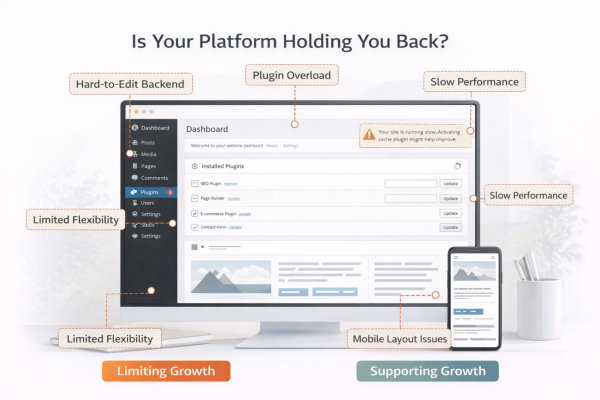
Not all redesigns require a platform change. However, sometimes the system underneath your website quietly limits what you can do.
This does not always show up as something “broken.” It often appears as friction:
When you begin compromising on presentation or structure because “the platform won’t allow it,” it may be time to evaluate whether the foundation still supports your direction.
Many websites are built using themes or visual builders that were suitable at the time. Over the years, updates, add-ons and customisations accumulate. What once felt flexible may now feel fragile.
Common warning signs:
Redesign may involve rebuilding on a cleaner theme structure or simplifying the builder setup to create long-term stability.
As websites grow, technical layers increase. Plugins, custom CSS, patches and temporary fixes accumulate. While each solution solves a short-term issue, collectively they can slow performance and reduce reliability.
Indicators of technical strain:
Redesign can simplify the system, reduce unnecessary complexity and restore long-term maintainability.
If a redesign involves structural change or platform adjustment, content must be migrated thoughtfully. This is not about copying and pasting pages – it is about reorganising them.
Strategic migration includes:
Redesign is an opportunity to improve clarity. Migration should support simplification rather than carry forward clutter.
Platform decisions should be based on long-term suitability, not short-term inconvenience. Staying on a limiting system may appear easier, but it can slow future growth.
Ask:
If the answer is repeatedly uncertain, redesign may involve rebuilding on a more stable foundation rather than continually adapting around constraints.
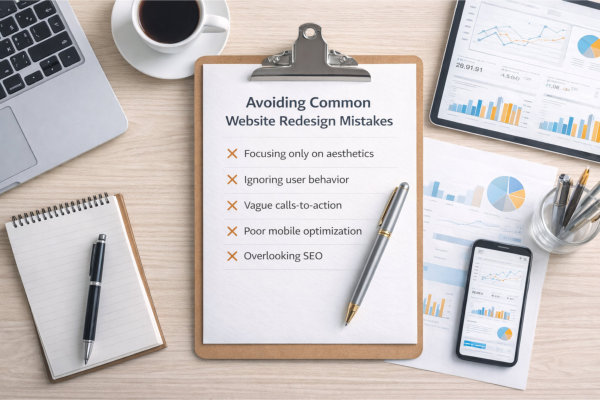
One of the most common mistakes in a website redesign is focusing on appearance before purpose. A site can look modern and still fail to support business growth.
Redesign decisions driven purely by trends often ignore:
Visual upgrades cannot compensate for unclear messaging or structural confusion. Strategic clarity must guide layout and design decisions.
For deeper structural alignment considerations, review the Website Structure & UX guide before making design-first decisions.
Many businesses carry unnecessary content forward during a redesign. Old blog categories, outdated service pages, redundant sections – all preserved “just in case.”
This leads to:
A redesign is not only about what to improve – it is about what to remove. Strategic simplification strengthens clarity.
Redesign is often assumed to be primarily visual. In reality, messaging refinement typically requires more effort than layout changes.
Common miscalculations:
If your business has evolved, your copy must evolve with it. Redesign is a strategic messaging opportunity, not just a layout update.
To evaluate page requirements during redesign, review Website Design Checklist.
Platform shifts can be beneficial – but they must be intentional. Moving to a new system without fully understanding its capabilities can create new limitations.
Before switching platforms, consider:
Redesign should improve stability, not introduce complexity.
A redesign represents strategic evolution. Rushing the launch undermines the value of the process.
Common rushed-launch issues:
Allowing time for review and testing protects the investment. Redesign is not about speed. It is about alignment and stability.
For a practical breakdown of redesign pitfalls, see Do’s and Don’ts of Website Redesign.
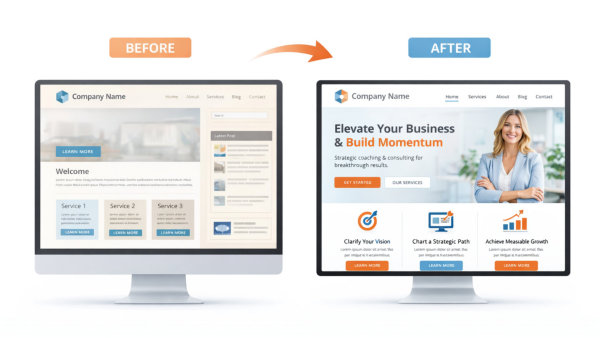
A before-and-after comparison should never be about “old vs pretty.” It should demonstrate clarity, cohesion and structural improvement.
Effective redesign typically improves:
If the only visible change is colour or imagery, the redesign may have been superficial. Strategic redesign improves how the website functions, not just how it looks.
When evaluating impact, look beyond style.
Structural improvements often include:
In many cases, the “after” version feels calmer and more confident because unnecessary elements have been removed.
Redesign should be evaluated against business goals, not aesthetic preference.
Ask:
If the answer to these questions is yes, the redesign has achieved alignment.
One often overlooked indicator of redesign success is confidence. If you feel proud sharing your website and comfortable directing traffic to it, that matters.
When presentation matches ambition, marketing becomes easier. Decision-making becomes clearer. Conversations start from a stronger foundation.
Redesign should remove hesitation and restore momentum.
For real examples of how structural, visual and messaging improvements work together, review the Website Redesign Gallery.
Notice not just the visual differences, but how hierarchy, clarity and focus improve in the final result.
Before committing to a redesign, confirm whether your website reflects your current business stage.
Ask yourself:
If multiple answers create hesitation, redesign may be justified.
Evaluate whether your current structure supports decision-making.
If your website feels layered, cluttered or confusing, structural revision should precede any cosmetic update.
Review the cohesion of your visual system.
Fragmented branding often signals incremental updates rather than intentional growth.
For deeper visual system evaluation, refer to the Visual Design & Branding guide.
Assess whether your current setup supports future growth.
If maintaining the website feels more difficult than it should, redesign may simplify long-term operations.
Finally, consider ambition.
If your website feels like it belongs to a previous version of your business, strategic redesign becomes less about appearance and more about expansion.
To explore how a structured redesign process can support business evolution, visit Website Redesign Services.
A website redesign is rarely isolated from structure. If navigation is overloaded, page hierarchy is unclear or service pages compete with each other, visual updates alone will not solve the issue.
Redesign often requires reviewing:
When structure is improved during redesign, clarity increases immediately. For deeper structural principles, review the Website Structure & UX guide to ensure foundational alignment.
Redesign presents an opportunity to refine brand expression. Even if a full rebrand is not required, consistency and cohesion should be strengthened.
This may involve:
When visual identity evolves in isolation from structure, friction remains. When both evolve together, the website feels unified and confident.
For guidance on strengthening visual systems, explore the Visual Design & Branding cluster.
Understanding the difference between refresh and redesign directly influences budgeting. Minor visual updates require different planning than full structural rebuilding or platform change.
Strategic cost planning considers:
When redesign scope is clearly defined, investment becomes predictable and aligned with outcomes.
To understand how planning and budgeting decisions connect to overall website strategy, review the Website Cost, Budget & Planning cluster.
Website redesign does not exist in isolation. It connects directly to structure, branding and long-term planning.
If redesign reveals navigation overload or page hierarchy confusion, revisit the Website Structure & UX guide to ensure your foundation supports clarity.
If visual inconsistency or brand fragmentation triggered the redesign decision, review the Visual Design & Branding cluster to strengthen cohesion.
If budgeting and scope planning are influencing timing decisions, explore the Website Cost, Budget & Planning cluster to define investment expectations clearly.
Redesign becomes most effective when it is part of a coordinated strategy rather than a standalone update.
This guide forms part of our complete Small Business Website Design resource, which covers structure, branding, cost planning and long-term sustainability.
How do I know if I need a redesign instead of just a refresh?
If your issue is mainly visual ageing – outdated fonts, old imagery, minor inconsistencies – a refresh may be enough.
If your structure feels cluttered, your messaging no longer reflects your services, or navigation has become overloaded, you likely need a redesign.
A simple test:
If you would not build your website the same way today, redesign is probably the right move.
Will redesigning my website confuse existing clients?
A strategic redesign should improve clarity, not create confusion.
Navigation becomes simpler. Service descriptions become clearer. Important information becomes easier to find.
If there are pages your clients rely on, they can be preserved or improved within the new structure. Redesign should strengthen trust, not disrupt it.
How often should a small business redesign its website?
There’s no fixed timeline. Redesign is triggered by business evolution, not by design trends.
Some businesses redesign every 3–5 years as their positioning matures. Others go longer if their structure and messaging still align.
If your business has grown but your website hasn’t, that’s your signal.
Can I redesign my website without changing platforms?
Yes. Many redesigns are completed within the same platform if the technical foundation is stable.
A platform change is only necessary when flexibility, stability or growth potential is restricted. The decision should be strategic, not reactive.
Will I lose content during a redesign?
Not if it’s planned properly.
Redesign includes evaluating what to keep, refine or remove. The goal is clarity, not deletion.
In many cases, outdated or redundant pages are intentionally removed to strengthen focus.
Does redesign affect website traffic?
A carefully managed redesign should maintain stability.
Over time, improved structure, clarity and usability can strengthen engagement. The primary purpose of redesign is alignment. When visitors understand your offer quickly, decision-making improves.
Is redesign worth the investment for a small business?
If your website no longer reflects your business stage, limits your marketing confidence, or creates confusion, redesign becomes a strategic investment rather than a cosmetic expense.
Your website supports credibility, communication and growth. When it aligns with your ambition, it strengthens everything connected to it.
A website redesign should not be driven by frustration or trend pressure. It should be guided by alignment.
When your business evolves, your website must evolve with it. Structure, messaging, branding and technical foundation should reflect your current stage — not your starting point.
Strategic redesign restores clarity, strengthens confidence and supports future growth. It ensures your website remains the centre of your business universe, connecting credibility, marketing and long-term direction.
If your website no longer reflects where your business stands today, explore our Website Redesign Services to begin a structured and strategic evolution.




