ChatGPT Confession #020 – I Asked ChatGPT to Turn My Google Analytics Data Into an SEO Plan
The Problem Wasn’t the Data
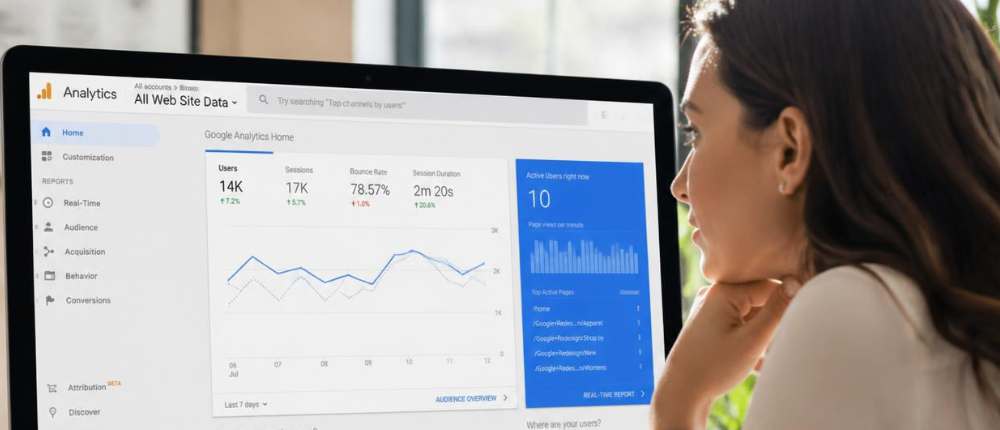
I had the tabs open. Google Analytics in one window, Search Console in another, and about six mental tabs open in my head trying to make sense of it all.
There were numbers everywhere. Impressions going up. Clicks doing… something. Positions moving slightly. Some pages looked promising, others looked like they’d been completely ignored by Google for sport.
I kept thinking I should be able to figure it out. I’ve been doing this long enough. I understand websites, I understand content, and yet I was staring at these dashboards like they were written in a language I almost understood but not quite.
At one point I actually caught myself clicking between reports hoping something would jump out and explain itself. It didn’t.
What These Tools Actually Do
Google Analytics tells you what people do after they land on your site. How many visitors, which pages they go to, how long they hang around, whether they leave straight away or click through to something else.
Search Console shows you how they got there in the first place. What they typed into Google, how often your pages showed up, how many people clicked, and roughly where you’re sitting in the results.
In theory, it’s brilliant. One shows behaviour, the other shows visibility. Put them together and you’re supposed to have this beautiful, clear picture of what’s working.
In reality, it felt like having two puzzle boxes tipped out on the table with no picture on the lid.
Where I Got Stuck
I started looking at specific examples, trying to make sense of them.
One page had over 400 impressions and zero clicks. That felt rude. Google was showing it to people and they were collectively deciding to ignore me.
Another page was sitting around position 11 or 12, which is basically the online equivalent of almost getting picked for the team and then being told to sit down.
I knew these were clues. I just didn’t know what they were clues for.
Why I Asked ChatGPT
I opened ChatGPT because I was going in circles. I kept looking at the same numbers, jumping between reports, thinking I was about to figure it out, and then ending up in the same place.
Everything I was looking at made sense on its own. The problem was pulling it together into something useful. I couldn’t see what to prioritise, and that’s what was slowing me down.
I needed a way to step back and look at it differently. Not more data, not more reports, just a clearer way of thinking about what was already there.
So I put it in front of ChatGPT and asked it to go through it with me. The question was simple. I wanted to know what I should actually focus on next.
The Prompt
I basically dumped the data in and asked ChatGPT to turn it into an SEO action plan. I asked it to look at impressions, clicks, positions, and tell me where I should focus if I actually wanted to move things forward instead of just watching numbers change.
No fancy wording. No overthinking. Just a very honest “help me make sense of this.”
What It Showed Me
The first thing it did was cut through the noise. It didn’t try to analyse everything equally, which is exactly what I had been doing.
It pointed straight at the pages with high impressions and low clicks. That’s where the opportunity was. People were seeing the page, they just weren’t choosing it.
Then it flagged the pages sitting just outside stronger positions. Those were close enough to improve with a bit of work instead of starting from scratch.
It also called out something I hadn’t properly considered. Some pages were trying to do too much. They weren’t clear enough about what they were actually targeting.
The Actual Action Plan
I started with one page. The one with impressions and no clicks. Instead of rewriting everything, I changed the title and meta description so it actually matched what people were searching.
Then I went back into the content and made it clearer. Less waffle, more direct answers. I also added internal links from other pages so Google had a better understanding of how it connected.
Next, I looked at the pages sitting around positions 10 to 15. Those became quick wins. I expanded the content slightly, tightened the headings, and made sure the keywords were actually reflected properly.
Then I built supporting articles around them. Not random blog posts, but pieces that actually linked back and strengthened the main page.
For the first time, I wasn’t guessing. I was working through a list.
What Changed
The difference wasn’t in the data itself. All of those numbers were there before, sitting in front of me every time I opened the reports. What changed was how I approached them once I had something to guide my thinking.
I stopped bouncing between pages and trying to make sense of everything at once. Instead of treating every metric like it mattered equally, I started focusing on the ones that actually pointed to an opportunity. That alone made it easier to decide where to spend my time.
Once I had a clear starting point, everything else followed more naturally. One change led to another, and the process felt a lot more structured instead of scattered. I wasn’t second-guessing every move because I could see how each step connected to the next.
That shift changed how the work felt as well. It stopped being this vague exercise in analysing numbers and started to feel like I was actively building something that had direction.
The Takeaway
Having access to data doesn’t mean you know what to do with it. That’s the trap.
ChatGPT helped me focus. It helped me stop overthinking and start making decisions based on what was already in front of me.
And honestly, it saved me from opening those tabs again and just staring at them, hoping I’d magically become a data analyst overnight.
Frequently Asked Questions
How can ChatGPT help you understand your Google Analytics data?
It helps you interpret what you’re looking at instead of just describing it. When you’re stuck in the numbers, it can highlight what actually matters and point you toward what to focus on next.
What should you ask ChatGPT when looking at your analytics?
Keep it simple and practical. Ask what actions you should take based on the data you’re seeing, rather than asking it to explain the metrics. That shift changes the quality of the response completely.
How does ChatGPT decide what matters in your data?
It looks for patterns and prioritises opportunities. Things like high impressions with low clicks or pages sitting just outside stronger rankings become easier to spot when everything is analysed together.
Can ChatGPT replace learning Google Analytics or SEO?
No, but it can speed up how you use it. Instead of trying to interpret everything yourself, it helps you focus on what’s relevant so you can take action sooner.
What should I ask ChatGPT so I don’t get a generic answer?
Ask for actions, not explanations. Something like “what should I do next based on this data” works better than asking it to explain what the numbers mean.
How do I know if ChatGPT’s suggestions are actually worth following?
Look for things that make sense in your context. If it’s pointing you toward pages with traffic potential or areas you’ve been ignoring, that’s usually a good sign you’re on the right track.
Can ChatGPT help me prioritise what to fix first?
Yes, and that’s where it’s most useful. Instead of trying to fix everything, it can highlight where a small change is likely to make the biggest difference.
Previous:
I Realised Every Time Someone Questioned My Price, I Felt Like I Had to Prove Myself
Next:
ChatGPT Confession #021
I Asked ChatGPT How to Start a Conversation at a Networking Event
 Ivana Katz from Websites 4 Small Business is an award winning web designer who builds websites that build your business. She provides unbeatable web design services to fit your budget.
The end result? Professional, custom-made sites that give your business the extra oomph it needs to stand out from the competition and make an impact.
Whether you’re a brand-new business or an established one ready to improve your digital presence, Ivana makes it easy to get your business online very quickly. Her websites are professional, tailored to fit your budget, and give your business a serious boost.
Download your FREE copy of “Ultimate Website Design Secrets Blackbook – 10 Bulletproof Strategies for Designing an Outrageously Successful Website”