Small Business Website Structure & User Experience

This guide forms part of our complete resource on Small Business Website Design.

What Website Structure Actually Means

It’s Not a Design Problem. It’s a Clarity Problem.

Most small business websites don’t have a design problem.  They have a clarity problem.  And clarity is almost always a structure issue.

If someone lands on your website and has to think too hard about what you do, who it’s for, or where to click, that’s not because your colours are wrong. It’s because your structure isn’t doing its job.

What Website Structure Is

Structure is simply how your website is organised.

  • What pages exist.
  • How they connect.
  • What sits in the navigation.
  • What order information appears in.

It’s not technical. It’s organisational.

When Structure Is Clear, Everything Improves

When structure is clear, everything else gets easier. Writing becomes simpler because you know where things belong. Design looks cleaner because sections make sense. Navigation feels lighter because it isn’t overloaded.

And most importantly, visitors feel comfortable.

Before changing colours.

Before redesigning layouts.

Before rewriting copy.

Get the structure right.

Everything else builds on that.

The Shop Analogy (Because It’s True)

Think of it like walking into a shop.

If everything is clearly grouped, labelled and easy to find, you feel relaxed. You don’t need help. You can browse confidently.

If things are scattered randomly, you feel slightly irritated without even knowing why. You leave faster.

Your website works exactly the same way.

Within a few seconds of landing on your homepage, someone should be able to tell:

  • What you do.
  • Whether it’s relevant to them.
  • What the next step is.

If that’s not obvious, the structure needs work.

Why Clarity Builds Trust

Clarity isn’t just about making your website easier to use. It directly affects how professional you appear.

When your structure is organised, your navigation is simple, and your pages follow a logical flow, it signals competence.

Visitors may not consciously think, “This website has good structure.”

But they will think, “This feels solid.”

And that matters.

When a website feels confusing, cluttered or inconsistent, it creates subtle doubt. If the website is disorganised, people start to wonder whether the business behind it is disorganised too.

That’s human nature.

We judge credibility quickly.

What User Experience Actually Means

It’s Not About Looking Impressive

User experience is not about fancy design.

It’s about how easy your website is to use.

If someone can:

Understand what you do
Find what they need
Move through pages easily
Take the next step without confusion

That’s good user experience.

If they hesitate, backtrack, or give up, that’s a UX issue.

Learn more about: Importance of UX in Web Design

It’s About Removing Friction

Good UX removes unnecessary effort.

No guessing where to click.
No hunting for contact details.
No trying to interpret vague language.

When a website is structured clearly and labelled properly, visitors don’t have to think.

That’s the goal.

User Experience for Small Business Websites

User-Friendly Means Predictable

A user-friendly website doesn’t surprise people with strange layouts or hidden information.

It follows patterns people already understand:

Logo top left
Navigation across the top
Contact easy to find
Buttons clearly labelled

That predictability builds confidence.

Learn more about building user-friendly business websites

Structure and UX Are Connected

Structure is the foundation.

User experience is what happens when someone moves through that structure.

You can think of structure as the blueprint of your website. It determines what pages exist, how they connect, what sits in the navigation and how information is organised.

User experience is what your visitor encounters when they actually use it.

If your pages are organised logically, if information appears in the right order, and if navigation is clear, the experience improves almost automatically. People don’t need to work to understand what’s going on. They move through the site naturally.

But if your structure is cluttered or inconsistent, no amount of visual polish can fix that.

Core Pages & Structural Foundations

Why Most Websites Become Structurally Messy Over Time

Before you fix user experience, you need to know whether your website even has the right foundation.

Most small business websites don’t fall apart because they’re missing something dramatic. They fall apart because pages have been added randomly over time and never reorganised.

You launch with five pages.
Then you add a new service.
Then a blog.
Then another offer.

Nothing gets restructured. It just grows.  That’s how structural clutter happens.

Where Structure Usually Breaks Down

Problems usually appear when businesses create:

  • A Services page
  • A What We Do page
  • A Solutions page
  • A Packages page

All explaining similar things.

Or they create one very long services page and never break it into clear subpages. Then when a new service is added, it just gets attached at the bottom.

That’s not structure. That’s stacking.

The Minimum Pages Most Businesses Need

At a minimum, most service-based businesses should have:

  • Home
  • About
  • Services overview
  • Individual service pages
  • Contact
  • Privacy policy

That’s your base.

From there, you may add:

  • Testimonials
  • Case studies
  • FAQs
  • Blog articles
  • Resources

The goal isn’t to have more pages. It’s to have the right ones.

If you’re unsure whether your website includes the right foundational pages, review:
The Most Important Pages You Need to Include On Your Website

List Everything Before You Change Anything

One of the fastest ways to get clarity is to list every page that currently exists on your site.

Not what you think exists.
What is actually live.

If you’re not sure how to do that, use this guide:  How to Find All Pages on a Website
When you see everything laid out, patterns appear.

You might notice:

  • Duplicate service explanations
  • Old offers that no longer exist
  • Blog posts that should sit under a core service
  • Pages sitting in the navigation that don’t deserve that level of visibility

Merge, Remove, Reorganise

Now ask:

Does this page support a core service?
Does it deserve its own page?
Should it sit under a broader category?
Is it outdated?

Sometimes merging two pages instantly improves clarity.  Sometimes removing one page reduces confusion more than rewriting five.

If you’re unsure whether your site includes the right types of pages, review: The Most Important Pages on a Website

Structure is not about adding more. It’s about organising properly.

When your foundation is clean, navigation becomes easier. Writing becomes clearer. Visitors feel more confident.

And your website starts to feel lighter.

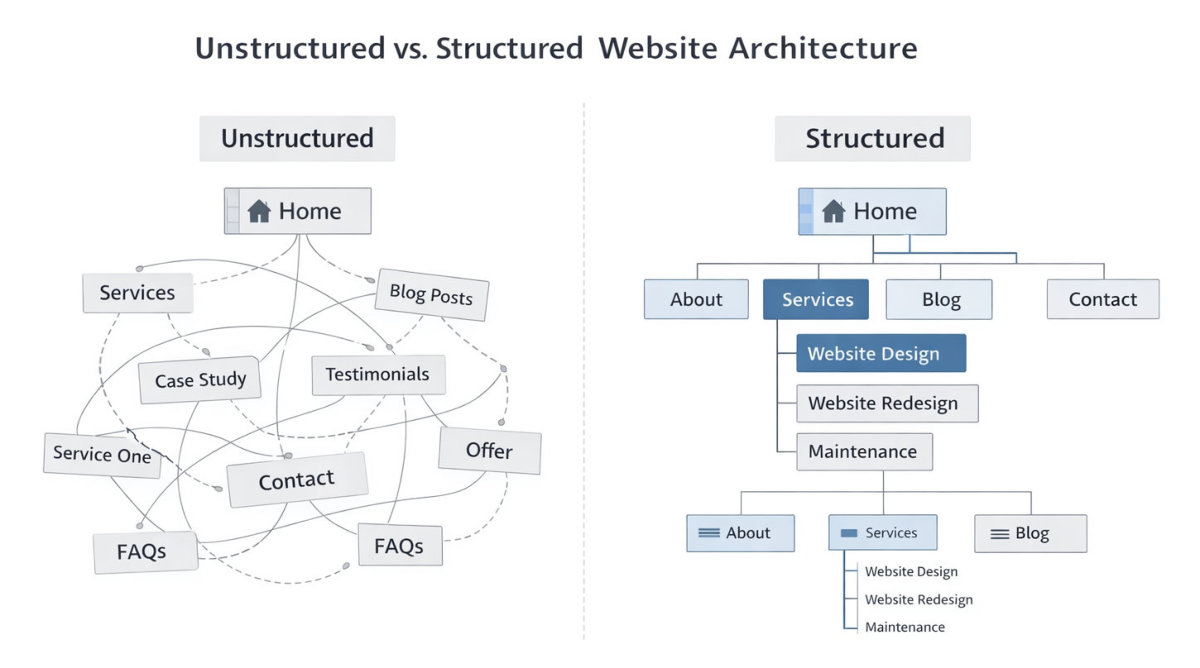
Unstructured vs structured website

Navigation That Makes Sense

Why Navigation Is Where Structure Shows

Your navigation is the first real test of your structure.

If the menu is overloaded, the entire website becomes harder to use.

Most small business websites don’t set out to create a messy navigation. It just happens gradually.

  • A new service gets added.
  • A free guide gets launched.
  • A blog category becomes a menu item.

Nothing gets reorganised. It just expands.

Before long, you’ve got 10–12 items across the top.

That’s not clarity. That’s clutter.

If you ever see me drift back into that wording again, call it out.

Top-Level Navigation Should Be Limited

Your top navigation is not a list of everything you do.  It’s a shortcut to the most important sections.

For most service-based businesses, the top level only needs:

  • Home
  • About
  • Services
  • Blog or Resources
  • Contact

That’s it.

Inside “Services,” you can break things down further. But they don’t all need to sit across the top.

When everything is in the main navigation, nothing stands out.  Limiting options actually makes your website feel more confident.

Group Related Services Together

One of the biggest structural mistakes is treating every service as separate at the top level.

Instead, group them logically.

For example:

  • Website Design
  • Website Redesign
  • Website Maintenance

Those can sit under one “Services” umbrella.

That keeps the top clean while still allowing depth.

If you’re unsure how layout influences grouping and flow, review: Website Layouts & Templates

Layout and navigation work together. You can’t fix one and ignore the other.

Clear Labels Beat Clever Labels

This is where ego sometimes gets in the way.

“Solutions.”
“Capabilities.”
“Offerings.”

They sound impressive. They don’t always mean anything to a new visitor.

Clarity wins.

“Services” is clear.
“Website Design” is clear.
“Contact” is clear.

Your navigation is not the place to be creative with wording. It’s the place to remove thinking.

If someone hesitates because they’re unsure what a label means, that’s friction.

The Mobile Menu Test

Open your website on mobile.

Tap the menu.  Scroll through it.

Does it feel simple? Or does it feel long?

Mobile exaggerates clutter. What looks acceptable on desktop often feels overwhelming on a phone.

If someone has to scroll through a long list before even seeing your content, that’s a structural issue.

Navigation should feel light.

Clear categories.
Limited choices.
Logical grouping.

If you want a practical planning reference while reviewing your structure, use: Website Design Checklist Infographic

Often, the fix isn’t adding more links. It’s removing unnecessary ones.

A Simple Navigation Audit

Ask yourself:

  • Can I explain my navigation structure in one sentence?
  • Are my most important services visible within two clicks?
  • Is anything in the top menu there “just because”?
  • Does the mobile version feel longer than it should?

If you hesitate on those, simplify.

Navigation should guide.

Not overwhelm.

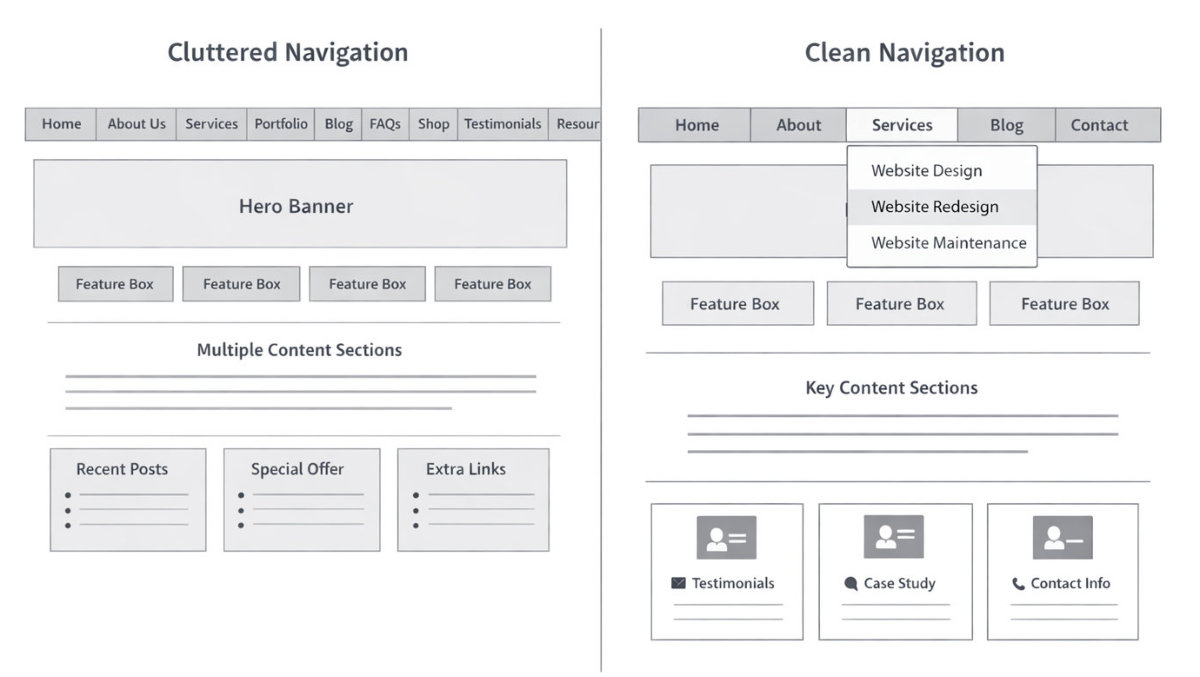
Cluttered navigation vs clear navigation

Homepage Structure & Information Flow

Your Homepage Is Not a Brochure

Your homepage is not where you say everything.

It’s where you guide people.

A lot of small business websites treat the homepage like a summary of every service, every achievement, every idea. The result? Long blocks of information with no clear direction.

Your homepage has one job:
Make it immediately clear what you do and what someone should do next.

If someone lands on your homepage and has to scroll aimlessly to figure it out, your structure isn’t doing its job.

Start With a Clear Headline

The very first thing people see is your homepage title.

If that headline is vague, clever or abstract, you’ve already lost clarity.

If you need help tightening this up, read: How to Write a Strong Homepage Title

Your headline should clearly state:

  • What you do
  • Who it’s for
  • The outcome

No interpretation required.

The Right Sections in the Right Order

Structure isn’t just about what appears. It’s about the sequence.

A clear homepage usually flows like this:

  • Headline – What you do
  • Subheading – Who it’s for
  • Primary call to action
  • Brief services overview
  • Proof (testimonials, results, case studies)
  • Secondary call to action

If you’re unsure whether you’ve included the right foundational elements, review:

Homepage Checklist Infographic

Or go deeper with:

24 Key Features of a Successful Homepage

Those resources break down what belongs on a homepage and what doesn’t.

One Clear Primary Goal

Another structural mistake is trying to push visitors in too many directions.

  • Book a call.
  • Download a guide.
  • Watch a webinar.
  • Read the blog.
  • Follow on Instagram.

Pick one primary action.  Everything else can sit lower on the page or in secondary positions.

When a homepage has one clear path, it feels intentional.  When it pushes five equal actions, it creates hesitation.

Think of It as a Guided Path

Your homepage should feel like a guided path. Not a wall of content.

Map it on paper. Write down each section in order. If it feels random on paper, it feels random online.

Clean structure builds confidence.  And confidence leads to action.

To see how homepage structure fits into the full website build process, review:
Website Design For Small Business: Step by Step Guide From Idea to Launch

Service Page Structure That Builds Trust

Every Core Service Deserves Its Own Page

One of the biggest structural mistakes small businesses make is trying to explain everything on one generic “Services” page.

If you offer core services, for example:

  • Business Coaching
  • Workshops
  • Online Courses
  • VIP Intensives

Each core service should have its own dedicated page.

Why?

Because structure signals importance.

When everything is squeezed onto one long page, nothing feels prioritised. Visitors have to dig for relevance. That creates uncertainty.

A structured website separates services clearly so visitors can go straight to what applies to them.

Your main Services page can act as an overview. But the detail belongs on individual service pages.

If you’re unsure how to structure those pages properly, review:  Service Page Content

What Should a Service Page Include?

Structure is about order and clarity.

A well-structured service page usually follows this sequence:

  • Clear headline – what the service is
  • Who it’s for
  • The problem it solves
  • How it works
  • What’s included
  • Proof or credibility
  • Clear next step

Notice what’s missing: long introductions about your journey.

People visiting a service page are already interested in that specific service. The page should confirm they’re in the right place and reduce doubt.

If you want a practical checklist format, review:  Services Page Checklist Infographic

That’s execution. Here we’re focusing on structure. For guidance on structuring services within a full website plan, see: Website Design Checklist – All You Need To Know For a Successful Website

Clarity Reduces Friction

A service page isn’t just a description. It’s reassurance.

When sections appear in a logical order, visitors don’t need to search for answers.

If pricing ranges exist, they should be visible.

If there’s a process, it should be explained.

If there are results, they should be shown.

Structure answers questions before they’re asked.

If you want a deeper walkthrough of how to write and organise your service content properly, go through:
Episode 8 – Service Page Content

Avoid the “Wall of Services” Problem

Another common issue is listing 12 services with equal weight.  Not every offering needs top-level visibility.

Core services deserve structure.  Secondary add-ons can sit within them.

For example:

Website Design

  • Landing Pages
  • Copywriting
  • Hosting

Instead of making each of those its own primary navigation item.

Structure simplifies choice.  And simpler choices increase confidence.

If you’re unsure whether a service should stand alone or sit under a broader offering, review: Do I Need a Website Designer for My Business?

Content Hierarchy Inside Pages

A beautiful layout means nothing if the content inside the page is chaotic.

User experience isn’t just menus and navigation. It’s how information flows once someone lands on a page. If the structure inside the page is messy, people feel lost – even if they can’t explain why.

Headings: H1, H2, H3 (Explained Simply)

Think of headings like a book:

  • H1 = The title of the chapter
  • H2 = The main sections
  • H3 = Sub-points inside those sections

Every page should have:

  • One clear H1
  • Logical H2 sections
  • Optional H3s where needed

What kills UX:

  • Multiple H1s
  • Jumping from H2 to H4 randomly
  • Headings that don’t match the content below

Search engines use headings to understand structure. Humans use them to decide whether to keep reading.

If someone scans your page in 5 seconds, headings are what they see first. If they don’t make sense, they leave.

Breaking Up Text

Walls of text are silent business killers.

People do not read online the way they read books.

They scan.

That means:

  • Short paragraphs
  • Clear spacing
  • Bullet points where helpful
  • Natural visual breaks

If a section feels visually heavy, people subconsciously assume it will take effort.

Effort = exit.

This is not about dumbing down content.

It’s about respecting attention spans.

When content is spaced properly, readers feel like they can move through it easily. They don’t feel trapped inside a dense block of information.

Clear spacing signals that the page has been organised with care, not rushed together. It allows the eye to rest, helps key points stand out, and makes it easier to return to a section later. Good formatting doesn’t reduce depth. It makes depth more accessible.

For practical examples of well-structured internal page layouts, review: How to Improve the Design of Your Internal Web Pages

Logical Section Flow

Every page should feel like a guided walk, not a maze.

A simple mental model:

  • What is this about?
  • Why does it matter?
  • How does it work?

What do I need to know next?

If the order is random, users feel friction.

Example of bad flow:

  • Pricing
  • Then benefits
  • Then definition
  • Then features
  • Then back to explanation

That feels chaotic.

Good UX moves from clarity → explanation → detail → support.

Making Pages Easy to Scan

Ask this brutally honest question:

If someone only reads the headings and the first sentence under each one… do they understand the page?

If not, your structure is weak.

Strong pages allow:

  • Skimming
  • Scanning
  • Jumping to relevant sections

Weak pages force:

  • Reading every word
  • Guessing what comes next
  • Searching for buried information

Guessing creates frustration.

Frustration reduces trust.

Why Order Inside a Page Matters

Order communicates authority.

When information is structured well:

  • It feels professional
  • It feels calm
  • It feels intentional

When it’s messy:

• It feels amateur
• It feels rushed
• It feels confusing

Users don’t analyse this consciously.

They feel it.

And that feeling shapes whether they stay, trust, or leave.

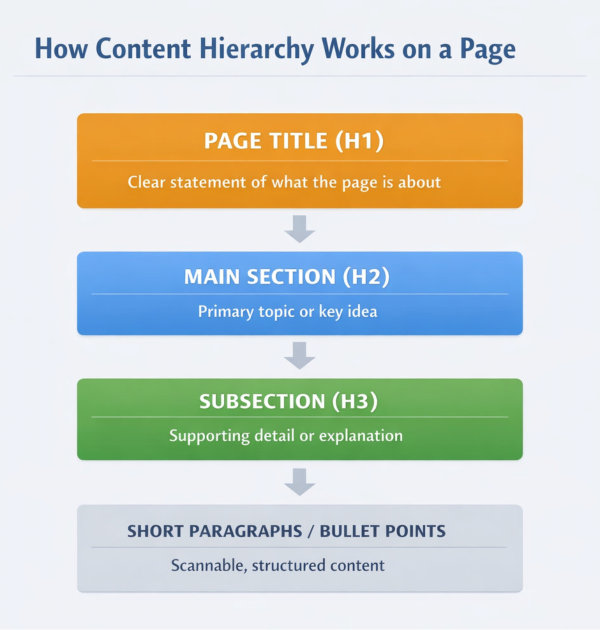
How content hierarchy works on a page

Internal Linking & Page Relationships

A Website Is a System, Not a Set of Pages

A well-structured website is not a group of standalone pages. It’s a connected system.

When pages relate to each other clearly, visitors can move naturally from one idea to the next. When those relationships are missing, people hit dead ends. They finish reading and have nowhere obvious to go.

Internal linking is how structure continues beyond navigation. It connects ideas, reinforces hierarchy, and helps users explore without feeling lost.

Links should feel intentional. Not random. Not excessive. Not inserted just to fill space.

When your website works as a system, every page has a purpose and a place. One page introduces an idea. Another expands on it. Another answers the next question.

Visitors aren’t forced to figure out the journey themselves because the structure quietly guides them. That’s when a website starts working properly – not as a collection of content, but as a clear, organised path from curiosity to confidence.

Structure Should Flow Between Pages

Think of your website like rooms in a building.  The navigation gets someone through the front door. Internal links guide them between rooms.

If a potential client lands on your homepage and reads about leadership coaching, it should be easy for them to move to:

  • Your coaching packages
  • A case study or testimonial
  • Your process
  • Your contact page

That progression makes sense. Those connections show how topics support each other.

Without those links, each page feels isolated. Visitors must return to the menu to figure out where to go next. That interrupts flow.

Clear internal linking keeps the experience continuous.

Hierarchy Matters Here Too

Not all pages carry equal weight.

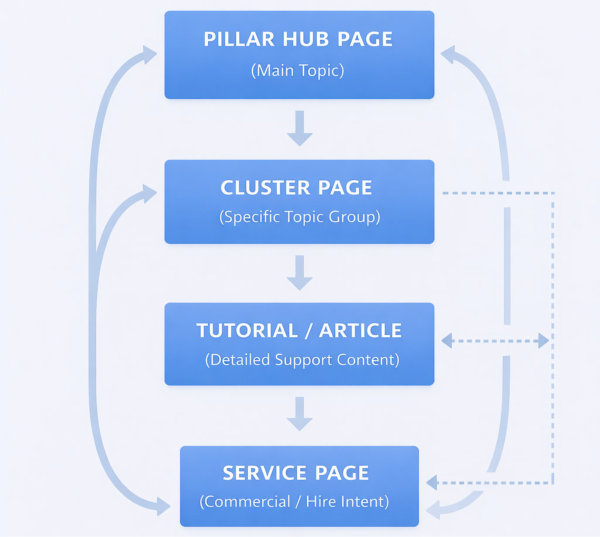
Your core pillar pages sit at the top of your structure. Cluster pages sit underneath. Tutorials and supporting content sit beneath those.

Internal linking should reflect that hierarchy.

Cluster pages link back to their pillar hub.

Tutorials link up to their most relevant cluster.

Pillar hubs link selectively downward.

When the linking reflects the structure, the website feels organised. When links are scattered randomly, the structure becomes unclear.

This is not about linking everywhere. It’s about linking with purpose.

For a practical walkthrough of building structured internal connections within WordPress, review:
Website Design Checklist – 16 Steps to an Awesome WordPress Website

How website page sconnect

Avoid Overlinking

More links do not equal better structure.

When every paragraph contains multiple links, it becomes distracting. It also reduces the importance of truly relevant connections.

Internal links should:

  • Support the topic
  • Extend understanding
  • Guide logically

They should not compete for attention.

If you wouldn’t naturally mention the related page in conversation, it probably doesn’t need a link.

Check for Structural Dead Ends

One of the most common structural issues is orphaned content.

Pages that:

  • Have no internal links pointing to them
  • Are not connected to a broader topic
  • Sit outside your main content themes

Those pages weaken clarity.  Every important page should be reachable within a few logical steps.

If you mapped your website visually, you should see clear groupings. Not scattered dots floating alone.

Internal linking is not just an SEO strategy. It’s architectural design.  It ensures that when someone starts exploring your website, they always know where they are and where they can go next.

If traffic is being sent to pages that don’t connect to your core structure, review: Why You Need to Stop Wasting Money on Website Traffic

Mobile Structure & Responsive Thinking

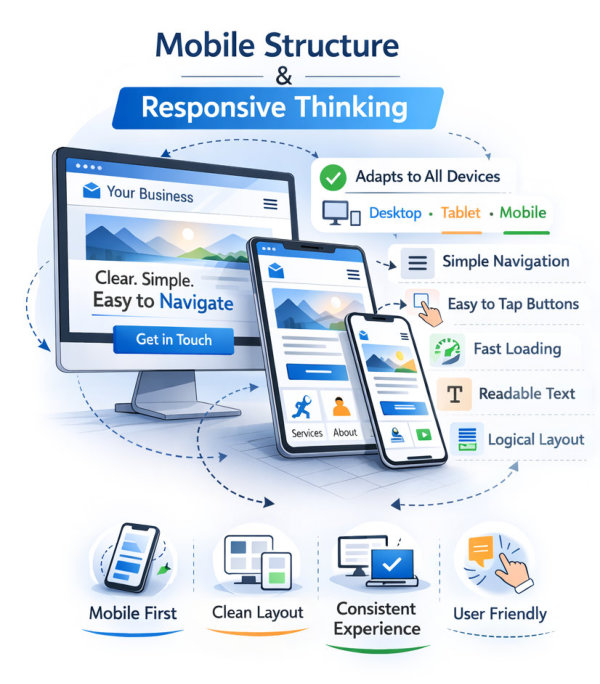
Your Structure Must Work on Mobile First

Most structural mistakes are invisible on desktop.

They become obvious on mobile.

A navigation that feels reasonable across a wide screen can feel overwhelming when collapsed into a vertical menu. Sections that look balanced side by side on desktop suddenly stack awkwardly. Long pages become endless scrolling experiences.

Mobile doesn’t create structural problems.
It exposes them.

If your structure only works when everything is visible at once, it isn’t strong enough.

Navigation Feels Longer on Mobile

On desktop, you might see six menu items neatly across the top.

On mobile, that same menu becomes a long list inside a dropdown.

If users have to scroll through ten options before seeing content, you’ve already created friction.

This is where grouping matters.

Services should sit under one heading.
Resources should sit under one heading.
Secondary pages should not compete for top-level space.

Mobile forces discipline.
And discipline improves clarity.

Section Order Matters More on Small Screens

On desktop, sections can appear beside each other.

On mobile, everything stacks vertically.

That means the order of your sections becomes even more important.

Ask yourself:

What appears first?
What appears immediately after that?
Does the page still make sense when everything is linear?

If key information sits halfway down a long page, mobile users may never see it.

Responsive design is not just about shrinking elements.  It’s about rethinking sequence.

Spacing and Tap Targets

Structure also includes how easy it is to interact with content.

Buttons that are too small.
Links placed too close together.
Menus that require precision tapping.

These are structural usability issues.

Mobile users are not using a mouse. They’re using thumbs.

Clear spacing between sections, readable font sizes, and well-sized buttons reduce accidental clicks and frustration.

If interacting with your site feels awkward, the structure needs refinement.

Test Structure, Not Just Design

Open your website on your phone.

Ignore the colours.
Ignore the imagery.

Ask:

  • Is it easy to understand what this page is about within seconds?
  • Can I move between sections without confusion?
  • Is the navigation simple?
  • Does anything feel unnecessarily long?

Mobile testing is not optional. It’s part of structural review.

A clean structure works on every device.

If it only works beautifully on desktop, it isn’t finished.

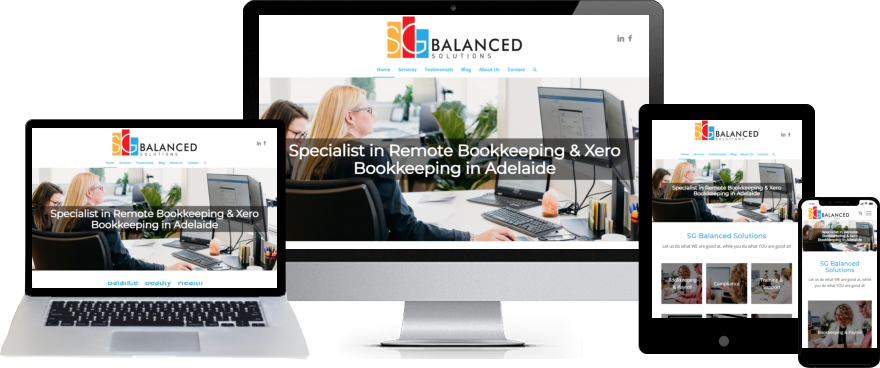
Mobile structure

Speed & Performance as User Experience

Slow Websites Break Trust

Speed is not just a technical issue.  It’s a user experience issue.

When a page loads slowly, people don’t analyse why. They don’t check hosting specs. They don’t blame image compression.

They assume the website feels unprofessional.

Even a small delay changes perception. It creates hesitation. And hesitation reduces confidence.

Fast-loading pages feel polished. Slow-loading pages feel neglected.

Speed affects how your structure is experienced.

Structure Impacts Speed

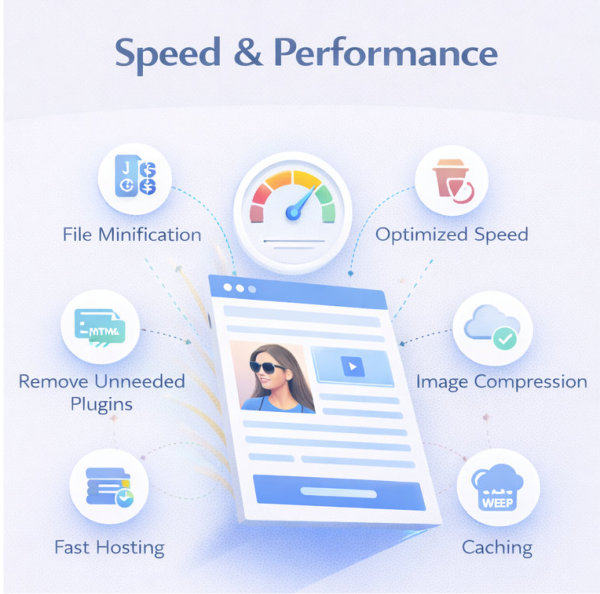
Heavy structure slows things down.

Too many large images.
Too many animations.
Too many scripts loading in the background.
Too many plugins doing similar jobs.

Even if the layout looks clean, hidden complexity can create delay.

A well-structured website is lean.

Each page has a purpose.
Each section has a reason to exist.
Each element earns its place.

Structure and performance are connected. When you remove clutter, you improve both clarity and speed.

Images Are the Biggest Culprit

Large image files are one of the most common causes of slow websites.

Images should be:

  • Properly sized
  • Compressed
  • Uploaded at the correct dimensions
  • Used intentionally

If you want practical guidance on this, review: Size Matters: Finding the Perfect Website Image Sizes and From Thumbnails to Banners: Navigating Website Image Types

Visual design should not compromise usability.

A fast site with clear structure will always outperform a visually impressive but slow one.

Plugin and Feature Overload

Many websites become slow because features are added without review.

  • Popups.
  • Sliders.
  • Tracking scripts.
  • Chat tools.
  • Extra design effects.

Each addition might feel small. Together, they accumulate weight.

Before installing something new, ask:

  • Does this improve clarity?
  • Or is it adding complexity?

If a feature doesn’t strengthen the experience, it’s structural noise.

Perceived Speed Matters Too

Speed is not only about milliseconds. It’s about perception.

  • Clear hierarchy.
  • Visible headings.
  • Content appearing quickly above the fold.
  • Light backgrounds.
  • Minimal distractions.

When users see immediate clarity, the site feels faster.

Structure shapes perception.

A well-organised page feels efficient. A chaotic page feels slow, even if it technically loads quickly.

Speed supports experience.

Experience supports trust.

Speed & performance

Final UX & Structure Audit Checklist

Use this as a practical review of your website’s structure.

Answer honestly.

Foundation & Core Pages

  • Is it immediately clear what your business does?
  • Do you have the core pages most service businesses need?
  • Are outdated or duplicate pages removed?
  • Does each page support a core service or topic?
  • Can you explain your site structure in one sentence?

Navigation

  • Are there fewer than 6–7 top-level menu items?
  • Are labels clear and predictable?
  • Are related services grouped logically?
  • Is the navigation clean on mobile?
  • Can visitors reach key pages within two clicks?

Homepage Structure

  • Does your headline clearly state what you do and who it’s for?
  • Is there one primary action?
  • Do sections appear in a logical order?
  • Is proof visible before someone has to scroll too far?
  • Does the homepage guide rather than overwhelm?

Content Hierarchy Inside Pages

  • Does each page have one clear H1?
  • Are H2 and H3 headings used logically?
  • Are paragraphs short and easy to scan?
  • Is information presented in a clear sequence?
  • Would the page make sense if someone only read the headings?

Internal Linking & Relationships

  • Do cluster pages link back to their pillar hub?
  • Do tutorials link to their most relevant cluster?
  • Are important pages free from being orphaned?
  • Are internal links intentional rather than excessive?
  • If you mapped your site, would it look organised?

Structure Is the Foundation

Most website problems are treated as design problems.

They’re rarely design problems.

They’re structural.

When your pages are organised logically, when hierarchy is clear, when navigation is simple, and when internal relationships make sense, your website becomes easier to use almost automatically.

Structure reduces friction.
Clarity builds trust.
Trust supports growth.

Before redesigning.
Before rewriting.
Before adding more features.

Audit the structure.

If you need support reviewing or reorganising your website structure, explore: Website Design & Redesign Services

Explore Other Website Design Topics

Website structure is only one part of building an effective site. You may also find these guides helpful:

If you’d like to explore additional website design guides, browse the full Website Design Tutorials collection.