The Complete Guide to Website Security
& Maintenance for Small Businesses

Most small business owners don’t spend much time thinking about website security while everything appears to be working.  The pages load. The contact form sends. Customers can find the website. Nothing looks unusual, so it is easy to assume everything behind the scenes must be fine too.

Unfortunately, that is not always what a website hack looks like.

A compromised website may continue operating normally while fake administrator accounts are being created, spam pages are being published, visitors are being redirected or malicious emails are being sent through the website. Sometimes the first sign of trouble is a customer raising the alarm. Other times, it is Google displaying a large warning telling visitors the website may be dangerous.

I know how unsettling this can be because my own website has been compromised.

Fortunately, the problem was identified and cleaned up reasonably quickly. I had recent backups, security alerts and access to Google Search Console, and I had someone experienced who could investigate immediately. Even with those safeguards in place, there were several hours when I had no idea how much damage had been done, whether my backups were clean or whether something malicious was still hiding behind the scenes.

For the next few weeks, every slightly unusual notification made me wonder whether the problem had genuinely been resolved.

That experience reinforced something I had already been telling clients for years. No security measure can make a website invincible. The goal is to reduce the opportunities for an attack, recognise problems quickly and have a recovery plan ready before you need one.

This guide explains what a WordPress hack can actually look like, why small businesses are being targeted, how websites become vulnerable and the practical steps you can take to reduce your risk.

On This Page You’ll Learn

  • Why small business websites are attractive to cybercriminals
  • What a compromised WordPress website may look like
  • How outdated software creates security vulnerabilities
  • Why regular updates reduce risk without guaranteeing complete protection
  • How passwords and administrator access affect website security
  • Why backups, monitoring and Google Search Console matter
  • What you should do if your website is compromised
  • How regular Website Security Care Plans can help

Think of this as the security plan you want in place before a large red warning appears on your website.
Why Small Businesses Are Being Targeted

Many small business owners assume cybercriminals are mainly interested in banks, government departments and large corporations.

That assumption can create a dangerous blind spot.

Most attacks against WordPress websites are automated. Bots continuously scan millions of websites looking for known weaknesses, including outdated WordPress installations, plugins and themes.

They don’t care whether your website belongs to a multinational company, a local accountant, a consultant, a tradie or a hair salon. If they discover an opening, they’ll attempt to exploit it.

Small businesses can actually be easier targets because they rarely have dedicated IT teams monitoring their websites, reviewing security alerts or keeping software up to date. If a vulnerability remains on a website for weeks or months, it gives cybercriminals more opportunity to take advantage of it.

The Australian Cyber Security Centre recommends that small businesses regularly update their software, use strong passwords and multi-factor authentication where possible, and maintain reliable backups. These simple steps significantly reduce the risk of a website being compromised.

The size of your business doesn’t protect your website. In many cases, the attack isn’t personal at all. Your website has simply been found by an automated system looking for websites with known security vulnerabilities.

Key Takeaways

  • Most attacks are automated rather than personally targeted.
  • Cybercriminals look for outdated WordPress versions, plugins and themes.
  • Small businesses are often targeted because they typically have fewer security measures in place.
  • Keeping your website regularly updated significantly reduces the likelihood of known vulnerabilities being exploited.

Unfortunately, many business owners still imagine that if their website was hacked, it would be immediately obvious. In reality, that’s often not the case.

What This Section Covers

  • Why automated attacks do not discriminate by business size
  • How known vulnerabilities are discovered and exploited
  • Why small businesses may have fewer security safeguards
  • The misconception that a small website is not worth attacking

What Does a Website Hack Actually Look Like?

When people picture a hacked website, they often imagine the homepage disappearing and being replaced with a message from the hacker.

While that can happen, many website hacks are far less obvious.

In fact, your website may continue looking completely normal while malicious activity is happening behind the scenes. That’s one of the reasons website owners are often unaware they’ve been compromised until somebody else discovers the problem.

A compromised WordPress website may:

  • Display a warning from Google or a visitor’s browser saying the website may be dangerous.
  • Redirect visitors to gambling, scam or malicious websites.
  • Create fake WordPress administrator accounts without your knowledge.
  • Add hundreds of spam pages designed to manipulate Google search results.
  • Send phishing or spam emails from your domain.
  • Modify existing pages or inject malicious code into your website.
  • Slow your website down or make it unstable.
  • Cause your hosting provider to suspend your website until it has been cleaned.

Let’s look at some real examples.

The Difficult Part Is That You May Not Know

One of the biggest misconceptions is that you’ll immediately know if your website has been hacked.

Unfortunately, that’s often not the case.

Your website may continue operating normally while malicious files, spam pages or fake user accounts remain hidden behind the scenes. Sometimes the first indication is a customer contacting you, your hosting provider suspending your website or Google displaying a security warning.

By that stage, the attacker may already have had access to your website for some time.

Understanding what a website hack can actually look like is the first step. The next question is understanding the impact it can have on your business.

Google Warning Visitors That Your Website May Be Dangerous

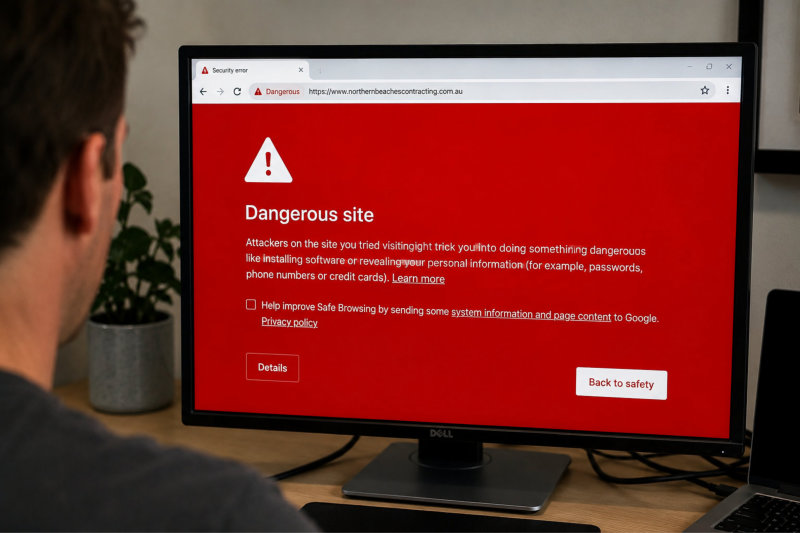
One of the most damaging consequences of a website hack is when Google or a visitor’s browser warns people not to visit your website.

Imagine someone searching for your business after receiving a recommendation. Instead of seeing your website, they’re greeted with a warning suggesting the site may contain harmful content.

Most visitors won’t continue. They’ll simply leave and contact one of your competitors instead.

[Insert Screenshot – Google “Dangerous Website” warning]

Caption: Google displayed this warning after malicious content was detected on a WordPress website.

Even after the website has been cleaned, Google still needs to review the website before removing the warning, meaning the impact can continue well after the technical problem has been fixed.

Dangeous website Google Warning - Website security and maintenance

Fake Administrator Accounts

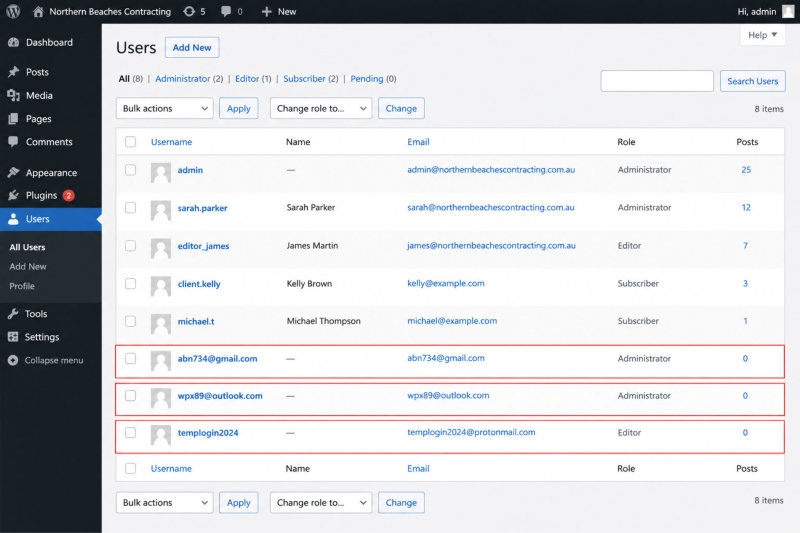
Another common tactic is for hackers to create their own administrator accounts.

Changing your password won’t necessarily remove the threat if an unknown administrator account is still active. The attacker can simply log back into the website using the account they created.

[Insert Screenshot – Fake Administrator Accounts]

Caption: These administrator accounts were created without the website owner’s knowledge, allowing the attacker to regain access.

Fake admininistrator accounts

Spam and Gambling Pages

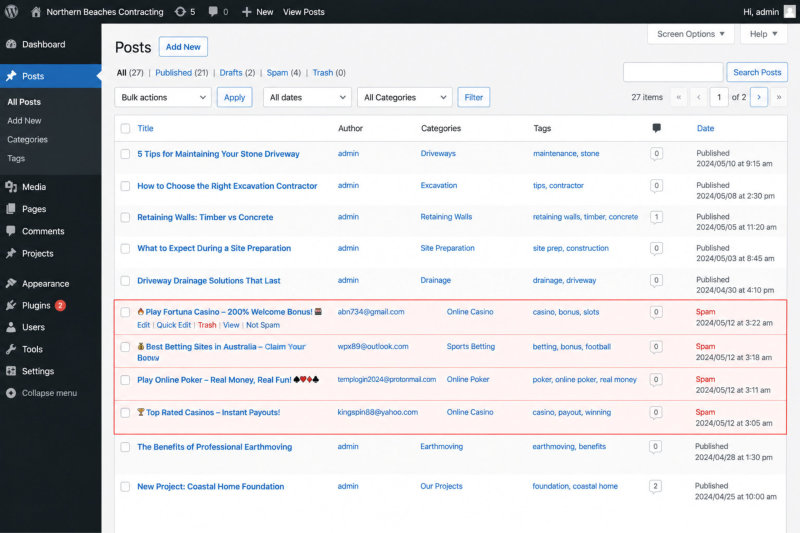
Sometimes hackers create hundreds of spam pages promoting gambling websites, counterfeit products or other unrelated content.

These pages often don’t appear in your website navigation, so everything looks perfectly normal from the front of the website. Meanwhile, Google is discovering and indexing pages that have nothing to do with your business.

[Insert Screenshot – Gambling/Casino Posts]

Caption: Spam pages were automatically added to this WordPress website without the owner’s knowledge.

Spam and gambling page examples

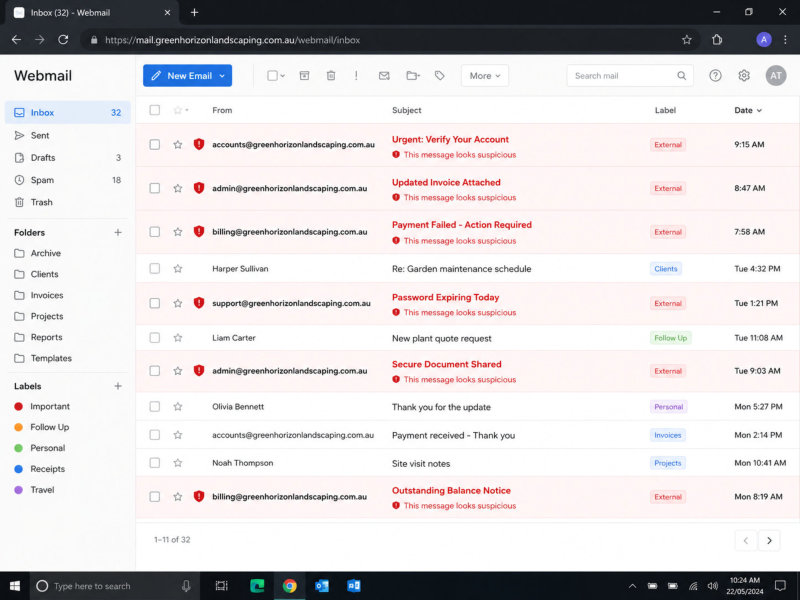
Phishing Emails Sent From Your Domain

Not every website hack is visible on the website itself.

Some attackers use compromised websites to send phishing or spam emails from the website’s domain. This can damage your email reputation, meaning legitimate emails such as enquiries, quotes and invoices may start ending up in junk folders.

The website may appear to be working normally while your business is quietly losing important emails.

Phishing emails

When My Own Website Was Compromised

Ironically, after spending years advising clients about website security, I found myself dealing with the very situation I hope none of my clients ever have to experience.

Some time ago, my own website was compromised.

The website was cleaned up reasonably quickly, and thankfully there was no lasting damage. I had backups, security monitoring and access to Google Search Console, and I had someone experienced who could investigate immediately.

Even so, those first few hours were incredibly stressful.  It wasn’t the thought of fixing the website that worried me most. It was not knowing how much damage had already been done.

What Happened

✔ A security alert identified suspicious activity on my website.
✔ The website was investigated immediately.
✔ The malicious files were removed and the website was cleaned.
✔ Backups were checked to ensure a clean recovery point was available.
✔ Google Search Console was reviewed to confirm there were no ongoing security issues.
✔ The website continued to be monitored over the following weeks for any signs that the attacker had returned.

The Questions Started Immediately

Although the website was cleaned relatively quickly, I still didn’t know exactly when the compromise had occurred.

That meant I didn’t know whether my most recent backup had been created before or after the attacker gained access. Like many business owners, I’d always taken comfort in knowing I had backups. Suddenly I realised the newest backup isn’t always the safest backup.

The Stress Doesn’t End When the Website Is Clean Again

Although the website was restored quickly, I found myself checking it constantly over the following weeks. Every unusual notification made me wonder whether something had been missed.

  • Had another administrator account been created?
  • Was there malicious code still hiding somewhere?
  • Could the attacker get back in?
  • Was my computer compromised, or was it the website?

Until you know exactly how someone gained access, it’s difficult to feel completely confident you’ve closed every possible entry point.

What I Learnt

Although my website was cleaned relatively quickly and there was no lasting damage, the experience changed the way I think about website security.

For years I’d encouraged clients to keep their websites updated, maintain backups and use strong passwords because they were considered best practice. Going through a security incident myself gave me a much deeper appreciation of why those things matter.

The biggest surprise wasn’t fixing the website. It was the uncertainty. Even after everything appeared to be back to normal, there was still that lingering question of whether we’d found everything and closed every possible way back in.

It also reinforced something I’ve always believed: website security isn’t something you think about once your website has been launched. Like every other important part of your business, it requires regular attention.

That experience also changed one of my long-standing recommendations. For many years, I suggested updating most small business websites every six months. Today, I recommend quarterly updates for most websites because they spend far less time exposed to known security vulnerabilities.

Perhaps the biggest lesson of all was this: it’s almost always easier, less stressful and far less expensive to reduce the risk of a problem than it is to recover after one has already occurred.

The Real Impact of a Website Hack

When most people think about a hacked website, they imagine somebody fixing a few files, restoring a backup and everything returning to normal.

Unfortunately, that’s rarely how it works.

While cleaning the website is an important part of the recovery, it’s often only the beginning. A website hack can affect your reputation, your Google rankings, your email system, your customers’ confidence and your own peace of mind.

The Uncertainty

One of the hardest parts of a website hack is not knowing how serious it is.

How did they get in? How long have they had access? Have they created another administrator account? Is there malicious code still hiding somewhere? Were any customer enquiries intercepted? Is your latest backup actually clean, or was it created after the website had already been compromised?

WordPress itself recommends maintaining multiple backups because a compromise may exist for some time before it is discovered, meaning the most recent backup isn’t always the safest one to restore.  Read WordPress’s official backup recommendations.

Even after the obvious problem has been removed, many business owners continue worrying that something has been missed. Every unusual notification suddenly raises another question.

It’s an incredibly stressful experience, particularly when your website generates enquiries and income for your business.

Damage to Your Reputation

Your website is often the first impression people have of your business.

If Google displays a warning telling visitors your website may be dangerous, or your website redirects them to gambling or scam websites, most people won’t wait to find out what happened. They’ll simply leave and contact somebody else.

Even after the technical problem has been resolved, rebuilding trust can take much longer.

Lost Enquiries and Revenue

If your website is unavailable, suspended by your hosting provider or removed from Google search results while it’s being cleaned, potential customers may never find you.

Some businesses lose online sales. Others lose quote requests, bookings or enquiries. In many cases, the business owner never knows how many opportunities were lost because customers simply moved on.

The Australian Cyber Security Centre warns that cyber incidents can cause financial loss, business disruption and reputational damage, particularly for small businesses that rely on their online presence.  Read the Australian Cyber Security Centre’s Small Business Cyber Security Guide.

Recovery Takes Time

Recovering from a website hack often involves much more than removing malicious files.

Depending on the nature of the attack, the recovery process may include:

  • Investigating how the attacker gained access.
  • Removing malicious files, pages and user accounts.
  • Updating WordPress, plugins and themes.
  • Resetting passwords across multiple systems.
  • Checking backups.
  • Testing contact forms, bookings and online payments.
  • Submitting a security review to Google.
  • Monitoring the website to ensure the attacker hasn’t returned.

Depending on the extent of the compromise, recovery may take hours, days or even weeks.

If Google identifies malware, phishing content or hacked pages, the website owner must clean the website and then request a review through Google Search Console before warnings can be removed.

Learn how Google handles hacked websites and security issues.

Sometimes a Website Can’t Be Restored

Many business owners assume they can simply restore a backup and everything will be fine.  Unfortunately, that’s not always possible.  If the compromise existed before the backup was created, restoring that backup may simply restore the malicious code as well.

In more serious cases, a website may need to be rebuilt from a known clean version because it is no longer possible to confidently determine what has been altered. The cost of rebuilding a website is almost always significantly higher than the cost of maintaining it properly.

WordPress recommends maintaining multiple restore points because a backup created after a compromise may already contain malicious files or database changes.  WordPress backup best practices.

The Emotional Cost

One of the things that often gets overlooked is the emotional impact. Your website represents your business, your reputation and, for many people, your livelihood.

Discovering that someone has gained unauthorised access can leave you wondering what else has been affected. Even after the website has been cleaned, it can take time before you feel confident everything is truly back to normal.

That’s why website security isn’t simply about fixing problems when they occur. It’s about reducing the likelihood of those problems happening in the first place and having a clear plan if they ever do.

Ironically, one of the biggest lessons I learnt came when my own website was compromised.

How Do WordPress Websites Become Vulnerable?

One of the biggest misconceptions about website security is that hackers “magically” gain access to websites. In reality, they usually exploit a weakness.

A WordPress website consists of several different components working together, including WordPress itself, your theme, plugins, hosting environment, user accounts and even the computers used to access the website.

If any one of those components contains a vulnerability, it may create an opportunity for an attacker.

The good news is that many of these risks can be significantly reduced through regular maintenance and good security practices.

Website Security Is About Reducing Risk

No website can ever be guaranteed to be completely immune from cyber attacks.

However, keeping WordPress, plugins and themes updated, using strong passwords and carefully managing who has access to your website significantly reduces the opportunities for attackers to exploit known vulnerabilities.

One of the most effective ways to achieve that is through regular website maintenance.

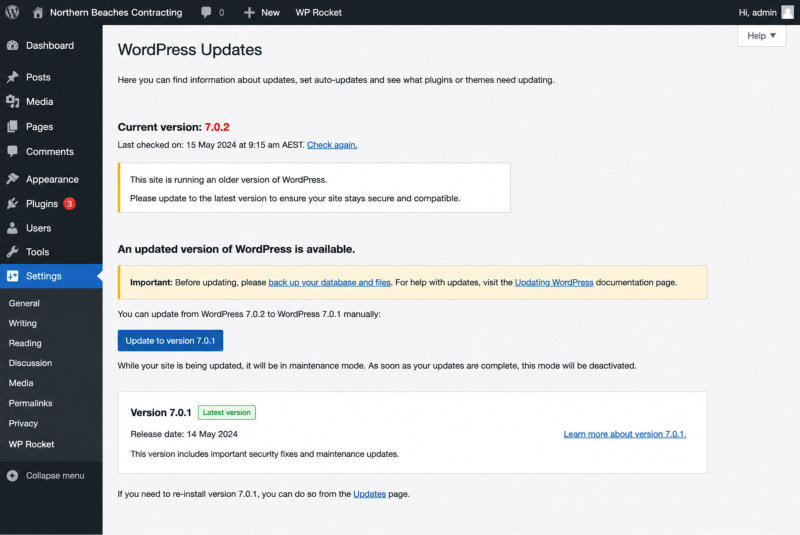
Outdated WordPress Versions

WordPress is continually being improved. New versions introduce features, fix bugs and, importantly, patch security vulnerabilities that have been discovered.

Once a vulnerability becomes publicly known, it doesn’t take long before automated bots begin looking for websites still running the older version.

The longer your website remains out of date, the longer that known vulnerability remains available to be exploited.

Related article: How Often Should You Update Your WordPress Website?

Outdated WordPress

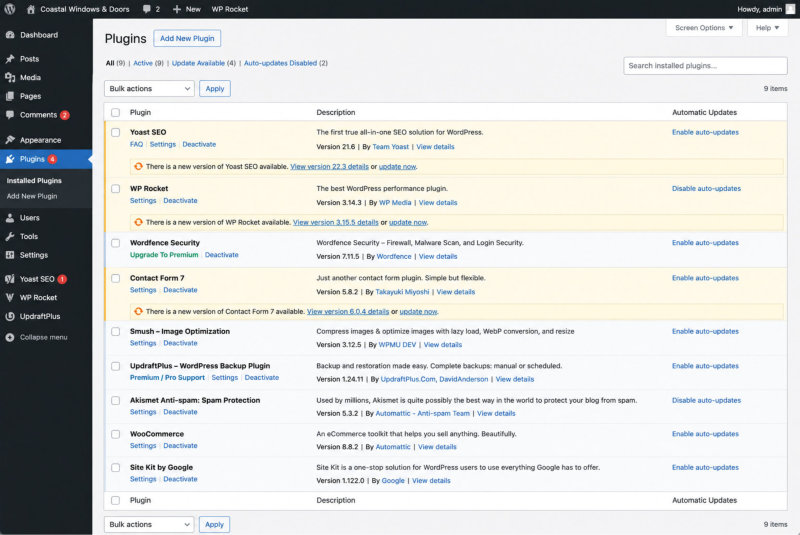
Outdated Plugins

Plugins provide much of the functionality that makes WordPress so flexible, from contact forms and booking systems through to ecommerce, SEO and image galleries.

Like all software, plugins occasionally contain bugs or security vulnerabilities.

When developers discover these vulnerabilities, they release updated versions to fix them. If those updates aren’t installed, the website continues running software with known weaknesses.

Unused plugins should also be removed rather than simply deactivated. Even inactive plugins can sometimes present unnecessary security risks.

Outdated plugins

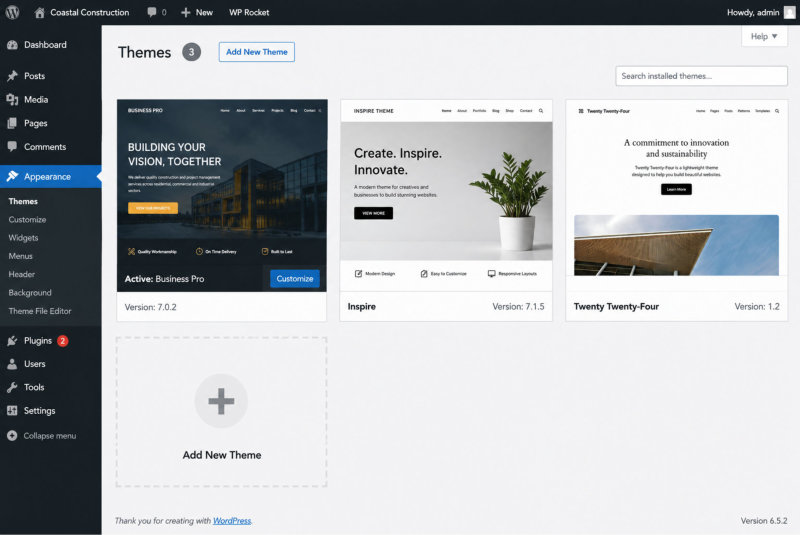
Outdated Themes

Your WordPress theme also requires ongoing maintenance.

One question I’m often asked is why a theme isn’t automatically updated years after a website has been built.

The answer is that premium themes are licensed software. When I build a website, it is built using the latest version of the theme available at that time. Like WordPress and plugins, themes continue to receive updates after the website has gone live.

Keeping those files current forms part of ongoing website maintenance.

Outdated themes

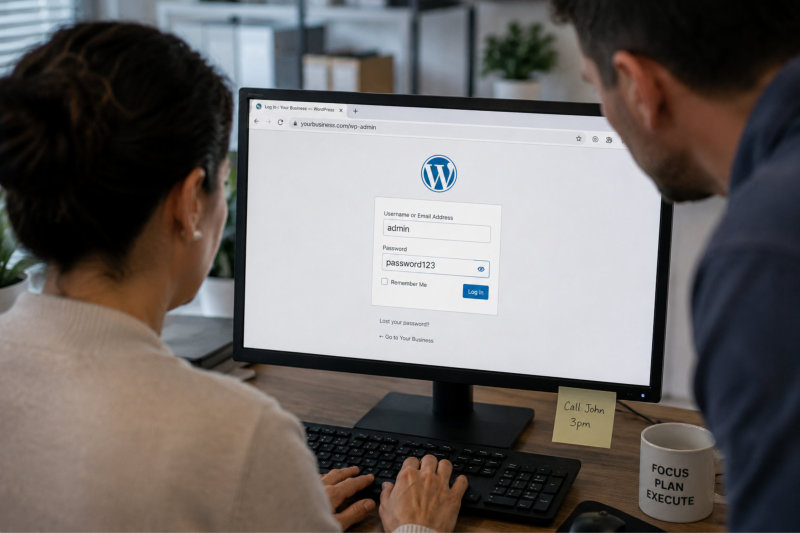
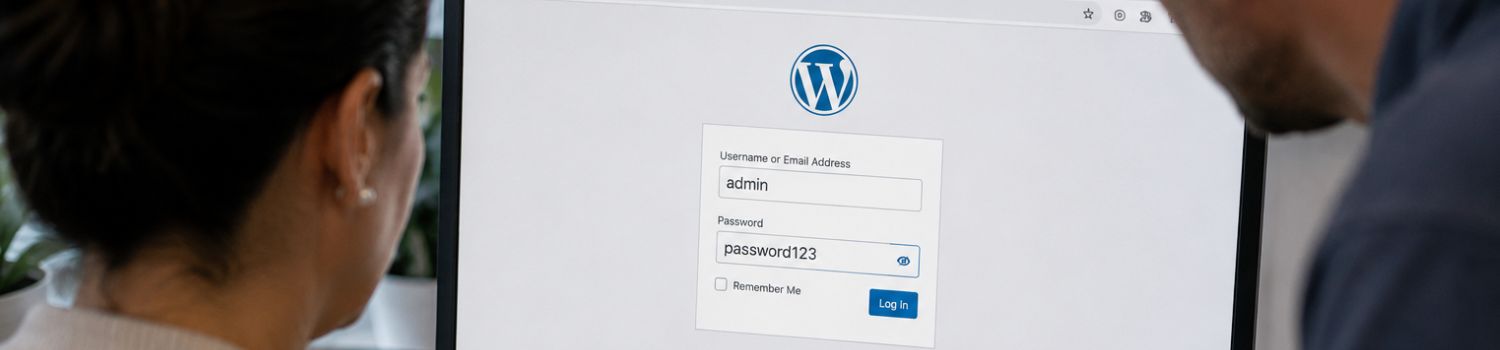
Weak Passwords

Strong passwords remain one of the simplest ways to protect your website.

Passwords should be unique for every website and never reused across multiple online accounts. If another website suffers a data breach and you’ve reused the same password, your WordPress login could also become vulnerable.

Where available, enabling two-factor authentication provides another important layer of protection.

Weak passwords

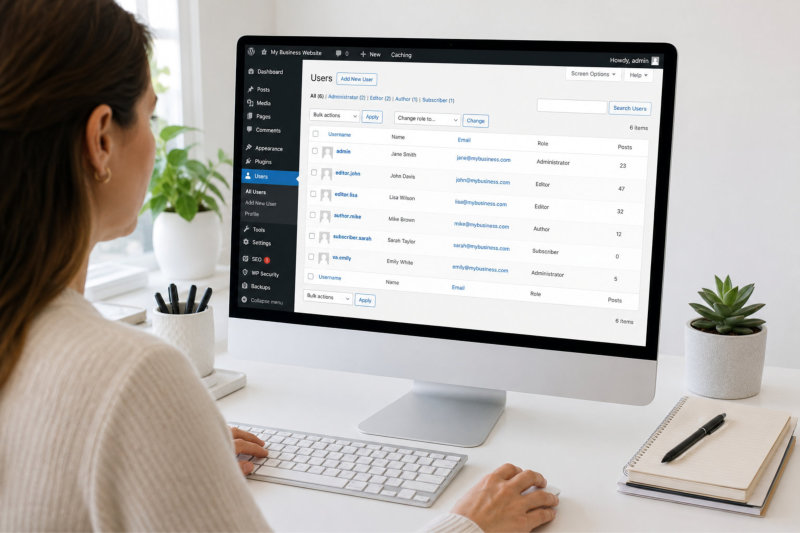
Who Has Access To Your Website?

This is one area many business owners never think about.

Over the years, you may have given website access to a web designer, SEO consultant, marketing agency, virtual assistant, copywriter or another member of your team.

That isn’t necessarily a problem.

However, every additional Administrator account creates another possible entry point into your website.

It’s important to remember that website security isn’t just about trusting the individual. You’re also relying on:

  • How securely they store passwords.
  • Whether they use multi-factor authentication.
  • The security of their own computer.
  • Whether their email account has been compromised.
  • Whether they still require access to your website.

If someone no longer needs access, remove their account. Regularly reviewing Administrator accounts is one of the simplest security checks you can perform.

Related article: Who Should Have Access To Your WordPress Website?

Review WordPress access

Why Regular Website Updates Matter

If there is one thing I would encourage every website owner to do, it’s to keep their website regularly updated.

Website updates are one of the simplest, most cost-effective ways to reduce the likelihood of your website being compromised.

They don’t eliminate every possible risk, but they do close known security vulnerabilities that cybercriminals actively look for.

Think of it like servicing your car.

You wouldn’t wait until the engine failed before changing the oil or replacing worn parts.

Regular servicing doesn’t guarantee your car will never break down, but it significantly reduces the chances of major problems developing.

Your website works exactly the same way.

WordPress, plugins and themes are constantly being improved. Developers regularly release updates that:

  • Fix known security vulnerabilities.
  • Improve compatibility between WordPress, plugins and themes.
  • Resolve software bugs.
  • Improve website performance.
  • Maintain compatibility with newer versions of PHP and modern browsers.
  • Introduce new features and functionality.

The longer updates are delayed, the longer your website may remain exposed to vulnerabilities that are already publicly known.  The Australian Cyber Security Centre recommends keeping software up to date because software updates frequently include security patches that address newly discovered vulnerabilities.  Similarly, the official WordPress Security Guide recommends keeping WordPress core, plugins and themes updated as one of the most effective ways to improve website security.

How Often Should A Website Be Updated?

For many years I recommended updating most client websites every six months.

However, over the past year I’ve changed that recommendation.

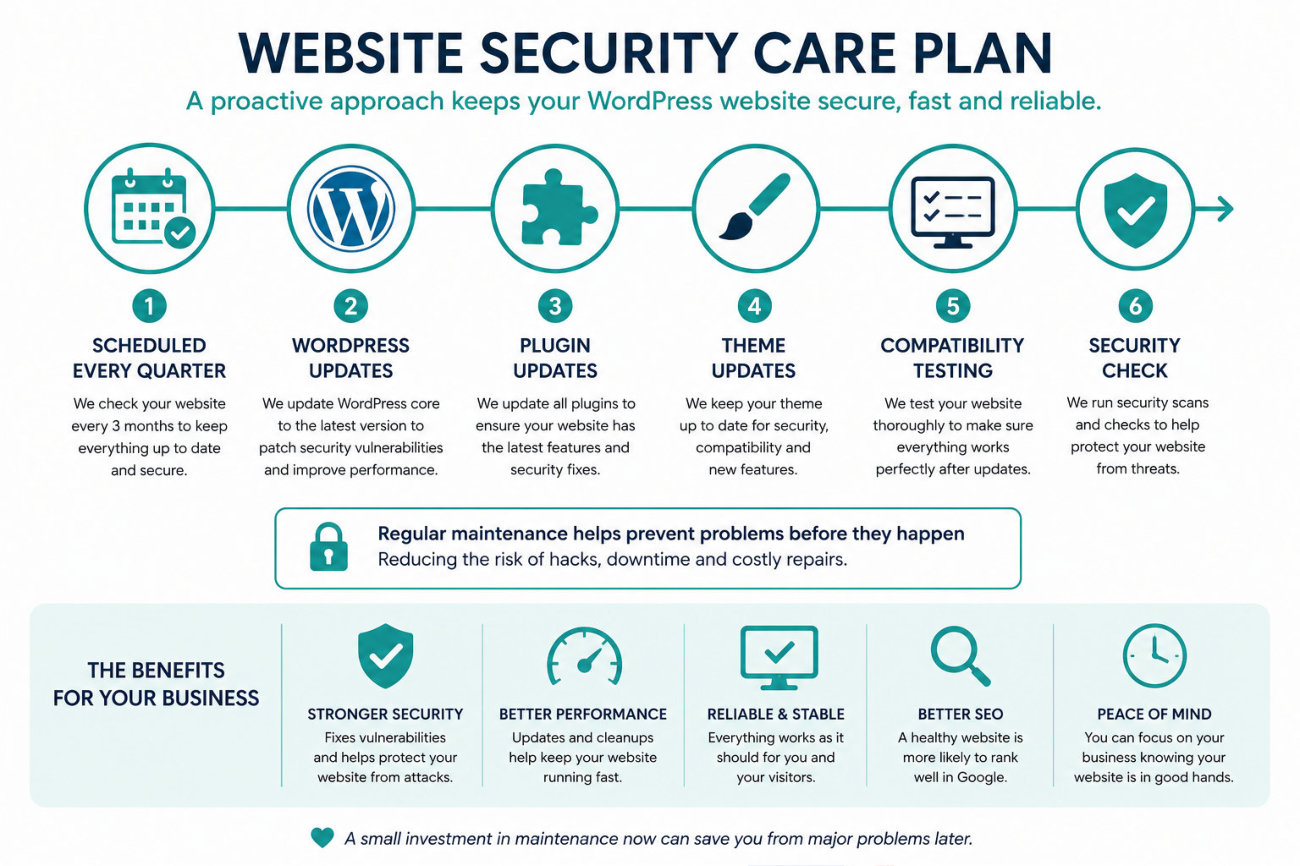
As cyber attacks have become more sophisticated and vulnerabilities are being discovered more frequently, I now recommend quarterly updates for most small business websites.

Updating every three months significantly reduces the amount of time known security vulnerabilities remain on your website. It also means there are generally fewer updates to install each time, making compatibility testing simpler and reducing the chance of multiple major changes occurring all at once.
That doesn’t mean every website requires quarterly updates.

Some low-maintenance brochure websites may be suitable for six-monthly maintenance, while ecommerce websites, membership sites or websites that are updated frequently may benefit from more regular attention.

Why Updates Should Be Tested

One common misconception is that website updates simply involve clicking an Update button.

In reality, updates should always be followed by testing.

Although most updates install without issue, occasionally an update may create a compatibility problem with another plugin, your theme or custom functionality.

After completing updates, I always recommend checking that:

  • Your homepage loads correctly.
  • Your contact forms are working.
  • Booking systems and ecommerce functions still operate correctly.
  • Menus, galleries and sliders display properly.
  • The website works correctly on mobile devices.

It’s much better to identify any issues immediately after an update than several days later when a customer tells you something has stopped working.

Regular Maintenance Is Better Than Emergency Repairs

Many business owners don’t think about website maintenance until something goes wrong.

Unfortunately, by then the damage may already have been done.

Regular maintenance won’t guarantee your website will never be compromised, but it significantly reduces the opportunities for attackers to exploit known vulnerabilities and gives you a much stronger foundation if something unexpected does occur.

Updates are only one part of protecting your website. Just as important is making sure you have reliable backups available if you ever need them.

Protect Your Website Before Problems Occur

For most small business websites, I now recommend scheduled maintenance rather than waiting until something goes wrong.

Plan Includes
Recommended
Quarterly Updates
✔ WordPress updates
✔ Plugin updates
✔ Theme updates
✔ Compatibility testing
$180 every 3 months
Six-Monthly Updates ✔ WordPress updates
✔ Plugin updates
✔ Theme updates
✔ Compatibility testing
$240 every 6 months

Website security care plan

Website Backups: Your Safety Net When Things Go Wrong

If you’ve ever accidentally deleted an important document on your computer, you’ll understand why backups matter.

Most of us never think about them until we actually need them.

The same applies to your website.

No matter how well your website is maintained, no one can guarantee it will never experience a cyber attack, hardware failure, software conflict or even simple human error. Things can and do go wrong. The difference is that businesses with reliable backups can usually recover much more quickly than those without them.

A website backup is simply a copy of your website that can be restored if something unexpected happens. It includes your website files, images, settings and database, giving you the opportunity to restore your website without having to rebuild it from scratch.

Having said that, one of the biggest misconceptions is that simply having backups means you’re completely protected. Unfortunately, it’s not quite that simple.

The Newest Backup Isn’t Always the Best Backup

This was probably the biggest lesson I learnt when my own website was compromised.

Like many business owners, I’d always felt reassured knowing I had regular backups. When the security alert came through, however, I suddenly realised I didn’t actually know when the attacker had gained access to my website.

If the website had already been compromised before my latest backup was created, restoring that backup could simply restore the malicious files as well.

Thankfully, that wasn’t what happened, but it completely changed the way I think about backups.

It made me realise that the newest backup isn’t always the safest backup. Sometimes you need to go back further to find a version of the website that you know is completely clean. That’s why having multiple restore points is so important, rather than relying on a single backup.

The official WordPress Backup Guide also recommends maintaining multiple backups and storing them separately from your website so they’re available if they’re ever needed.

Where Are Your Backups Stored?

Another question worth asking is where your backups actually live.

Many business owners assume their hosting company is taking care of everything. While most hosting providers do create backups, they all have different policies. Some only keep a few days’ worth of backups, others keep them longer, and some charge additional fees to restore them.

Ideally, your backups should also exist somewhere outside your hosting account. If the hosting account itself experiences a serious issue or becomes compromised, having an off-site copy provides another layer of protection.

A Backup Is Only Valuable If It Can Be Restored

Creating backups is only half the job.

You also need confidence that those backups can actually be restored successfully if something goes wrong.

There’s very little comfort in knowing a backup exists if you discover, during an emergency, that it’s incomplete, corrupted or missing important parts of your website.

That’s why professional website maintenance isn’t simply about creating backups. It’s about making sure suitable restore points are available should the unexpected happen.

Backups Don’t Stop Websites Being Hacked

One of the most important things to understand is that backups don’t prevent websites from being compromised.  They simply make recovery much easier if something does happen.

That’s why backups should always form part of a broader security strategy that includes regular WordPress updates, plugin and theme updates, strong passwords, carefully managed administrator access and ongoing website security monitoring.

The Australian Cyber Security Centre also recommends maintaining regular backups as one of the simplest and most effective ways to recover from a cyber security incident.

Your Website’s Safety Net

I genuinely hope I never need to restore another client’s website from a backup.  But if something unexpected does happen, I want to know there’s a clean copy available that allows the website to be restored quickly, with as little disruption to the business as possible.

Backups won’t prevent a cyber attack, but they can dramatically reduce the time, stress and cost involved in recovering from one.

Of course, even better than recovering from an attack is detecting suspicious activity before it has the opportunity to cause significant damage. That’s where ongoing website security monitoring becomes invaluable, which we’ll look at next.

Why Ongoing Security Monitoring Matters

Keeping WordPress, your plugins and your theme up to date significantly reduces the likelihood of your website being compromised. However, as my own experience demonstrated, no website can ever be guaranteed to be completely immune from cyber attacks.  That’s where ongoing security monitoring becomes incredibly valuable.  Think of it like the alarm system in your home.

Locking your doors and windows makes it much harder for someone to break in, but an alarm system alerts you if something unusual happens. Website security monitoring works in much the same way. It doesn’t replace regular maintenance; it adds another layer of protection by helping identify suspicious activity before it has the opportunity to cause significant damage.

Why Early Detection Matters

One of the biggest challenges with website security is that many compromises aren’t immediately obvious.  Your website may continue looking completely normal while malicious files are added behind the scenes, fake administrator accounts are created or cyber criminals begin using your website for purposes you know nothing about.

In some cases, the first indication there’s a problem is when Google displays a warning telling visitors your website may be dangerous, your hosting provider suspends your website or a customer contacts you to ask why they’re being redirected to another website.  The earlier suspicious activity is detected, the greater the chance of limiting the damage and restoring your website quickly.

What Does Website Security Monitoring Actually Do?

Depending on the monitoring system being used, ongoing website security monitoring may include a combination of:

  • Monitoring for malware and malicious code.
  • Firewall protection that blocks many common attacks before they reach your website.
  • Monitoring changes to important WordPress files.
  • Identifying known software vulnerabilities.
  • Monitoring repeated login attempts and other suspicious activity.
  • Regular security scanning designed to identify potential problems early.

These tools work quietly in the background, continually checking for activity that may indicate your website has been compromised or is becoming vulnerable.

Monitoring Doesn’t Replace Good Website Maintenance

One of the biggest misconceptions is that installing a security plugin means you no longer need to keep your website updated.

Unfortunately, that’s not how website security works.

Security monitoring, regular updates, reliable backups and strong passwords all work together. Each layer reduces risk in a different way.

The official WordPress Hardening Guide recommends taking a layered approach to website security, combining software updates, secure passwords, appropriate user permissions and additional security measures rather than relying on a single solution.

Monitoring Gives You Peace of Mind

One of the things I found most difficult after my own website was compromised wasn’t fixing the website. It was wondering whether there was still something I hadn’t found.

That experience reinforced just how valuable ongoing monitoring can be.

Rather than waiting for a customer to tell you something is wrong, monitoring provides another opportunity to identify unusual behaviour earlier, investigate it and take action before the problem becomes much larger.

No monitoring system can promise your website will never be hacked. However, when combined with regular maintenance, reliable backups and sensible security practices, it forms an important part of a proactive website security strategy.

Another tool that many website owners don’t realise plays an important role in website security is Google Search Console.

In the next section, I’ll explain why every business owner should have access to it, even if they never log in themselves.

Google Search Console: An Often Overlooked Security Tool

When most people think about Google Search Console, they think about SEO.

They associate it with search rankings, keywords and website performance. While it certainly helps with all of those things, Google Search Console can also play an important role in identifying website security issues.

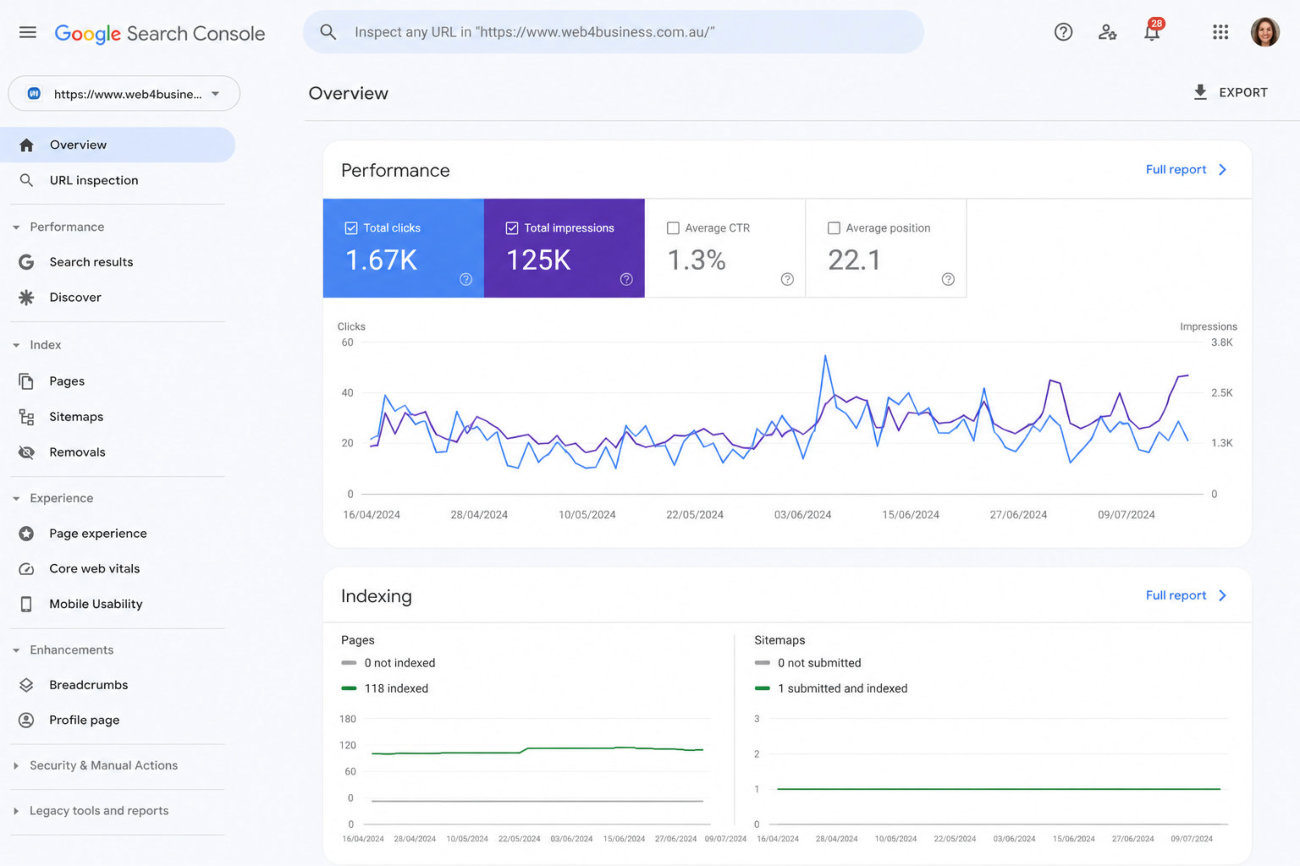
In fact, if Google detects malware, hacked content or other security problems on your website, one of the first places you’ll usually see that information is inside Google Search Console.

That’s why I believe every business owner should have access to it, even if they never intend to log in themselves.

How Google Search Console Can Help

Google is constantly crawling websites to understand their content and determine whether they’re safe for users to visit.

If Google’s systems detect malware, phishing pages or hacked content, they may flag your website as unsafe. In some cases, visitors will see a warning before they’re even able to access your website.

Google Search Console also allows website owners to:

  • View security issues detected by Google.
  • Receive notifications if hacked content is discovered.
  • Request a review after a compromised website has been cleaned.
  • Monitor how Google is indexing the website.
  • Identify unexpected pages appearing in Google Search.

Google explains the Security Issues report in more detail within its Google Search Console Help documentation.

One Lesson I Learnt the Hard Way

After my own website was compromised, I was incredibly grateful that my website had already been connected to Google Search Console.  It meant we could quickly check whether Google had detected any hacked content and monitor the website as it was being cleaned.

It also reinforced something I’d never really thought about before.  Simply having Google Search Console connected isn’t enough. You also need to make sure the verification remains active.

During another security incident involving a client’s website, we discovered that Google Search Console verification had disappeared without anyone realising. Had the website been flagged by Google, it would have delayed the review process while we re-established access.

It was a timely reminder that website security isn’t just about installing the right tools. It’s also about periodically checking they’re still working as expected.

Should Every Business Owner Have Google Search Console?

Absolutely.  Even if you never intend to log in yourself, having your website connected to Google Search Console provides another layer of visibility into your website’s health.

Whether your website is managed by you, your web designer or your marketing agency, it’s reassuring to know the connection is already in place if it’s ever needed.

Google Search Console won’t prevent your website from being hacked, but it can play an important role in identifying security issues and helping your website recover if Google has applied security warnings.

Of course, even with regular updates, backups, monitoring and Google Search Console, it’s still important to know what to do if the unexpected happens. Let’s look at the practical steps you should take if your website is ever compromised.

What To Do If Your Website Has Been Hacked

The First Few Hours Matter

Discovering your website has been compromised can be incredibly stressful.

Whether it’s a Google warning saying your website may be dangerous, a customer telling you they’re being redirected to another website, or a security plugin alerting you to suspicious activity, it’s easy to panic.

The good news is that the actions you take during the first few hours can make a significant difference to both the recovery process and the amount of damage caused.

Best Time To Prepare Is Before You Need To

The reality is that no one expects their website to be hacked.  However, if it does happen, having regular updates, reliable backups, ongoing security monitoring and access to Google Search Console can make the recovery process significantly smoother.

Better still, having an experienced web professional available to investigate and respond quickly can save countless hours of stress and uncertainty.  Of course, many business owners choose to manage their own websites. If that’s you, there are several simple checks you can carry out regularly to reduce your risk, and we’ll look at those next.

  • Don’t Ignore the Warning

    If you suspect your website has been compromised, don’t assume the problem will simply disappear. The longer malicious files or fake administrator accounts remain on your website, the greater the opportunity for additional damage to occur. Treat any security warning as a priority.

  • Don’t Start Deleting Files

    It can be tempting to delete anything that looks suspicious, but doing so can sometimes make the situation worse. Without understanding how the attacker gained access, you may remove the symptoms while leaving the original vulnerability behind, allowing the attacker to return.

  • Change All Website Passwords

    Change your WordPress password immediately, along with your hosting account, FTP and database passwords if necessary. If you’ve reused those passwords on other websites or online services, change those too.

  • Review Administrator Accounts

    Check every administrator account on your website and remove anyone who no longer requires access. Hackers sometimes create additional administrator accounts so they can regain access later, even after passwords have been changed.

  • Update WordPress, Plugins and Themes

    Once the website has been cleaned, update WordPress, your plugins and your theme to their latest versions. If the attack was caused by a known vulnerability, leaving outdated software in place increases the risk of it happening again.

  • Check Google Search Console

    Review the Security Issues section in Google Search Console to see whether Google has detected any malware or hacked content. If your website has been flagged, you’ll also need to request a security review once the website has been cleaned.

  • Continue Monitoring Your Website

    Don’t assume everything is resolved simply because the website appears to be working normally again. Continue monitoring your website over the following days and weeks for unusual activity, unexpected administrator accounts or further security alerts.

  • Get Professional Help if You’re Unsure

    If you’re unsure how the attacker gained access or you’re not confident cleaning the website yourself, seek professional assistance. Identifying the cause of the compromise is just as important as removing the malicious files, as it helps reduce the risk of the same problem happening again.

Managing Your Own Website? Here’s What You Should Be Checking

Not every business owner chooses to outsource website maintenance, and that’s perfectly fine.  If you’re comfortable logging into WordPress, installing updates and keeping an eye on your website, there are several simple checks you can carry out regularly to help reduce the likelihood of problems developing.

Website security isn’t about finding one magical plugin or ticking a single box. It’s about consistently following good practices and addressing small issues before they become much bigger ones.

Keep WordPress, Plugins and Themes Up to Date

The single most important thing you can do is keep WordPress, your plugins and your theme updated.

Developers regularly release updates to fix bugs, improve compatibility and, most importantly, patch known security vulnerabilities. Delaying updates simply gives cyber criminals more time to exploit those vulnerabilities.

After installing updates, don’t forget to check that your contact forms, booking systems, online shop and other important functionality are still working correctly.

Run Regular Security Scans

If your website has a security plugin installed, make a habit of running regular security scans.  Many security plugins can identify known vulnerabilities, suspicious files and other issues that deserve your attention. While a clean scan doesn’t guarantee your website is completely secure, it can provide valuable early warning if something needs investigating.

If I built your website, there’s a good chance I’ve already installed a security plugin. It’s worth logging in from time to time and checking whether it has reported any warnings or recommendations.

Review Administrator Accounts

Take a few minutes every so often to review who has Administrator access to your website.

Over the years, it’s common to provide access to web designers, SEO consultants, marketing agencies, virtual assistants, developers or staff members. If someone no longer requires access, remove their account.  Remember, website security isn’t simply about trusting the individual. It’s also about the security of their own devices, passwords and systems.

Use Strong, Unique Passwords

Every website-related password should be strong, unique and not reused across other online accounts.

If one of your passwords is exposed through a data breach on another website, reusing that same password could also put your WordPress website at risk.

Where available, enable multi-factor authentication to provide an additional layer of protection.

Keep an Eye on Google Search Console

If your website is connected to Google Search Console, occasionally check that there are no security issues or unusual indexing activity.

It’s also worth confirming that your Search Console verification is still active so you can access important information quickly if it’s ever needed.

Don’t Forget About Backups

Make sure your backups are running successfully and that you know how they would be restored if something went wrong.

It’s also worth understanding how many restore points are available and how long your hosting provider retains them.

Website Security Is Ongoing

Website security isn’t something you set up once and forget about.

WordPress continues to evolve, new vulnerabilities are discovered, plugins receive updates and cyber threats continue to change. The websites that remain the most secure are usually the ones that are maintained consistently, rather than only receiving attention when something breaks.

If you’re comfortable managing all of these tasks yourself, that’s fantastic. However, if you’d rather spend your time running your business instead of keeping track of website maintenance, a regular Website Security Care Plan can take care of it for you.

Choosing a Website Designer Who Takes Security Seriously

For many business owners, choosing a website designer is all about price, design or how quickly the website can be built.

While those things are certainly important, they’re only part of the picture.

Your website isn’t a project that ends the day it goes live. WordPress continues to evolve, plugins and themes receive updates, new security vulnerabilities are discovered and cyber threats continue to change.

One of the most important questions you can ask before choosing a website designer is what happens after your website has been launched.

Questions Worth Asking

Whether you’re choosing a new website designer or reviewing the support you’re currently receiving, here are some worthwhile questions to ask:

  • Do you recommend regular WordPress, plugin and theme updates?
  • Do you offer ongoing website maintenance plans?
  • How do you monitor websites for security issues?
  • Do you recommend regular backups?
  • Will you let me know if a serious security vulnerability is discovered?
  • What happens if my website is compromised?
  • Who owns and has access to my website?
  • Will I have access to Google Search Console if it’s ever needed?

There isn’t necessarily one right answer to every question. The important thing is knowing that somebody has thought about these issues before a problem occurs, rather than trying to work everything out during a cyber security incident.

Website Security Is a Shared Responsibility

It’s also important to understand that website security isn’t the responsibility of one person alone.

Your website designer, your hosting provider, your plugin developers and even you as the website owner all play a role in helping keep your website secure.

For example, if multiple people have administrator access to your website, every one of those users should be following good security practices. Strong passwords, secure devices and removing accounts that are no longer needed all help reduce unnecessary risk.

Likewise, if you engage SEO consultants, marketing agencies, developers or virtual assistants, it’s worth reviewing who still has access to your website from time to time. Every additional administrator account creates another potential entry point, even if the person themselves is completely trustworthy.

Building a Long-Term Relationship

One of the things I’ve learnt over the years is that a website isn’t something you build once and forget about.

The businesses whose websites perform best over the long term are usually the ones that continue maintaining them, updating them and reviewing them regularly.

Website security works exactly the same way.

Rather than reacting when something goes wrong, it’s far better to have a plan in place before you ever need it.

That’s exactly why I’ve introduced my Website Security Care Plans. They’re designed to help business owners reduce the likelihood of security issues while keeping their websites maintained, monitored and ready for whatever comes next.

Website Security Care Plans

Recommended – Quarterly Website Updates

Recommended for most small business websites.

✔ WordPress updates
✔ Plugin updates
✔ Theme updates
✔ Compatibility testing after updates
✔ Scheduled every 3 months

$180 per update

Six-Monthly Website Updates

Suitable for lower-maintenance websites that require less frequent updates.

  • ✔ WordPress updates
  • ✔ Plugin updates
  • ✔ Theme updates
  • ✔ Compatibility testing after updates
  • ✔ Scheduled every 6 months

$240 per update

Website Security Monitoring

For businesses wanting an additional layer of protection, ongoing website security monitoring helps identify potential security issues early and provides assistance if your website is ever compromised.

Includes:

  • ✔ Weekly website security scanning
  • ✔ Malware monitoring
  • ✔ Firewall protection
  • ✔ If your website is compromised: Malicious file removal, WordPress core files restored where required, Password resets, Google Search Console security review submission to help remove Google’s security warning (where Google Search Console access is available)

$99 per month

Keep Your Website Secure

Your website isn’t something you build once and forget about. WordPress, plugins and themes continue to evolve, new security vulnerabilities are discovered and cyber threats continue to change.

To help reduce the risk of your website being compromised, I offer scheduled Website Security Care Plans that allow you to choose the level of protection that’s right for your business.

Which Option Is Right for Your Website?

For most small business websites, I now recommend quarterly updates because they significantly reduce the amount of time known security vulnerabilities remain on your website.

If your website is particularly important to your business, receives regular enquiries, bookings or online sales, or you’d simply like greater peace of mind, ongoing Website Security Monitoring provides another layer of protection.

If you’re not sure which option is right for your website, simply get in touch. I’ll recommend the most appropriate solution based on your website and how it’s used.

Frequently Asked Questions

For most small business websites, I now recommend updating WordPress, plugins and themes every three months. Websites that process online payments, receive frequent updates or rely on many plugins may benefit from more frequent maintenance. The longer updates are delayed, the longer known security vulnerabilities remain on your website.

Yes. No website can ever be guaranteed to be completely immune from cyber attacks. However, keeping your website updated significantly reduces the likelihood of known vulnerabilities being exploited. Regular updates, strong passwords, backups and security monitoring all work together to reduce risk.

Website updates reduce the likelihood of your website being compromised by fixing known security vulnerabilities. Security monitoring helps detect suspicious activity, malware and other potential issues as early as possible. They complement each other rather than replace one another.

Sometimes it’s obvious, but often it isn’t. Warning signs can include Google displaying a security warning, visitors being redirected to another website, spam pages appearing in Google search results, unknown administrator accounts, unexpected website behaviour or alerts from a security plugin.

Most hosting companies provide a secure hosting environment and many also create backups. However, hosting alone doesn’t keep WordPress, plugins and themes updated, nor does it monitor every aspect of your website. Website security is a shared responsibility.

Many hosting providers do create backups, but every provider has different backup schedules, retention periods and restoration processes. It’s worth understanding exactly what your hosting includes rather than assuming every situation is covered.

Developers regularly release updates to fix bugs, improve compatibility and patch newly discovered security vulnerabilities. Delaying updates leaves your website running older software that may contain known weaknesses.

Absolutely. Many business owners successfully maintain their own websites. Just remember to take a backup first, install updates carefully and test your contact forms, bookings, online shop and other important functionality afterwards.

It’s a good idea to review administrator accounts several times a year. Remove anyone who no longer requires access, including previous developers, agencies, virtual assistants or staff members. Every additional administrator account creates another potential entry point.

Yes. A good security plugin adds another layer of protection by monitoring your website for suspicious activity, malware and known vulnerabilities. While it won’t guarantee your website can never be hacked, it can provide valuable early warning if something requires attention.

Don’t panic, but don’t ignore it either. Change your passwords, review administrator accounts, identify how the compromise occurred, clean the website properly, update WordPress and plugins, and check Google Search Console for any security warnings. If you’re unsure how to investigate the problem, seek professional assistance.

My Website Security Care Plans include scheduled WordPress, plugin and theme updates, compatibility testing after updates and the option of ongoing security monitoring, including malware monitoring, firewall protection and regular security scanning.

For most small business websites, quarterly updates are $180 every three months and six-monthly updates are $240 every six months. Websites with more complex functionality or premium plugins may require additional maintenance, which I’ll always discuss with you beforehand.

Many business owners only think about website maintenance after something goes wrong. The reality is that regular maintenance is preventative. Just like servicing your car or testing your smoke alarms, it’s much easier and usually far less expensive to reduce the risk than it is to recover after a major problem.

Final Thoughts

Website security isn’t about living in fear that your website will be hacked.

It’s about understanding the risks, taking sensible precautions and having a plan in place should the unexpected happen.

Over the years I’ve seen firsthand how much cyber threats have changed. Attacks are becoming increasingly automated, vulnerabilities are discovered more frequently and small businesses are being targeted just as readily as much larger organisations.

The good news is that reducing your risk doesn’t require expensive enterprise software or an in-house IT department. In many cases, regularly updating your website, using strong passwords, limiting administrator access, maintaining reliable backups and monitoring your website can make a significant difference.

Whether you choose to manage your website yourself or would prefer someone else to look after it, the most important thing is not to ignore it. Website security isn’t something you set up once and forget about. Like every other part of your business, it requires ongoing attention.

If you’re unsure whether your website is up to date, whether it’s adequately protected or whether your current maintenance routine is sufficient, I’d be happy to take a look and point you in the right direction.

Sometimes a few small changes are all that’s needed to significantly reduce the likelihood of problems in the future.

If you’d like me to review your website or discuss one of our Website Security Care Plans, simply get in touch. I’d be happy to help.