
Best VPN for Small Business Remote Access Australia: 7 Static IP Picks
Remote work is now the norm for Australian SMBs. In August 2024, the ABS reported that 36 percent of employees—and 60 percent of managers and professionals—usually work from home. Over the same period, the ASD recorded an average A$56,600 cyber-crime loss for each small business in FY 2024–25. More logins and higher breach costs mean you’ll need tougher remote-access controls. The ASD Gateway guide even mandates MFA and strict identity checks on every connection. The quickest way to tick those boxes—and give clients one allow-list-friendly address—is to run a business VPN with a static Australian IP.
Which business VPN should an Australian SMB choose?
Looking for the short version? If you run a five- to 25-person team, choose the service that solves your biggest headache: price, policy depth, privacy, or pure simplicity. Pick well and you’ll seldom go wrong.
- TorGuard: bundles five seats with one Australian static IP for roughly US$45 a month, keeping budgets under control.
- GoodAccess: spins up a dedicated Sydney gateway that non-specialists can run in minutes.
- NordLayer: adds granular SSO, split-tunnel, and device rules for growing teams that crave control.
- Proton VPN for Business: fits privacy-first firms that still want central admin and SSO.
- ExpressVPN for Teams: wins on sheer ease: set it up, share the fixed IP, and get back to work.
- Check Point SASE: built for regulated or multi-site operations that need full mesh connectivity.
- PureDome: lets agencies mix per-user and team-shared IPs without emailing sales every time.
Match the line that mirrors your pain point, then jump into the deeper reviews below.
At-a-glance: the finalists side by side
Want to scan the shortlist in thirty seconds? The table below highlights the features that usually sway a buying decision: static IP availability, identity controls, five-seat cost, refund window, and a single headline caveat. Compare it now, then head to the deep dive that follows for the story behind each number.
| Provider | Category win | AU dedicated IP | SSO & SCIM* | Five-seat monthly cost† | Money-back window | Research score‡ | One big caveat |
| TorGuard | Bundled value | Yes | No | US$44.99 (1 IP) | 7 days | 78/100 | Audit transparency trails rivals |
| GoodAccess | Managed gateway | Yes | Premium tier | US$84.00 (1 gateway) | 14 days | 88.5/100 | Split tunnelling desktop-only |
| NordLayer | All-round controls | Yes | Core + | US$95.00 (Core + IP) | 14 days | 89/100 | Dedicated IP add-on cost |
| Proton Business | Privacy-led | Yes‡‡ | Yes | US$89.94 (1 server) | 30 days | 86/100 | AU server stock can sell out |
| ExpressVPN for Teams | Plug-and-play | Yes | No | US$48.70 | 30 days | 84.5/100 | No granular access policies |
| Check Point SASE | Regulated & multi-site | Yes | Yes | Quote | Contract | 87.5/100 | Pricey and complex for micro-teams |
| PureDome | Flexible IP models | Yes | Yes | US$92.25 (Basic + gateway) | Verify | 81.5/100 | SSO can’t be enforced exclusively |
- Single sign-on and automated user provisioning
† US dollars, GST excluded, checked 17 September 2026
‡ Weighted score explained in “How we ranked…” section
‡‡ Confirm Australian dedicated-server stock at checkout
If SSO is essential, TorGuard drops off your radar. If every dollar counts, it bounces right back. Keep this grid open as we unpack the trade-offs in the next sections.
How we ranked business VPNs for Australian remote access
Our first question was simple: Can the service give an Aussie SMB one fixed IP, unique logins, and an audit trail that shows who used it?
Any platform that failed even one of these five gate checks was cut:
- Australian static or dedicated IP
- Separate user accounts, not one shared password
- Public, up-to-date product docs
- Modern desktop and mobile clients
- Hosted deployment; no DIY server builds
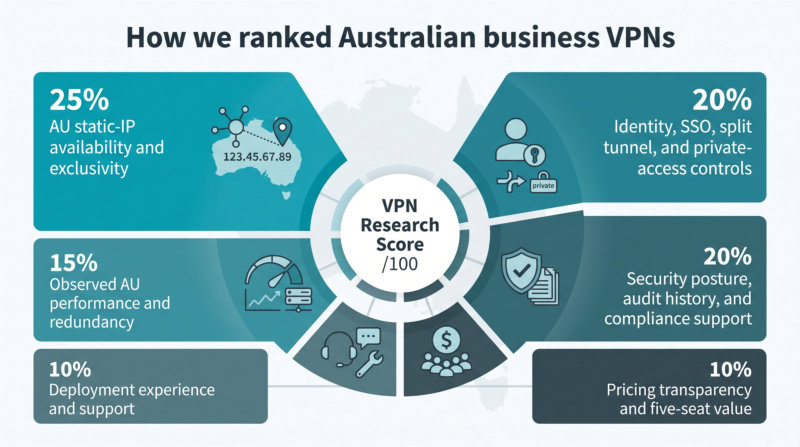
Only seven vendors cleared that bar. We then scored each one on six weighted factors that reflect daily pain points:
| Factor | Weight |
| AU static-IP availability and exclusivity | 25 % |
| Identity, SSO, split tunnel, and private-access controls | 20 % |
| Security posture, audit history, and compliance support | 20 % |
| Observed AU performance and redundancy | 15 % |
| Deployment experience and support | 10 % |
| Pricing transparency and five-seat value | 10 % |
Each provider earned zero to five points per factor. We multiplied those points by the weight and summed the results for a score out of 100 (for example, a 4 in security × 20 % = 8 points).
That maths pushed all-rounders such as NordLayer (89/100) and GoodAccess (88.5/100) to the top, while still letting TorGuard (78/100) headline the value story. Vendors like Check Point SASE scored high on capability but lost marks on cost clarity. Consumer-style services with no central user management, including Surfshark, PIA, and others, never reached the starting gate.
You’ll see every raw score in the comparison table above, and the details in the deep-dive sections that follow.
TorGuard Business VPN: best bundled dedicated-IP value
TorGuard VPN is the budget pick for teams that need a fixed Australian address. Its Starter bundle pairs five user licences with one dedicated IP for US$44.99 a month, and each higher tier scales seats and IPs in the same neat ratio, so you always know when it’s time to move up.
Getting started is simple. Invite users from the web console, enable two-factor authentication, then map people to the included IP. Bulk CSV import and an admin API shave minutes off onboarding or off-boarding contractors. The desktop and mobile apps cover Windows, macOS, Linux, iOS, and Android and support WireGuard, OpenVPN, and IKEv2, letting you standardise on one protocol or switch if a firewall blocks it.
TorGuard covers everyday work comfortably, and it is built as a locked-down egress pipe rather than a full zero-trust suite, so SAML SSO, device-posture checks, and deep audit logs sit outside its scope.
Even so, the effective cost sits at about US$9 per user, and no other finalist gives you a Sydney static IP plus unique credentials for less. If you run a five- to 20-person agency that mainly needs one allow-listed address for SaaS dashboards and client firewalls, TorGuard hits a sweet spot.
NordLayer: best all-round controls for growing teams
NordLayer shines where “one-IP-fits-all” tools stall. A dedicated Sydney gateway gives you a fixed egress address, and layered identity, network, and split-tunnel rules let you decide exactly who can touch what.
NordLayer business VPN with dedicated Sydney gateway screenshot
Pricing starts on the Core plan. Seats cost US$11 per user (billed annually). Add a US$40 dedicated-server licence and optional extra gateways as you grow. For 15 users, Core plus one server lands at roughly US$14 per user, matching GoodAccess once you include SSO and SCIM, which are native here.
The control panel is the real draw. Tie groups to Entra ID, build include-or-exclude split-tunnel lists, and spin up site-to-site connectors for an office router or AWS subnet. Want Zoom to bypass the tunnel while billing data stays behind the Sydney IP? Two clicks. NordLayer documents its WireGuard-based NordLynx protocol as holding near-line speeds, with automatic failover to a secondary data centre so sessions stay up.
Trade-offs? Each dedicated server costs extra, and some endpoint features lag on macOS or ChromeOS, so double-check parity before rollout. Still, if you’re chasing Essential Eight maturity without paying for a full SASE stack, NordLayer balances cost, control, and Australian latency better than any other option on this list.
Note: A static IP is an address that doesn’t change. A dedicated IP is static and reserved for one customer, while a private gateway lets multiple approved users share that IP under your own policies. Keep the terms straight to avoid buying the wrong product.
Proton VPN for Business: best for privacy-led and sensitive teams
If privacy is mission-critical for your firm—think law practices, health-tech start-ups, or security consultancies—Proton deserves attention.
Employees sign in with the same Proton Account they already use for Mail, Drive, or Pass. From the admin console you can enforce MFA, drop staff into least-privilege groups, and route traffic through a Sydney-based dedicated gateway that belongs only to you. Pricing starts at US$9.99 per user on the Professional plan plus US$39.99 for a dedicated server, so a five-seat rollout lands near US$89.94 a month before GST.
Why pay more than TorGuard? Trust engineering. Proton’s apps are open source, its infrastructure has passed independent security audits, and the dashboard shows connection logs that capture who signed in, when, and from which device—details auditors value.
Note two caveats. Australian dedicated-server stock can sell out, so lock in a gateway before you promise a launch date. And while WireGuard delivers strong speeds, desktop split-tunnel rules haven’t reached iOS yet (Proton lists the update on its 2026 roadmap).
If your risk register demands confidentiality and accountability, Proton’s mix of proven security pedigree, enterprise controls, and a fixed Sydney IP is hard to beat. Just confirm server availability and the 30-day money-back window before you swipe the card.
ExpressVPN for Teams: best plug-and-play deployment
If your team wants a fixed Australian IP with zero setup fuss, ExpressVPN for Teams delivers. Buy the five-seat bundle, choose Australia as the dedicated location, and you’ll receive two static IPv4 addresses on separate servers for instant redundancy. Add both to your allow-lists, hand staff the familiar ExpressVPN app, and you’re online. WireGuard handles the tunnel, so speeds stay close to raw NBN bandwidth even on video calls.
The price of that simplicity is minimal policy depth. The dashboard lets you reassign licences or disable a leaver, but you won’t find SSO, split-tunnel rules, or device-posture checks, so it can’t match the granular control of NordLayer or GoodAccess.
Pricing is transparent and offered on one-month, one-year, or two-year terms, with bulk discounts as you add more seats. Dedicated-IP fees fall under ExpressVPN’s 30-day money-back guarantee, a rare safety net if you change your mind.
Need one trusted Aussie address and refuse to wrestle with firewall rules or token mapping? ExpressVPN gets you there fast and gives you a backup IP for good measure.
Check Point SASE: best for regulated and multi-site SMBs
When one Sydney gateway isn’t enough, Check Point SASE builds a mesh of private gateways in Sydney, Melbourne, and Perth, each with its own static IP. You can drop users, branch routers, and cloud VPCs into the same policy fabric, a lifesaver for firms juggling contractors, audits, and multiple offices.
The console draws on Check Point’s firewall heritage. Create identity rules, device-posture checks, and granular web filtering in one pane, then push them to every location. Site-to-site traffic runs over IPsec or WireGuard, and remote staff connect with the same lightweight client. If the Perth PoP fails, users auto-failover to Sydney without losing their static egress identity.
Power doesn’t come cheap. Pricing starts near US$12 per user for the Premium tier, though the minimum seat count can surprise a ten-person team. Deployment is deeper than the other VPNs here; you’ll map network segments, identity providers, and log targets over a few days. The payoff is a single control point that keeps auditors happy with role-based access, log retention, and documented redundancy.
Choose Check Point when a client contract, regulator, or cyber-insurance assessor demands more than a fixed IP. Skip it if you only need to allow-list one SaaS portal.
PureDome: best for flexible per-user and team-shared IPs
Agencies often juggle two needs at once. Consultants require a traceable IP for each client firewall, while the studio still wants one common address for Jira or HubSpot. PureDome meets both needs by letting you buy individual dedicated IPs and multi-user gateways from the same dashboard.
During signup you pick Sydney or Melbourne, then choose whether each seat gets its own IP or uses the shared gateway. Need exclusivity halfway through a project? Flip a drop-down; no sales ticket required. SSO with Entra ID, Okta, or Google Workspace appears in every paid tier, though fallback passwords can’t be disabled entirely, so build that into your policies.
Pricing stays straightforward. The SSO-equipped Professional plan costs US$10 per user plus a US$50 gateway fee, competitive once you include those identity controls. Support offers 24/7 chat. Caveats: WireGuard isn’t yet available for dedicated IPs, and the service relies on parent brand PureVPN’s no-logs audits rather than a fresh business-specific report.
If you hand out one IP per head on Monday and reclaim them by Friday, PureDome’s mix-and-match model saves hours and keeps client CISOs happy.
Static IP, dedicated IP, private gateway or ISP static IP?
These labels sound similar, yet each solves a different problem:
| Term | What it means | When to choose it |
| Static IP | An address that never changes, often shared with other customers, so you can’t control its reputation. | You only need a consistent location for low-risk tasks and don’t mind sharing. |
| Dedicated IP | A static address reserved for one customer, delivered from a data-centre server. | You must allow-list a single user or team in SaaS dashboards or client firewalls. |
| Private gateway | Your own VPN server. Multiple users exit through the same fixed IP while you control logs, policies, and fail-over. | Several staff need the same public identity plus role-based policies. |
| ISP static IP | A fixed address tied to your office fibre or NBN service. It never follows laptops off-site. | Hosting gear in the office; not useful for roaming staff. |
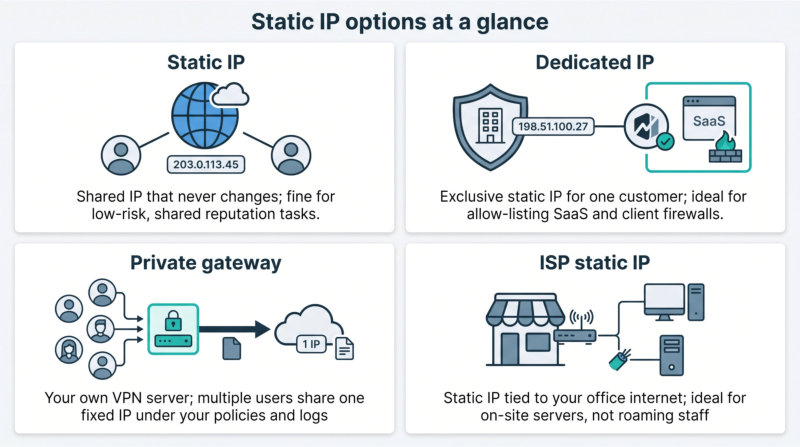
Match the label to the job. Pick a dedicated IP when one clean public identity is enough, step up to a private gateway when a whole team must share that identity, and keep an ISP static IP for routers that never leave the building.
(Provider reviews continue in their dedicated sections above. Removing duplication keeps this guide scannable.)
Business VPN vs consumer VPN: why user management matters
A consumer VPN hides one person’s IP so they can stream or browse safely. A business VPN proves who is connecting, records the session, and lets you revoke access the moment an employee leaves.
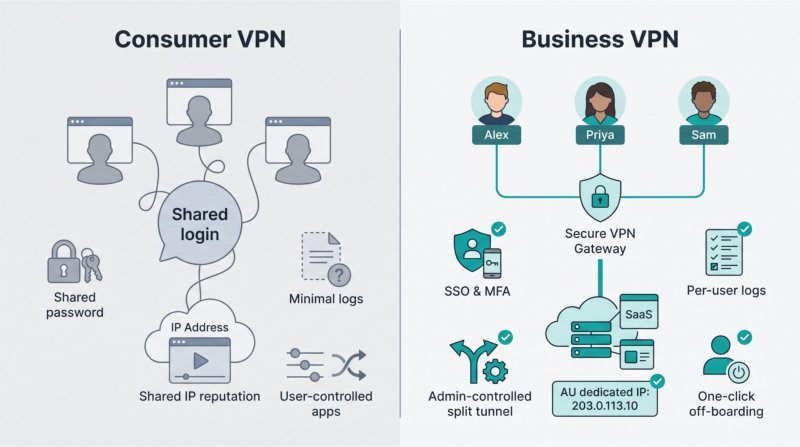
| Feature | Consumer VPN | Business VPN |
| User identity | Shared account or personal login | Unique credentials tied to Entra ID, Google Workspace, etc. |
| Off-boarding | Change a shared password | One click to disable the user |
| Logs | Minimal or none | Connection and device audit trails |
| MFA inside tunnel | Rare | Standard |
| Split-tunnelling control | User decides | Admin-enforced include/exclude lists |
| Static / dedicated IP | Usually shared | Often dedicated or private gateway |
If you employ more than yourself and care about least privilege, audit readiness, or clean off-boarding, a consumer VPN quickly becomes a liability. Stick with the business-grade options above and sleep easier before your next penetration test.
How to choose a static IP VPN for your Australian business
Use the checklist below to match your need with the right service in seconds.
| Your priority | Shortlist to start with | Why it fits |
| Just one fixed IP for a SaaS portal | TorGuard, ExpressVPN for Teams | Bundled five-seat plans spin up in minutes. |
| Private-resource access (office LAN, AWS subnet) | GoodAccess, NordLayer | Built-in site-to-site and branch connectors. |
| Regulatory pressure (SSO, device checks, multi-region) | NordLayer, Proton, Check Point | Native SSO/SCIM and granular policy controls. |
| Small team (≤ 5 seats) | TorGuard, Proton | Lowest published entry costs. |
| Mid-size team (10–30 seats) | GoodAccess, NordLayer | Gateway fee spreads over more users, dropping per-head cost. |
| Need a backup IP or city-level redundancy | ExpressVPN (two IPs), Check Point, NordLayer | Secondary address or extra gateway in another AU city. |
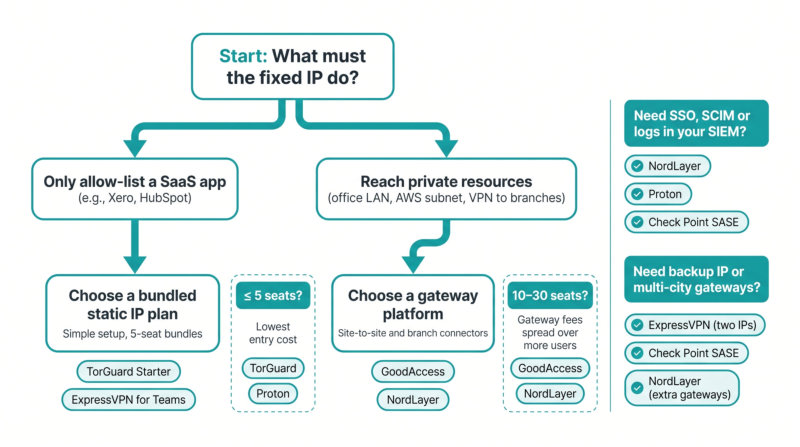
Still unsure? Walk through these questions:
- What must the fixed IP do?
- Only allow-list a SaaS app → pick a bundled plan.
- Reach private subnets → choose a gateway platform.
- How many users today—and in 12 months?
- Under five → look at TorGuard or Proton.
- Over 25 → gateway-fee models often win.
- Do auditors require SSO, SCIM, or logs in your SIEM?
- Yes → NordLayer, Proton, or Check Point.
- No → TorGuard or ExpressVPN may suffice.
- What happens if the IP fails?
- Need instant fail-over → choose a provider with a second static IP or multi-city gateways.
Answer those four questions and the best fit will surface quickly, without guesswork.
What does a business VPN with a static IP really cost?
Ignore the “from US$7” headline on most vendor pages. Once you add a dedicated IP or gateway, the bill looks closer to the figures below for a five-seat team (GST excluded, prices checked September 17 2026).
| Provider | Monthly spend | What that buys you |
| TorGuard Starter | US$44.99 | 5 seats + 1 dedicated IP |
| GoodAccess Essential + gateway | US$84.00 | 5 seats + 1 Sydney gateway |
| Proton Professional + server | US$89.94 | 5 seats + 1 dedicated server/IP |
| TorGuard Small (10 seats) | US$82.99 | 10 seats + 3 dedicated IPs |
| GoodAccess Essential (10 seats) | US$119.00 | 10 seats + 1 gateway |
Quote-only vendors sit higher:
- ExpressVPN for Teams: transparent per-user pricing with bulk discounts across monthly, annual, or two-year terms.
- Check Point SASE: highest entry cost, but folds in multi-city gateways and web filtering.
- PureDome: US$10 per user (Professional plan) plus a US$50 gateway fee; scales in a straight line.
What to confirm on every quote:
- List three lines on every quote: seat licences, gateway or server fee, and GST.
- Convert to AUD on the payment day and save the rate.
- Ask which charges sit inside the refund window, since dedicated-IP and gateway fees are often handled separately from seat licences.
Does a business VPN make you Privacy Act or Essential Eight compliant?
Short answer: no. A VPN is just one control in a much bigger security puzzle.
Under the Privacy Act you must take “reasonable steps” to protect personal information. Encrypting data in transit helps, but you still need policies, breach-response plans, and access governance to satisfy the Office of the Australian Information Commissioner.
ASD’s Essential Eight tells a similar story. MFA, patching, backups, and application control sit right alongside secure remote access. The gateway guidance even says remote-access tools should enforce MFA and role-based permissions, but it never claims a VPN alone reaches Maturity Level Two.
Think of the VPN as your encrypted front door. It’s useful, but pointless if the windows are unlocked. Pair it with:
- MFA on every privileged account
- Regular patching of servers and endpoints
- Daily backups stored offline
- Least-privilege groups and fast off-boarding
- Continuous log review (pipe VPN events into your SIEM)
Is a free VPN ever acceptable for an SMB?
Rarely. Free services stay afloat by showing ads, collecting usage data, or throttling bandwidth until video calls stall. They almost never include:
| Missing from most free VPNs | Why it matters to SMBs |
| Static or dedicated IP | You can’t allow-list SaaS dashboards or client firewalls. |
| Unique user accounts | No way to off-board a leaver quickly. |
| Service-level agreement | Uptime and support are “best effort.” |
| Audit logs | You can’t prove who connected or when. |
One exception: a time-limited free proof of concept from a reputable vendor. Use it to test split tunnelling or client compatibility, then upgrade to a paid plan with a dedicated IP, logs, and support before any real customer data moves through the tunnel.
In production, free plans often cost more in lost productivity, higher risk, and last-minute migrations. Pay for the static IP now and keep the CFO out of breach-response meetings later.
Business VPN deployment checklist
Rolling out a VPN takes more than sending a download link. Work through these three phases and you’ll dodge 90 percent of first-week support tickets.
Before launch
- Map your assets. List every SaaS app, office subnet, and cloud VPC that must sit behind the static IP.
- Separate egress from private access. Decide what only needs a fixed public address and what needs full network reach.
- Secure the IPs. Order the primary and any fail-over Australian addresses before you invite a single user.
- Turn on MFA. Enable it in the VPN console and in your identity provider, with no exceptions.
- Build least-privilege groups. Marketing doesn’t need SSH, and devs don’t need payroll.
During rollout
- Test full vs split tunnel. Check video calls, file transfers, and latency-sensitive apps in both modes.
- Invite users in batches. Onboard five people, gather feedback, then scale up.
- Allow-list the IPs everywhere. SaaS portals, client firewalls, AWS security groups; cover them all.
Ongoing hygiene
- Pipe logs to your SIEM. Keep VPN events next to server and endpoint alerts.
- Run an off-boarding drill. Disable a test account and verify the tunnel drops instantly.
- Keep a break-glass login. Store a secondary admin credential offline in case SSO or MFA fails.
- Review IP reputation monthly. Replace any address that starts triggering CAPTCHAs or geo-blocks.
- Audit every six months. Re-check pricing, features, and log retention before complacency creeps in.
Tick these boxes and your new static-IP VPN will feel like part of the stack, not another support headache.
Frequently asked questions
What’s the best VPN for small-business remote access in Australia?
It depends on your need: TorGuard for the cheapest five-seat static IP, GoodAccess for easy cloud allow-listing, NordLayer for granular policy control, Proton for audit-ready privacy, ExpressVPN for instant rollout, Check Point for compliance breadth, and PureDome if you want both shared and per-user IPs.
Does my business need a dedicated IP or is a shared static IP enough?
Choose a dedicated IP if clients, SaaS dashboards, or firewalls allow-list by address. A shared static IP can change owners or carry someone else’s bad reputation.
Can several employees share one dedicated IP?
Yes, provided the provider offers a team gateway (Proton, GoodAccess, NordLayer, Check Point, PureDome). TorGuard and ExpressVPN assign the IP to the whole account by default.
Is a dedicated IP less private?
Slightly. Traffic from that address can be linked to your company even though it stays encrypted. If you need anonymity for research as well as a fixed IP for SaaS, keep two separate profiles.
Will an Australian dedicated IP stop bank or payment-gateway blocks?
It cuts the risk but never guarantees success because banks also score reputation, device fingerprints, and behaviour.
Do I need an Australian server?
Yes if latency or geo-checks matter. Singapore or Auckland can work for private-resource access when the public IP location is less critical.
Which VPN protocol is best for remote work?
WireGuard (or NordLynx) is fastest and reconnects quickly. OpenVPN is the compatibility fallback; IKEv2 excels on mobile networks.
Is admin-defined split tunnelling safe?
Yes. Letting users set their own rules isn’t.
Can a VPN alone make us Essential Eight compliant?
No. It helps with MFA and secure remote access, but you still need patching, backups, application control, and other controls to reach any maturity level.
Final verdict: match the VPN to the access problem
No single service wins every category, so let your access need pick the tool:
| Your use case | First service to test | Why it fits |
| One steady IP for ≤ 5 users (e.g., Xero, HubSpot) | TorGuard Starter | Cheapest bundled static IP |
| Cloud SaaS plus branch or VPC access | GoodAccess or NordLayer | Gateways and site-to-site connectors |
| Privacy-first, audit-ready teams | Proton | Open-source clients and published audits |
| Instant rollout, minimal admin | ExpressVPN for Teams | Two static IPs, five-seat bundle |
| Heavy compliance, multi-site mesh | Check Point SASE | Multi-city AU gateways and posture checks |
| Mix of per-user and shared IPs | PureDome | Flip seats between solo IPs and a team gateway |
Set up a proof of concept with real apps for a weekend. Latency, admin workflow, and the first invoice will guide you faster than any sales deck. Whichever box you tick, lock down MFA, stream logs to your SIEM, and get back to the business you signed up to run.
***
Sumeraayaz