
• Link to Facebook
  • Link to Instagram
  • Link to LinkedIn
  • Link to Youtube
  • Link to Pinterest
  • Link to Mail
  • Link to Rss this site
02 9907 7777
Websites 4 Small Business - Website Design & Development
  • Home
  • Services
    • Website Design
    • Website Audit
    • Create Your Own Website – Web Design Coaching
    • Website Redesign
    • Website Design Extras
    • Business Logo Design
    • Domain Name Registration
    • Webhosting
    • Small Business Marketing
    • SEO Search Engine Optimization
  • Pricing
  • Testimonials
  • Portfolio
    • Website Design Gallery
    • Website Redesign Gallery
    • Business Logo Gallery
  • Blog
  • About
    • About Us
    • Guest Posts
    • In the Media
    • Business Partners
    • Privacy Policy
    • Service Provider Terms and Conditions
  • Guides
  • Industry
    • Coaches and Consultants
  • Learn
    • The Complete Guide to Website Design & Redesign
    • The Complete Guide to Website Conversion & Growth
    • The Complete Guide to Website Content & Visibility
    • The Complete Guide to AI & Automation
    • All Tutorials
  • Resources
    • FAQ
    • Ultimate Website Design Blackbook
    • 7 Powerful Ways to Promote Your Business for Free
    • FREE Downloadables
    • Savvy Woman’s Practical Guide to Online Business
    • Website Design Humour – Max vs Jordan
    • Website Audit Videos
    • Videos
    • Business Tools
    • Technical Jargon Explained
    • Search Engines and Directories
    • WordPress How To
      • How To Edit Pages Using the Enfold Theme
      • Enfold Theme Video Tutorial
      • How to Back Up WordPress Using CPANEL
      • How to Upgrade your WordPress Website
  • Contact
  • Click to open the search input field Search
  • Menu Menu
You are here: Home1 / Small Business Blog2 / Technology3 / What Is OCR Technology and How Does It Work in Image-to-Text Conversio...

What Is OCR Technology and How Does It Work in Image-to-Text Conversion?

This blog post will help you know the fundamentals of OCR technology and its working mechanism in image-to-text conversion.

Gone are the days when office workers, students, and professionals had to spend a lot of time and effort converting images to editable text. Fortunately, OCR technology stepped in and offered an effective solution for image-to-text conversion.

OCR technology works at the back end of different kinds of tools. It allows them to automatically recognize and extract text from scanned documents, screenshots, PDFs, and images. If you’re interested in what OCR is, and how it does image-to-text conversion, read on. We’ll discuss all about it in this article.

What is OCR Technology?

OCR stands for “Optical Character Recognition”. It is an advanced technology that works to extract text from different kinds of documents including;

  • PDFs.
  • Image files.
  • Screenshots.
  • Handwritten Notes
  • Scanned paper Documents.

This technology is widely used in different applications and tools, including image-to-text, PDF-to-word, and others. However, in this blog, we are focused on OCR work during image-to-text conversion.

Working Mechanism of OCR Technology in Image-to-Text Conversion

Let’s discuss the working mechanism of OCR in image-to-text conversion. As mentioned above, the OCR technology can only work if paired with online tools. So, we’ll discuss the OCR technology’s working mechanism in an image-to-text converter. For this, we have divided the details into three steps.

Step 1: Image Preprocessing

When an image is provided to an image-to-text converter, preprocessing is the first step that OCR technology takes. It involves techniques that enhance the overall quality and clearance of the image for better text recognition.

In other words, preprocessing is about making the image ready for text recognition. Below are the things done during this step.

  • Converting Image to Grayscale: OCR technology starts the process of converting the provided picture to grayscale. It removes colors from the image to simplify it. Ultimately, it is easier to differentiate between the printed text and the background of the image.
  • Reduce Noise: Next, the OCR tech uses algorithms to reduce noise from images. It removes blurriness, smudges, or specks.
  • Binarization: The OCR tech transforms the grayscale image to black and white format. It turns the printed text into black pixels and the background into white, distinguishing the text from the background.
  • Skew Correction: At the end of preprocessing, the OCR algorithms align text horizontally and make it ready for text recognition.

Step 2: Text Recognition

After the image preprocessing, text recognition is the next step of OCR. It involves recognizing the characters embedded in the image. This step is further divided into two main methods: pattern recognition and feature extraction

  • Pattern Recognition: Pattern recognition is usually done by traditional OCR systems. In this method, each character of the text is compared with the predefined data (set of characters). When the OCR-based tool finds a match, it converts that image into the corresponding text.
  • Feature Extraction: Feature extraction is done in more advanced OCR systems. In this method, an OCR system/tool analyzes the individual features of characters (such as edges, angles, curves, intersections, etc.) instead of matching characters with predefined data.

It helps in recognizing data if it is not written in a font or style that an OCR tool has not encountered before.

Step 3: Post-processing

Once the OCR system has recognized the text and special characters, the next step is post-processing. It ensures that the output of image-to-text conversion is as precise as possible.

Before finalizing the extracted text, OCR tools check the grammar and spelling mistakes to reduce misperceptions.

For example, if the OCR technology mistakenly recognized “Hello” instead of “Hello”, it would correct the spelling.

After all, the OCR system generates the final result by converting recognized text into an editable format. In some OCR advanced tools, OCR technology maintains the original text font, layout, and formatting.

A Real-Time Image-to-Text Conversion by OCR-Based Online Tool

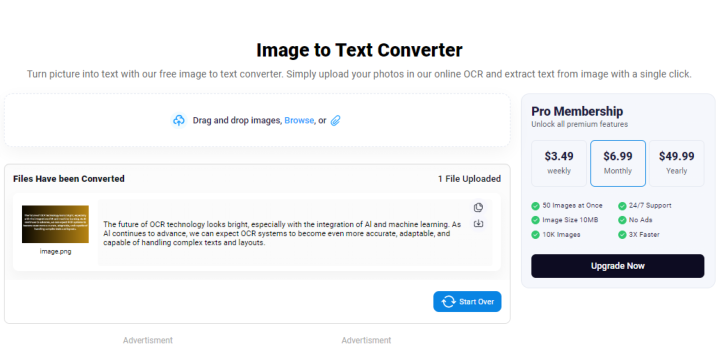
Let’s showcase a real-time image-to-text conversion by an OCR-powered online tool, for your better understanding. We chose a suitable online image-to-text converter that is powered with advanced OCR technology.

Here is the link to the tool: https://www.imagetotext.io

We uploaded an image that contains text into the tool and clicked the “Submit and Extract” button. The tool took no time for image-to-text conversion and provided us with editable text in the output box, as can be seen below.
Conclusion

OCR technology, or Optical Character Recognition, offers an efficient solution for converting images to editable text. This technology works by extracting text from various documents like PDFs, images, screenshots, handwritten notes, and scanned paper documents.

OCR technology operates through image preprocessing, text recognition methods, and post-processing steps to ensure accurate and precise conversion results. With advanced OCR systems, pattern recognition, and feature extraction techniques are used to enhance text recognition capabilities, making image-to-text conversion more accessible and efficient for users.

***

Jhon Butler

Website strategy session

You may also be interested in:

All 6 /Business Tools and Resources 6
AI tools for small business

Artificial Intelligence: Easy-to-Implement AI Tools for Small Business

Dropbox File Hosting and sharing

Dropbox File Hosting: Where Your Files Are Always Within Reach

GetResponse - Marketing multi tool

GetResponse: Your Ultimate Marketing Multi-Tool

ToDoIst - Task management tool

ToDoist: The Ultimate, Yet Simple Task Management Tool

Lastpass - Business Security for small business

LastPass: Elevate Business Security and Never Search for Passwords Again

AI for small business

AI For Small Business: Unleashing the Power of Artificial Intelligence

Award Winning Website Designer

Wait. You Can Do That?

Use AI to get more done in less time – without adding more tools.

Wait! You can do that? Save 10–12 hours a week as a solo business owner using AI

Get the guide →

Many Happy Customers

I just wanted to say thank you for again building my new website, it looks fabulous and reflects my style totally. Thank you also for listening to my requests and not giving up until I was happy with the end result. As always you are a pleasure to work with and your knowledge and skill, not to mention your patience is unquestionable. I would happily recommend you to anyone seeking help with web design.

Danielle DuBois – Your Marriage Celebrant

****

I am delighted with your design of our web site. Your design ideas have always been in line with the company look and are fresh and innovative, as well as being easy to read and understand. Your suggestions regarding adding value to the web site and on how to get the site to work harder have been invaluable.

Not only have you fulfilled our design wishes, but you have also given that oh so necessary ongoing support. I have found this to be incredibly helpful and, for a small business, financially manageable. Now, if only you could bottle your creativity, enthusiasm and efficiency …..! Thanks Ivana! I look forward to continuing to work with you!

Louise Brogan - All Money Matters

Let's Connect

Facebook YouTube Twitter LinkedIn Pinterest

Follow us on Facebook

Download Library of Free Resources To Help You Grow Your Business

Resource Consulting Business

Categories

  • Accounting
  • Artificial Intelligence
  • Branding
  • Business Management
  • Business Online
  • Business Start-Up
  • Content
  • Customer Service
  • Domains & Webhosting
  • Email marketing
  • Finances
  • Legal
  • Marketing
  • Privacy and Security
  • Search Engines
  • Small Business
  • Social Media
  • Software
  • Staff
  • Technology
  • Time Management
  • Uncategorized
  • Website Design
  • Website Marketing
  • Work At Home
  • Workspace
Search

Recent Posts

  • Best Coworking Spaces in Melbourne for Web Designers
  • The Hidden Cost of Manual Finance Admin in Small Business
  • Why Australian Digital Marketers Are Investing in a Proper Home Office
  • AI Tools for Creating Marketing Presentations: Which Let You Edit Directly?
  • How Dark AI Differs from Traditional Cybercrime Tools
  • How to Run a Proper Website Chatbot Comparison Before You Commit
  • Clean Sites, Credible Businesses: The Outdoor Builder’s Guide to Local SEO and Job Site Logistics
  • When Your Website Success Creates Legal and Financial Challenges with Online Marketing
  • Why AI Video Creation Is the Biggest Shift in Content Production Since the Smartphone
  • Choosing an SEO Agency: A Practical Small-Business Guide

Contact Us

Tel: 02 9907 7777 – 0405 636 204
Email: ask@web4business.com.au
Location: Narrabeen NSW 2101, Australia
Areas: Website Design by Location

Must-Have Business Tools

Wait. You Can Do That?
Save 10 – 12 hours a week with AI

GetResponse Automation

Envato Market

Dropbox

Some content on this site may include paid placements. All content is reviewed to ensure relevance and quality for small business owners.

Award Winning WordPress Website Designer in Sydney for Small Businesses and Professionals


Connect

Facebook YouTube Twitter LinkedIn Pinterest

Solutions

Small Business Website Design & Development
Website Audit
Create Your Own Website – Web Design Coaching
Website Redesign
Business Logo Design
Domain Name Registration
Webhosting
SEO Search Engine Optimisation

Resources

Guest Posts & Editorial Features

Privacy Policy


© Copyright - Websites 4 Small Business - Enfold Theme by Kriesi
Link to: Seal the Deal: Importance of Packaging in eCommerce Seal the Deal: Importance of Packaging in eCommerceSeal the deal - importance of packaging in ecommerce Link to: The Why, What & How of Integrating Traditional & Digital Marketing Strategies Integrating Traditional & Digital Marketing StrategiesThe Why, What & How of Integrating Traditional & Digital Marketing ...
Scroll to top Scroll to top