8 Steps to Drive Traffic to Your Website Through Social Media
Are you looking to generate more traffic to your website? Don’t underestimate the power of social media to help you hit your goals.
Social media is more than just a platform for sharing memes and funny videos. With billions of people spending their time on social media, it’s a necessity for your marketing strategy.
Done right, social media will raise brand awareness, enhance your audience engagement, and build a loyal customer base. However, simply having social media will not drive customers to your website. To get the results you want and need, you must use your social channels intentionally and strategically.
Navigating the nuances of social media marketing can be challenging. We’re here to help. In this article, we’ll share eight actionable steps to help you drive traffic to your website through social media.
1. Choose the right social media platforms
Not all platforms are created equal. Depending on your business, you’ll want to choose the right platforms to help drive traffic to your website.
Understanding your audience demographics is vital. Age, location, income, and interests help shape buyer personas and guide platform selection. Customer experience insights can reveal patterns in your audience’s behaviour and preferences.
Creating profiles on various platforms is free, but managing them takes up valuable time. To be as efficient as possible, concentrate on platforms that will help you meet your goals to get the best ROI.
What platforms should you use?
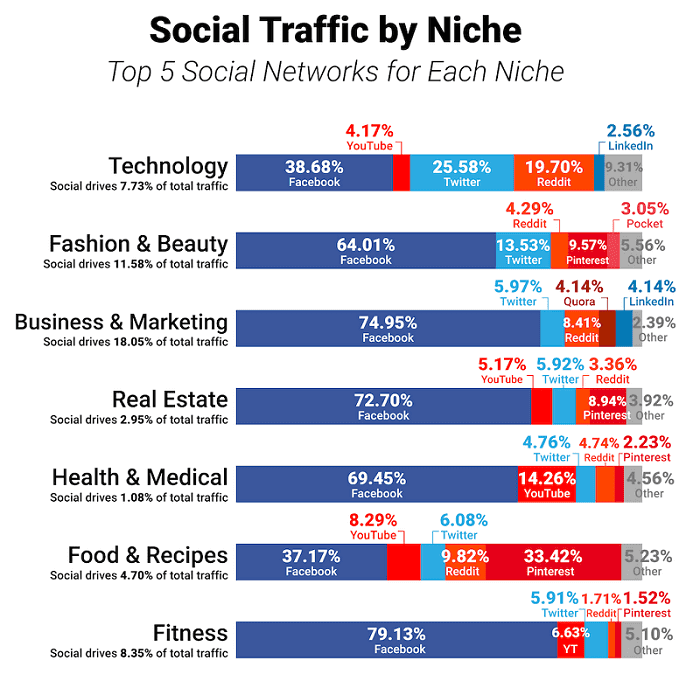
One study revealed that Facebook is the top social media referrer. This makes sense given its widespread popularity, with almost 3 billion users. X (Twitter), with its potential for viral content, also boasts significant traffic-driving capabilities.
Conversely, Instagram and Pinterest typically yield less traffic to external sites. However, their effectiveness varies widely across industries, emphasizing the importance of ensuring your social media strategy aligns with your objectives and your audiences’ preferences.
ContentShare is a B2B SaaS company. When they write a blog on creative briefs or onboarding clients, potential customers are their target audience. Posting on Facebook or X may be helpful, but LinkedIn will make the most sense since it’s a professional network. Here are some general guidelines to consider:
- X/Twitter and Facebook work great for B2C interactions and direct customer engagement.
- LinkedIn is a hub for B2B networking, focusing on professional connections.
- Pinterest’s visual emphasis makes it ideal for showcasing products and informative content. Pinterest is perfect for retailers or small business boutiques.
- Instagram offers a visually appealing platform for product displays.
Ultimately, success in leveraging social media for traffic growth hinges on strategic platform selection tailored to your audience and business objectives.
2. Optimize your social media profiles
Optimizing your profiles plays a significant role in driving traffic to your website through social media. Don’t skip this! An optimized profile is like an excellent first impression. Without that, you’ll miss out on tons of potential website visitors.
Here are five simple ways to optimize your social media profile.
(a) Complete your profile
Fill out every section with accurate and up-to-date information. Include your business name, logo, website, bio, and contact details. A complete profile looks professional and provides users with essential information about your business.
(b) Use keywords
Using relevant keywords in your profile bio and descriptions make it easier for people to find you. For example, if you’re an attorney office specializing in helping people who are victims of law insurance fraud, then say that in your bio! People who search that term will find your profile and have access to your website.
(c) Maintain visual consistency
Use the same profile picture, cover photo, and brand colors across all social media platforms. Consistency helps reinforce brand recognition and makes your business memorable.
(d) Use a CTA
Include a clear call-to-action (CTA) in your profile bio to encourage visitors to take the next step. Invite users to visit your website, sign up for a newsletter, or contact you. A compelling CTA can prompt users to engage further with your brand.
(e) Highlight key content
Pin important posts to the top of your profile. This will be the first thing visitors see. This feature is available on X, Facebook, and other platforms. Pin posts to highlight promotions, events, or popular content. Pinning is also a great way to include a CTA if there’s no room in your profile area.
By optimizing your social media profiles with these strategies, you can increase visibility and credibility and point users to your website.
3. Tailor your content for each channel
Because not all social media platforms are created equal, not all content should be created equal. In other words, what you post on one profile may need to be tweaked to make an impact on another. Each platform has its unique format, trends, and vibe.
There’s no easy way to do this. Tailoring your content for each channel takes hard work, and it’s not something every business does. Do you want to stand out from your competitors? Then, take the time to customize your posts on each channel.
If you don’t do this, you’ll blend in with competitors who don’t go the extra mile. And you’ll be frustrated by the lack of positive results.
Why should you tailor content? Let’s say you create a blog post and share it on Facebook, LinkedIn, and X. If each post looks the same, people will scroll right past it if they see it on the other platform. Worse, they won’t even think about sharing it.
But imagine you customize your posts for each platform. If someone misses it on Facebook, the way it’s worded or a different image on LinkedIn might catch their eye.
Sometimes, all you have to do is change the copy, like in this example from Nike. It’s the same photo but slightly different phrasing on X (the first image) than on Instagram (the second image). Try it for yourself and see what results you get.
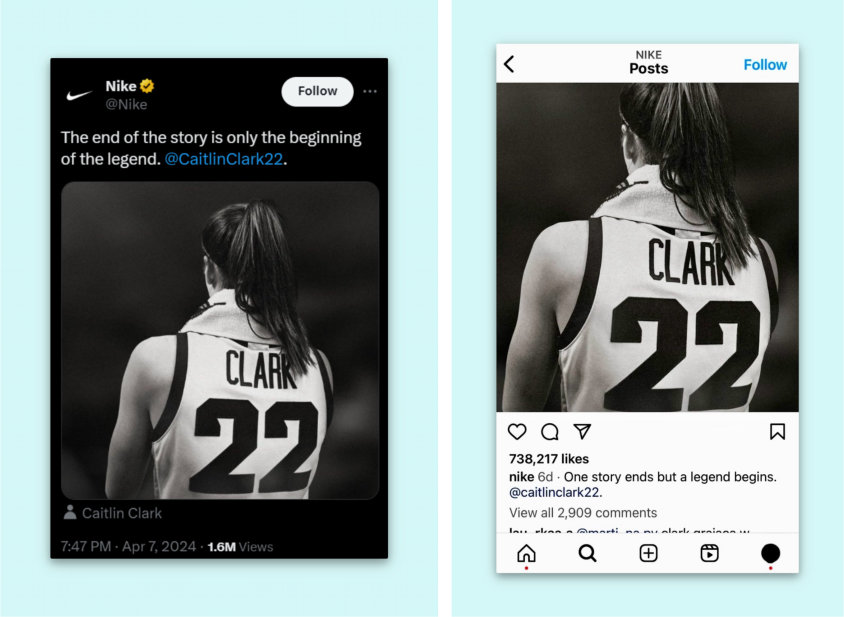
Also, remember that every social channel has unique characteristics. On X, for example, you can only post 280 words (unless you subscribe to premium). LinkedIn doesn’t allow hashtags. Instagram does, but doesn’t allow you to hyperlink a URL.
Tailoring your content will feel laborious, but you need to do it if you want potential customers to be engaged and drive traffic to your website.
4. Include referral links in your profile and posts
In the bio area (sometimes called “about section”), each social media platform has a space where you can insert a link to your website or any page online. Always include a link! This is the easiest way to funnel social media traffic to your website.
Most social platforms allow you to enter multiple links, but Instagram and TikTok only allow you to include one.
It’s easy to default to using that one URL spot for your website.
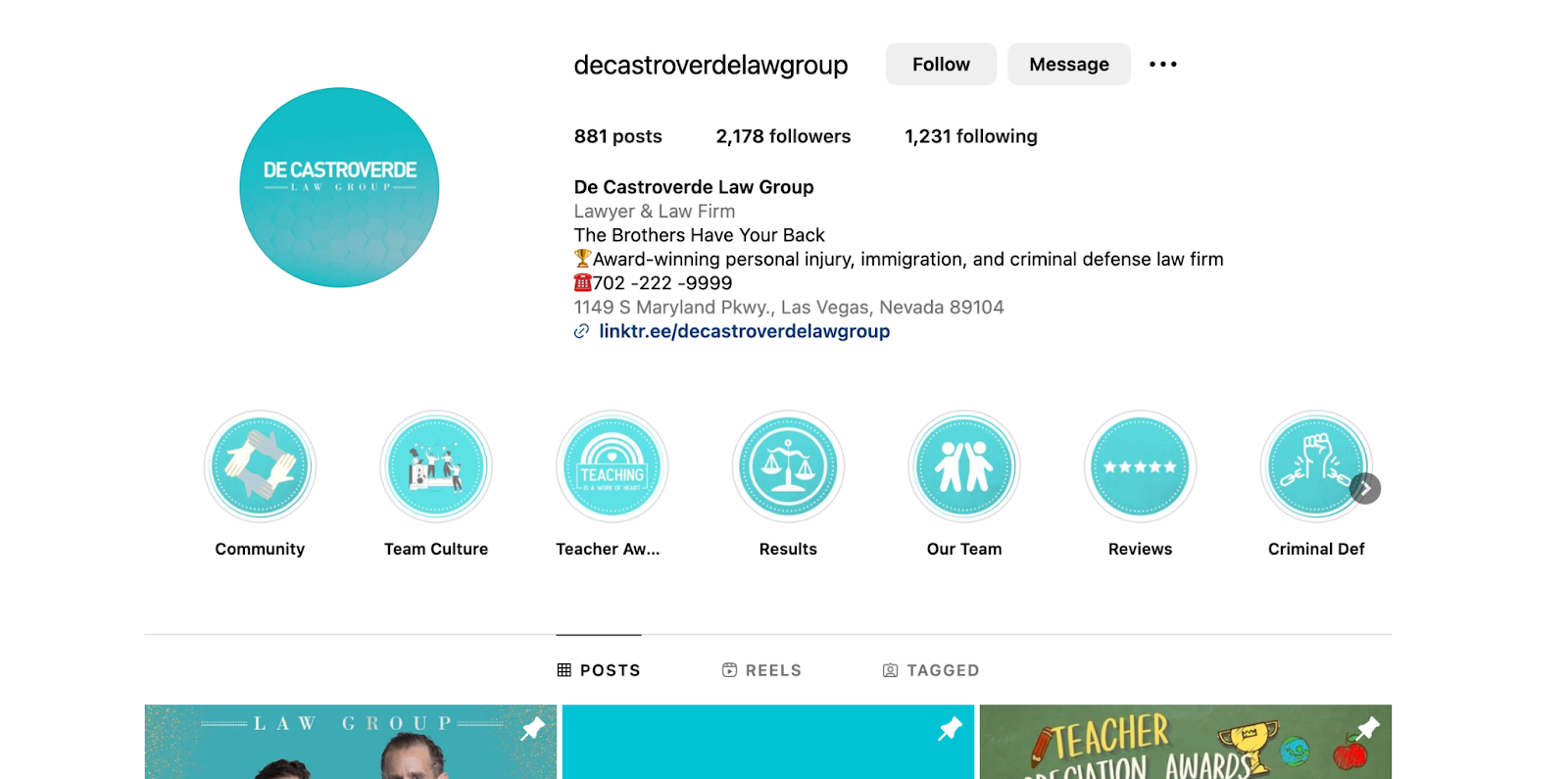
De Castroverde Accident & Injury Lawyers not only include their website URL in their Instagram bio but also use LinkTree that leads people to a landing page that has multiple links to their website, articles, newsletter, or other relevant pages on their website.
You should also include referral links to your website in your social posts.
When you post a new article on your blog, link to it on your website. Do you have a monthly newsletter? Invite people to join with a signup link. Launching a new product or service? Share the link.
In step #6 (see below), we’ll discuss techniques to get click-throughs to generate website traffic.
5. Customize your publishing frequency for each platform
Not only should you tailor your content on each platform, but you should also customize when you post. The reason is simple: people don’t use every platform at the same time of day.
Take LinkedIn, Instagram, and TikTok, for example. Since LinkedIn is a network to make professional connections, users are most active during the day while they’re at work. Posting on Instagram or TikTok during the lunch hour or later in the day will be more effective since people aren’t working during those times.
How do you know when people are online so you’ll know when to post? Most social media platforms will show when users are most active, or when your posts have the most engagement. Look for “Insights,” “Analytics,” or something similar in your profile settings to find this information.
6. Utilize content techniques to encourage click-throughs
When you capture your audience’s attention with your posts, they will likely visit your website to learn more about your work. That’s why you must find a way to capture their curiosity quickly.
Unfortunately, the social media click-through rate is just above 1%. Don’t let that discourage you. Here are a few tips to help you encourage click-throughs from your social media profiles.
(a) Hook your audience
Get them invested in your brand. Emotional appeals are important here. Share the beginning of a dynamic story and tell them they can find out more on your website.
(b) Create FOMO
Fear of missing out (FOMO) is a real thing and a natural human response to something exciting other people are a part of. You can take advantage of this emotion with headlines like, “Don’t be the last to find out!” or “Hurry before this deal ends!” to get people to click through.
(c) Use negative keywords
Research shows that negative words on social posts can increase click-through rates by 2.3% per each negative word you use. For example, if you are an injury attorney, you can post, “Don’t let a wreck become a crisis. We can help if you’ve been injured in a car accident.” The negative word “crisis” will stand out and intrigue your readers.
(d) Add a CTA
In addition to the CTA in your bio (see above), use a clear call to action in posts. A web design business that sells courses might post a link with something like this: “We’ve launched a new design course that will teach you how to code in just 12 weeks. Start today.”
You must deliver on your promises whenever you encourage users to click through. Never use clickbait tactics to drive up your traffic metrics. You might get some short-term gains, but in the long run, it will breed distrust of your brand.
7. Interact with your audience on social media
Did you know that only 11% of clients report getting responses from brands online? Every time someone comments on a post, thank them. If they ask a question, answer it. If they push back or criticize, handle their concern compassionately and pursue a resolution. If you do, you’ll stand out from the competition.
When you interact with your audience on social media, you show that you aren’t an intangible and invisible brand but a real group of humans seeking to build an online community. That can be the difference for many potential customers in a digitally dominated world.
Followers who know you care about them will be more engaged, more excited to share your posts, and more likely to buy your products. They won’t just visit your website but become loyal customers.
8. Encourage social shares in each post
Our final step may seem obvious, but it’s often disregarded because social platforms offer built-in sharing buttons. There are two key ways to prompt your audience to click or tap that share icon.
First, focus on creating exceptional content. Whether it’s captivating writing or stunning visuals, compelling content naturally encourages people to share your posts. The share button may always be there, but it’ll never get tapped if your content isn’t amazing.
Secondly, while organic sharing is ideal, sometimes people need a gentle nudge. Don’t hesitate to include a CTA to encourage your audience to share your post.
Wrapping it Up
Thanks to social media, driving traffic to your website has never been easier. But your social media accounts won’t magically do that alone. You must be intentional with your social media strategy. From choosing the right platforms to what you link in a post to regularly engaging with followers, it takes work, but it’s worth it.
Following the eight steps in this article will make your social media feed stand out from your competition. Ultimately, that will boost your website traffic, bring in new clients, and grow your business.
Are you a small business owner and overwhelmed with your digital marketing? If you want to use social media to help grow your business, we’re here to help. Book a free 30-minute marketing session today to get started.
***
Author: Freya Laskowski