• Link to Facebook
  • Link to Instagram
  • Link to LinkedIn
  • Link to Youtube
  • Link to Pinterest
  • Link to Mail
  • Link to Rss this site
02 9907 7777
Websites 4 Small Business - Website Design & Development
  • Home
  • Services
    • Website Design
    • Website Audit
    • Create Your Own Website – Web Design Coaching
    • Website Redesign
    • Website Design Extras
    • Business Logo Design
    • Domain Name Registration
    • Webhosting
    • Small Business Marketing
    • SEO Search Engine Optimization
  • Pricing
  • Testimonials
  • Portfolio
    • Website Design Gallery
    • Website Redesign Gallery
    • Business Logo Gallery
  • Blog
  • About
    • About Us
    • Guest Posts
    • In the Media
    • Business Partners
    • Privacy Policy
    • Service Provider Terms and Conditions
  • Guides
  • Industry
    • Coaches and Consultants
  • Learn
    • The Complete Guide to Website Design & Redesign
    • The Complete Guide to Website Conversion & Growth
    • The Complete Guide to Website Content & Visibility
    • The Complete Guide to AI & Automation
    • All Tutorials
  • Resources
    • FAQ
    • Ultimate Website Design Blackbook
    • 7 Powerful Ways to Promote Your Business for Free
    • FREE Downloadables
    • Savvy Woman’s Practical Guide to Online Business
    • Website Design Humour – Max vs Jordan
    • Website Audit Videos
    • Videos
    • Business Tools
    • Technical Jargon Explained
    • Search Engines and Directories
    • WordPress How To
      • How To Edit Pages Using the Enfold Theme
      • Enfold Theme Video Tutorial
      • How to Back Up WordPress Using CPANEL
      • How to Upgrade your WordPress Website
  • Contact
  • Click to open the search input field Search
  • Menu Menu
You are here: Home1 / Small Business Blog2 / Accounting3 / How to Plan Your Website Before You Start Building It

How to Plan Your Website Before You Start Building It

Planning your website before you start building it is a smart move. First, think about who your audience is and what you want your site to achieve. Jot down the main goals and what kind of content or features you’ll need. Sketch a rough outline or map of your site’s structure to see how pages will connect. This can save you time later and make the building process smoother. Also, consider the look and feel you want—colours, fonts, and layout that suit your style. Taking these steps before you dive into building will help you stay focused and avoid big changes down the road.

1. Define Your Goals and Audience

Trying to build a website without a clear plan usually ends up wasting time, going over budget, and producing something that doesn’t really meet the business goals. Planning ahead helps make sure your website has a clear goal, makes sense to navigate, and has the right technical setup before you start designing or building it.

This guide walks you through the key steps to take before you start building, so you end up with a website that’s clear, easy to use, and does exactly what it’s meant to do.

First, figure out what you want to achieve and who you’re trying to reach.

Before worrying about layouts, colours, or technology, you first need to figure out what your website is supposed to accomplish. Are you looking to get leads, sell things online, show off your portfolio, or just share some information? Having clear objectives will guide every choice made afterward.
It’s just as important to know who your target audience is. Think about who they are, what problems they need solved, and how they might use your site. A website for corporate decision-makers is going to sound and look a lot different than one made for students or people in the local community. Knowing your audience from the start helps make sure your messaging, navigation, and calls to action match what users expect.

2. Research, Content and Structure

After you know your goals, the next thing is to plan what your website will have. Begin by writing down the main pages you need, like Home, About, Services, Blog, and Contact. Then, create a basic sitemap to show how they link together.

At this point, planning the content carefully really matters. Consider what information users need at each step of their journey and find a clear way to share it. Look into what your competitors are doing in your field to find common patterns and spot any areas they might be missing. Think about search engine optimisation (SEO) right from the start by picking the right keywords and making sure each page has a clear focus.

Organizing content well from the start helps prevent big changes down the road. A clear navigation menu and a simple page structure help people use your site better and make it easier for search engines to find.

3. Drawing up UX ideas and making wireframes

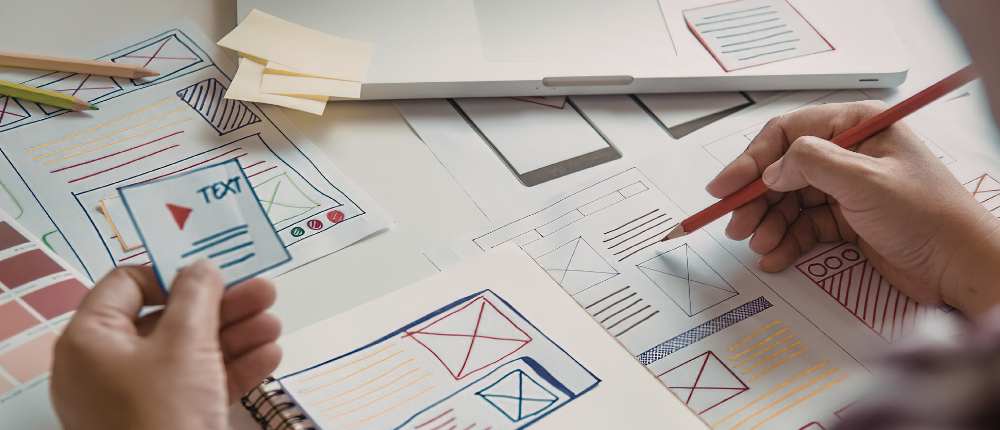
Now that you have your structure set, it’s time to picture how each page will actually function. Wireframes are basic sketches that show where important parts like navigation menus, headings, images, forms, and calls to action will go.

Right now, just concentrate on making sure it works, not on how it looks. Wireframes help you check how users move through a site and make sure key information is where it needs to be. They also come in handy for getting feedback from stakeholders before development starts, which saves time and cuts down on expensive changes later on.

If you focus on improving layout and usability right from the start, you set up a strong user experience (UX) base before writing any code.

4. Technical Considerations and Planning Tool

Before you start building, there are a few practical choices you need to make. Pick the platform or content management system (CMS) that fits your needs, lock down your domain name, find a trustworthy hosting service, and set your budget and timeline. You should think about how to measure success, like setting up analytics and tracking conversions.

You should include security in your planning right from the start. When you’re working on development, especially if your team is remote, it’s really important to keep staging sites and sensitive data secure. Using secure access tools like a Windows VPN helps protect configuration details and stops unauthorized access while the site is under construction.

Sorting out these technical details early on cuts down on problems later and makes the launch go more smoothly.

In the end, what really matters is how everything comes together and what we take away from it all.

Taking the time to plan a website before you start building it usually ends up saving you a lot of trouble later on. If you set clear goals, know who your audience is, organize your content well, and get the technical parts ready, your chances of building a successful website go way up.
When you take the time to plan, you’re not just making a website—you’re making one that actually works.

***

RCP

Website strategy session

You may also be interested in:

All 6 /Website Design & Redesign 6
How to choose the right website designer on the northern beaches

How to Choose the Right Website Designer (Northern Beaches Guide)

Work from home on the northern beaches - Best spots and cafes

Work From Home on the Northern Beaches: Best Cafes and Laptop-Friendly Spots

Common website design mistakes businesses on the northern beaches often make

Common Website Mistakes Northern Beaches Businesses Make (and How to Avoid Them)

What pages does a website need for a business on the northern beaches

What Pages Does a Small Business Website Need? (Northern Beaches Guide)

How long does it take to build a website on the northern beaches

How Long Does It Take to Build a Website? (Northern Beaches Business Guide)

DIY vs professional website design on the northern beaches

DIY vs Professional Website Design: What Actually Works for Northern Beaches Businesses

Award Winning Website Designer

Wait. You Can Do That?

Use AI to get more done in less time – without adding more tools.

Wait! You can do that? Save 10–12 hours a week as a solo business owner using AI

Get the guide →

Many Happy Customers

I just wanted to say thank you for again building my new website, it looks fabulous and reflects my style totally. Thank you also for listening to my requests and not giving up until I was happy with the end result. As always you are a pleasure to work with and your knowledge and skill, not to mention your patience is unquestionable. I would happily recommend you to anyone seeking help with web design.

Danielle DuBois – Your Marriage Celebrant

****

I am delighted with your design of our web site. Your design ideas have always been in line with the company look and are fresh and innovative, as well as being easy to read and understand. Your suggestions regarding adding value to the web site and on how to get the site to work harder have been invaluable.

Not only have you fulfilled our design wishes, but you have also given that oh so necessary ongoing support. I have found this to be incredibly helpful and, for a small business, financially manageable. Now, if only you could bottle your creativity, enthusiasm and efficiency …..! Thanks Ivana! I look forward to continuing to work with you!

Louise Brogan - All Money Matters

Let's Connect

Facebook YouTube Twitter LinkedIn Pinterest

Follow us on Facebook

Download Library of Free Resources To Help You Grow Your Business

Resource Consulting Business

Categories

  • Accounting
  • Artificial Intelligence
  • Branding
  • Business Management
  • Business Online
  • Business Start-Up
  • Content
  • Customer Service
  • Domains & Webhosting
  • Email marketing
  • Finances
  • Legal
  • Marketing
  • Privacy and Security
  • Search Engines
  • Small Business
  • Social Media
  • Software
  • Staff
  • Technology
  • Time Management
  • Uncategorized
  • Website Design
  • Website Marketing
  • Work At Home
  • Workspace
Search

Recent Posts

  • Best Coworking Spaces in Melbourne for Web Designers
  • The Hidden Cost of Manual Finance Admin in Small Business
  • Why Australian Digital Marketers Are Investing in a Proper Home Office
  • AI Tools for Creating Marketing Presentations: Which Let You Edit Directly?
  • How Dark AI Differs from Traditional Cybercrime Tools
  • How to Run a Proper Website Chatbot Comparison Before You Commit
  • Clean Sites, Credible Businesses: The Outdoor Builder’s Guide to Local SEO and Job Site Logistics
  • When Your Website Success Creates Legal and Financial Challenges with Online Marketing
  • Why AI Video Creation Is the Biggest Shift in Content Production Since the Smartphone
  • Choosing an SEO Agency: A Practical Small-Business Guide

Contact Us

Tel: 02 9907 7777 – 0405 636 204
Email: ask@web4business.com.au
Location: Narrabeen NSW 2101, Australia
Areas: Website Design by Location

Must-Have Business Tools

Wait. You Can Do That?
Save 10 – 12 hours a week with AI

GetResponse Automation

Envato Market

Dropbox

Some content on this site may include paid placements. All content is reviewed to ensure relevance and quality for small business owners.

Award Winning WordPress Website Designer in Sydney for Small Businesses and Professionals


Connect

Facebook YouTube Twitter LinkedIn Pinterest

Solutions

Small Business Website Design & Development
Website Audit
Create Your Own Website – Web Design Coaching
Website Redesign
Business Logo Design
Domain Name Registration
Webhosting
SEO Search Engine Optimisation

Resources

Guest Posts & Editorial Features

Privacy Policy


© Copyright - Websites 4 Small Business - Enfold Theme by Kriesi
Link to: Web Hosting for Australian Startups: Performance, Security & Cost Considerations Web Hosting for Australian Startups: Performance, Security & Cost Consi...Web hosting for Australian startups Link to: How Local Specialty Retailers Win on Experience, Not Scale How local speciality retailers winHow Local Specialty Retailers Win on Experience, Not Scale
Scroll to top Scroll to top